Everything is going digital today — and your website is at the center of it all. But here’s something most businesses overlook: the content management system (CMS) you choose has a direct impact on your SEO performance, site speed, security, and long-term scalability. In fact, WordPress alone powers over 43% of all websites globally — yet it is just one of dozens of platforms available in 2026.
Whether you are launching a brand-new website, dissatisfied with your existing platform, or transforming your business into a digital-first operation, choosing the right CMS is one of the most strategic technology decisions you will make. Get it wrong and you face slow page loads, poor SEO, costly developer dependency, and painful migrations down the road. Get it right and you unlock a scalable content engine that grows with your business. Combining a well-chosen CMS with professional SEO services can dramatically accelerate your search visibility and organic growth.
It does not matter how great your content is — if you cannot publish, manage, and optimise it efficiently, it will not deliver the results you expect. This guide walks you through everything you need to know to choose the right CMS for your business in 2026: platform types, key evaluation criteria, a side-by-side comparison of the top platforms, use-case recommendations, and a migration checklist.
Why Your CMS Choice Matters More Than Ever in 2026
A CMS is no longer just a publishing tool — it is the content engine behind every digital experience your business delivers. It determines how fast your pages load, how easily your team can publish content, how well your site ranks on Google, and how securely your data is protected. In 2026, with Google’s AI Overviews influencing search results and Core Web Vitals directly impacting rankings, the technical capabilities of your CMS have never been more critical to your bottom line.
The global CMS market was projected to exceed $23 billion in 2025, with platforms powering nearly 70% of websites globally. The landscape has also shifted dramatically: traditional monolithic systems are giving way to headless and composable architectures that allow businesses to deliver content across websites, mobile apps, and IoT devices from a single source. Pairing the right CMS with tailored SEO packages ensures your platform investment translates directly into measurable rankings and revenue.
Why You Should Use a CMS for Your Business Website
Before diving into the different CMS platforms and how to choose the right one for your needs, here are the core reasons why every business — whether you are a content creator, webmaster, or web developer — should be using a CMS:
- ✅ Make changes and edits quickly and easily — no coding required for day-to-day updates
- ✅ Easy-to-use content composition — preview work, save drafts, schedule publishing, and manage workflows
- ✅ Automation and flexibility — manage content at scale across multiple channels simultaneously
- ✅ No HTML knowledge needed — non-technical team members can publish and edit independently
- ✅ Secure back-end database interaction — total control over website management with role-based access
- ✅ Built-in SEO tools — meta tag editing, sitemaps, schema support, and redirect management built in
- ✅ Scalability — grow your content operation without rebuilding your technology stack from scratch
Types of CMS Platforms Explained
The CMS landscape in 2026 is more diverse than ever. Understanding the core architectures will help you make a smarter decision — especially as headless and composable CMS platforms rapidly gain market share.
Traditional (Monolithic) CMS
A traditional or monolithic CMS manages both the backend (content creation and storage) and the frontend (how it appears to visitors) in a single, tightly coupled system. It is the most common architecture, powering the majority of business websites today.
Examples: WordPress, Joomla, Drupal | Best for: Blogs, small-to-medium business websites, content-heavy sites
Headless CMS
A headless CMS decouples the content management backend from the presentation layer (frontend). Content is stored once and delivered via APIs to any frontend — a website, mobile app, smart TV, digital signage, or IoT device. This omnichannel content delivery capability makes headless CMS the architecture of choice for fast-growing digital businesses.
Examples: Contentful, Strapi, Sanity, Ghost | Best for: SaaS companies, multi-channel brands, enterprises with development teams
Hybrid / Composable CMS
A hybrid or composable CMS combines the editorial simplicity of a traditional CMS with the API-first flexibility of a headless system. It is the newest architecture and increasingly favoured by enterprises that need flexibility without sacrificing editorial control. Composable CMS platforms are sometimes called Digital Experience Platforms (DXPs).
Examples: Storyblok, CoreMedia, Contentstack | Best for: Enterprises, global brands, organisations requiring omnichannel governance
Content Management System — Open-Source vs. Proprietary CMS
One of the most important decisions you will face is choosing between an open-source or proprietary (SaaS) CMS platform. Both have compelling advantages depending on your business size, technical resources, and budget.

Open-Source CMS Platform
An open-source CMS (also called an on-premise CMS) is free to download and deploy on your own servers or your hosting provider’s infrastructure. You retain total control over your website, your data, and how you customise the platform. The CMS provider is responsible only for maintaining and improving the core software.
Open-source CMS platforms are the most widely used by businesses of all sizes. Their large developer communities have produced vast ecosystems of themes, plugins, and integrations — giving you virtually unlimited customisation potential.
Pros
- Full ownership and control over your website and data
- Easy modification and deep customisation
- Highly flexible — adapt to any business requirement
- Cost-effective to get started
- Faster initial deployment
- Excellent scalability with the right hosting
- Massive plugin/extension ecosystems (WordPress alone has 59,000+ plugins)
Cons
- Higher long-term costs due to hosting, maintenance, and security upkeep
- Security vulnerabilities are your responsibility to patch
- Requires developer resources for complex customisations
WordPress, Joomla, and Drupal are the most widely used open-source CMS platforms for creating a variety of business and personal websites. WordPress alone commands a 60%+ share of all CMS-powered websites as of early 2026.
Proprietary (SaaS) CMS Platform
A Proprietary or Software-as-a-Service (SaaS) CMS is developed, maintained, and controlled by a single company. Unlike open-source platforms, proprietary CMS solutions are not publicly available — access requires a paid licence. The provider manages all hosting, security patches, updates, and infrastructure so your team can focus entirely on content.
Pros
- Zero installation, maintenance, or infrastructure management
- Automatic regular updates and feature releases
- Feature-rich out of the box
- Enterprise-grade security and compliance
- Scalability managed by the provider
- Strong backup and disaster recovery processes
- Dedicated support and SLAs
Cons
- Limited control over customisation and underlying code
- Third-party dependency for maintenance, security, and support
- Vendor lock-in risk — migrating away can be complex and costly
- Subscription costs can escalate significantly at scale
Popular proprietary CMS platforms include Kentico, Sitecore, Adobe Experience Manager (AEM), HubSpot Content Hub, Crownpeak, and Squarespace.
Choosing a CMS for Your Business: 7 Key Factors to Evaluate
To choose the right CMS platform for your team, you need to follow a structured evaluation process. Here are the seven most important factors to assess — covering everything from team usability to long-term total cost of ownership.
1. Connect With Stakeholders and Define Requirements First
The very first step is to align your team’s needs with CMS capabilities before evaluating any platform. Connect with all stakeholders involved in the CMS decision — IT, marketing, content, and sales teams all have different requirements that the system must satisfy.
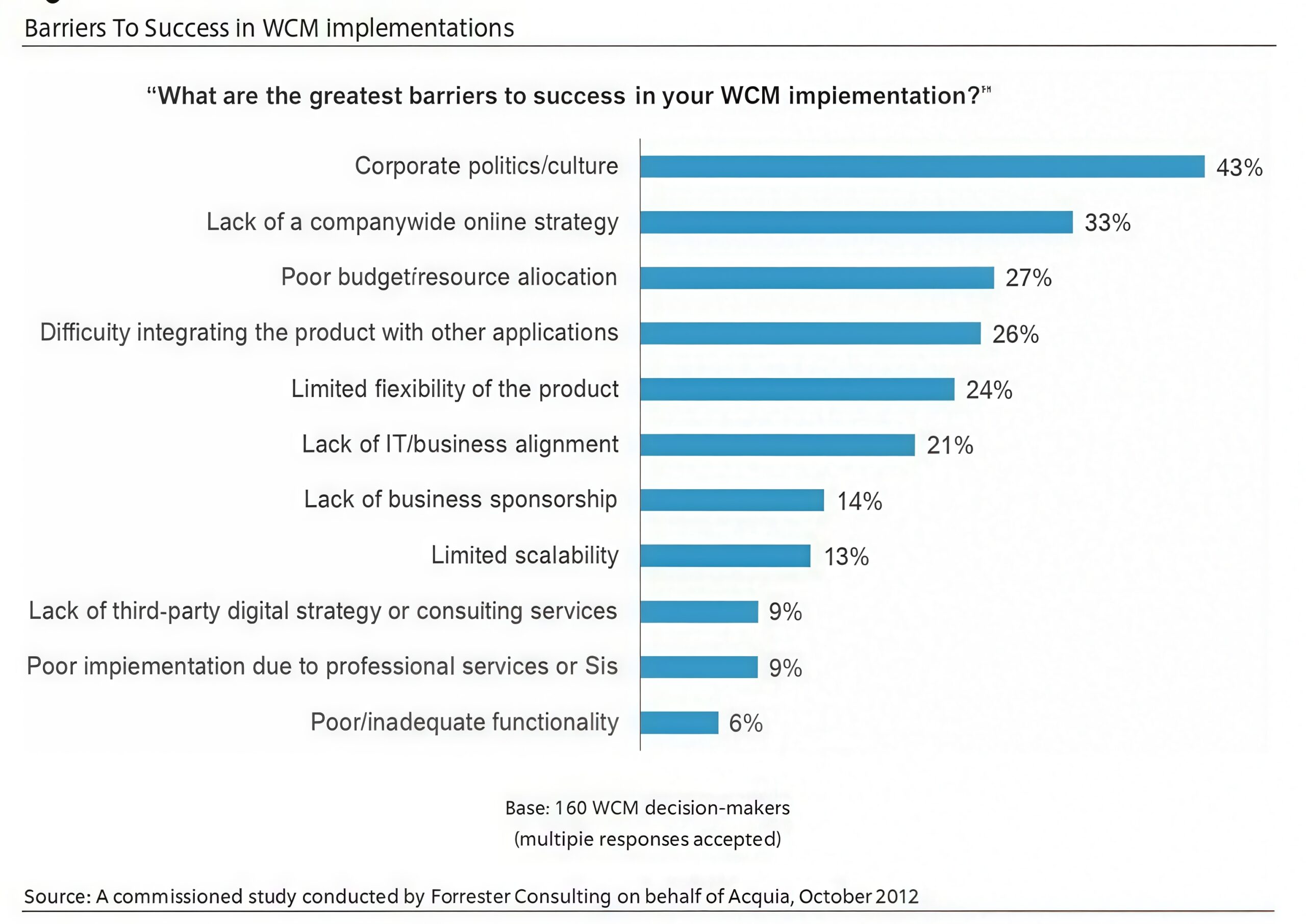
According to a Forrester survey, most companies fail with their web content management system solutions due to misaligned internal requirements. Your IT team needs compatibility with existing infrastructure, your marketing team needs integrations with analytics and automation tools, and your content team needs a workflow that minimises developer dependency for day-to-day publishing.
All concerned teams should sit together and document what they need the CMS to deliver. This is the single most valuable step in the entire evaluation process.
2. Ease of Use — Avoid Heavy Developer Reliance
The right CMS empowers your marketing and content teams to publish, edit, and optimise content independently — without filing a developer ticket every time. Reducing development and deployment time gives you a decisive competitive advantage: faster content publishing, faster campaign launches, and faster response to market changes.
It is always better to choose a CMS with which your team is already familiar, or one with a shallow learning curve. Consider the technical skill level of your primary users — a drag-and-drop builder suits non-technical teams, while a developer-focused platform may be preferable for engineering-led organisations.
3. Scalability — Evaluate Current and Future Business Needs
Your CMS must grow with your business — not constrain it. Evaluate both your current requirements and your projected needs over the next 3–5 years. Consider traffic growth, content volume, new markets, additional languages, and emerging channels like mobile apps and voice interfaces.

A CMS that cannot scale will force a costly migration at exactly the moment your business is growing fastest. Headless and cloud-native CMS platforms typically offer the strongest scalability through CDN-based content delivery, auto-scaling infrastructure, and multi-site management from a single interface.
4. SEO Features and Core Web Vitals Support
Your CMS directly affects your ability to rank on Google. In 2026, an SEO-ready CMS must support at minimum: editable meta titles and descriptions, customisable URL structures, canonical tag management, XML sitemap generation, structured data / schema markup, and Core Web Vitals optimisation (LCP, CLS, FID).
Beyond the basics, look for a CMS that enables speakable schema for voice search, supports hreflang tags for international SEO, and integrates with Google Search Console and analytics platforms. As Google’s AI Overviews become more prominent in SERPs, the ability to implement structured content that is easily parsed by both search engines and large language models is increasingly important — a concept known as Generative Engine Optimisation (GEO).
5. Customisation and Content Marketing Functionality
The best CMS platforms give webmasters full control over the look, feel, and functionality of their website without unnecessary complexity. They include built-in editors and tools that make it easy to customise and extend the platform as your requirements evolve.
For content marketing, your CMS must support robust blogging — flexible layouts, scheduled publishing, category management, and author profiles. It should also natively support or integrate with your email marketing and social media distribution tools so that content reaches your audience across every channel from a single platform.
6. Security, Compliance, and Integration Capabilities
Security cannot be an afterthought. Your CMS must protect your content and user data against evolving threats. Look for: automatic security updates, role-based access control (RBAC), SSL/TLS support, two-factor authentication, and data encryption at rest.

For businesses operating in regulated industries or serving European customers, your CMS must also support GDPR and CCPA compliance — including consent management, data portability, and audit logging. Additionally, evaluate integration capabilities: your CMS should connect seamlessly with your CRM (HubSpot, Salesforce), analytics (GA4), marketing automation, and eCommerce platforms through native integrations or a robust API / plugin ecosystem.
7. Total Cost of Ownership (TCO)
The sticker price of a CMS is rarely the true cost. When calculating total cost of ownership, factor in: licensing or subscription fees, hosting and infrastructure, theme and plugin costs, developer time for setup and customisation, ongoing maintenance, security audits, and eventual migration costs. Open-source platforms often appear cheaper upfront but carry higher long-term operational costs. SaaS platforms have predictable monthly fees but can become expensive at enterprise scale.
CMS Comparison: Top Platforms at a Glance (2026)
With hundreds of CMS platforms available, the choice can feel overwhelming. Here is a comparison of the most widely used platforms in 2026 to help you shortlist the right options for your business:
| Platform |
Type |
Best For |
Starting Price |
SEO-Friendly |
Headless Option |
| WordPress |
Open-Source |
Blogs, SMBs, corporate sites |
Free (hosting extra) |
⭐⭐⭐⭐⭐ |
✅ Via REST API |
| Shopify |
SaaS |
eCommerce of all sizes |
From $29/mo |
⭐⭐⭐⭐ |
✅ Headless Commerce |
| Drupal |
Open-Source |
Enterprise, government, community |
Free (dev costs apply) |
⭐⭐⭐⭐ |
✅ API-first support |
| HubSpot Content Hub |
SaaS |
Marketing teams, CRM-integrated sites |
From $23/mo |
⭐⭐⭐⭐⭐ |
✅ Partial |
| Webflow |
SaaS |
Designers, agencies, landing pages |
From $14/mo |
⭐⭐⭐⭐ |
✅ Yes |
| Contentful |
Headless SaaS |
SaaS, multi-channel, enterprise |
Free tier / from $300/mo |
⭐⭐⭐⭐ |
✅ Native headless |
| Strapi |
Open-Source Headless |
Developer teams, custom frontends |
Free / from $29/mo (Cloud) |
⭐⭐⭐ |
✅ Native headless |
| Squarespace |
SaaS |
Small business, portfolios, blogs |
From $16/mo |
⭐⭐⭐⭐ |
❌ Limited |
These are just a few names — there are hundreds of content management systems to choose from based on your requirements and capabilities. It is always advisable to take your time before making any final decision, as your CMS platform will be a long-term asset for your business. Once you find the right CMS for your website, you can easily meet your content goals in ways that pay off immensely over time.
How to Choose a CMS Based on Your Business Type
There is no one-size-fits-all answer to the best CMS. The right platform depends heavily on your business size, technical resources, and primary use case. Here are the most common scenarios:
Best CMS for Small Businesses and Bloggers
If you need a quick, cost-effective website with minimal technical overhead, WordPress.com, Wix, or Squarespace are excellent starting points. They offer intuitive drag-and-drop interfaces, built-in hosting, and enough SEO capability for most small business needs. WordPress.org (self-hosted) is the upgrade path when you need deeper customisation and plugin access.
Best CMS for eCommerce Businesses
For businesses whose primary goal is selling online, Shopify remains the global leader — combining a powerful eCommerce engine with hosting, payment gateways, and inventory management in one platform. WooCommerce (built on WordPress) is the best choice if you want full ownership and control over your store. For large-scale or complex eCommerce operations, Magento (Adobe Commerce) offers enterprise-grade functionality.
Best CMS for Enterprise Organisations
Large organisations with complex multi-site, multi-language, and multi-team requirements should evaluate Drupal, Adobe Experience Manager (AEM), Sitecore, or CoreMedia. These platforms offer enterprise-grade security, compliance tooling, workflow governance, and the infrastructure to manage content at global scale. Many enterprises are now moving to composable or headless architectures to deliver omnichannel experiences without monolithic constraints.
Best CMS for SaaS and Technology Companies
SaaS companies and technology startups planning to scale across web, mobile, and other digital channels should evaluate Contentful, Strapi, or Sanity. These headless CMS platforms are API-first, developer-friendly, and built for multi-channel content delivery — ideal for teams that need flexibility without vendor lock-in.
CMS Migration: Key Considerations Before You Switch
If you are currently using a CMS that no longer serves your needs, migrating to a new platform is a significant undertaking — but a manageable one with the right preparation. Here is a practical checklist to protect your SEO rankings and data integrity during a CMS migration:
- 📋 Conduct a full content audit — catalogue every URL, page, post, image, and file on your current site
- 🔗 Map old URLs to new URLs — create a comprehensive redirect mapping document
- ↩️ Implement 301 redirects — redirect every old URL to its new equivalent to preserve link equity and rankings
- 🔍 Migrate metadata — ensure all title tags, meta descriptions, alt text, and structured data transfer correctly
- 🗺️ Submit an updated XML sitemap to Google Search Console immediately after launch
- ⚡ Test Core Web Vitals on the new platform before going live — target LCP under 2.5 seconds
- 📊 Monitor rankings and crawl errors closely for 4–6 weeks post-migration using Google Search Console
- 🔒 Verify SSL certificate and HTTPS configuration on the new platform
The Future of CMS: AI, Headless Architecture, and What’s Coming in 2026
The CMS landscape is evolving faster than ever. Staying aware of these trends will help you choose a platform that remains competitive well beyond 2026:
- 🤖 AI-Powered Content Creation and Personalisation: Modern CMS platforms are integrating AI assistants that help teams draft, optimise, and personalise content at scale. Platforms like HubSpot and Contentful are leading this integration, automatically adapting content to individual user behaviour and intent.
- 🔗 Headless and Composable Architectures: The separation of content management from content delivery continues to accelerate. Businesses that invest in headless CMS today gain the flexibility to deliver content to any channel — including voice assistants, AR applications, and AI chatbots — that emerges tomorrow.
- 🌐 Generative Engine Optimisation (GEO): As AI Overviews and LLM-powered search become the dominant discovery method, content must be structured not just for traditional search engines, but for machine understanding and extraction. CMS platforms that support robust structured data and semantic content modelling will provide a significant competitive advantage.
- ☁️ Cloud-Native Deployment: Cloud-based CMS solutions continue to replace on-premise installations, offering reduced infrastructure costs, automatic scaling, and support for distributed teams.
- 🎯 Omnichannel Content Delivery: The best CMS platforms in 2026 manage content across websites, mobile apps, digital signage, email, and social media from a single unified interface — eliminating content silos and improving brand consistency.
Frequently Asked Questions About Choosing a CMS
What is the easiest CMS for beginners and non-technical users?
For beginners with little or no technical experience, Wix, Squarespace, and WordPress.com are the most user-friendly options. They offer drag-and-drop editors, built-in hosting, and guided setup wizards. WordPress.org (self-hosted) is slightly more technical but remains the most popular choice for growing businesses due to its vast plugin ecosystem and flexibility.
Is WordPress still the best CMS in 2026?
WordPress remains the world’s most widely used CMS, powering over 43% of all websites globally as of 2026. It is an excellent choice for most small to medium-sized businesses, bloggers, and content-driven sites. However, for enterprises needing omnichannel delivery or developer teams building complex applications, headless alternatives like Contentful or Strapi may be more appropriate.
What is a headless CMS and do I need one?
A headless CMS separates the content management backend from the frontend presentation layer. Content is stored once and delivered via APIs to any channel — website, mobile app, smart device, or digital signage. You need a headless CMS if you are delivering content across multiple platforms, building a custom frontend, or working with a developer team that wants full control over the user experience.
How much does a CMS cost?
CMS costs vary enormously. Open-source platforms like WordPress and Drupal are free to download but carry hosting, maintenance, plugin, and developer costs that typically range from $500 to $5,000+ per year for small businesses. SaaS platforms like Squarespace ($16–$49/month) and HubSpot Content Hub ($23+/month) offer predictable pricing but can scale significantly for enterprise usage. Enterprise CMS platforms (AEM, Sitecore) often require custom pricing based on usage.
What is the best CMS for SEO in 2026?
WordPress with Yoast or Rank Math remains the most SEO-accessible CMS for most businesses, offering robust on-page optimisation, schema support, and sitemap management. For enterprises, HubSpot Content Hub and Drupal also score highly for SEO capability. The most critical factors are: editable meta tags, structured data support, clean URL structures, fast page loading, and Core Web Vitals optimisation.
Can I switch CMS without losing my SEO rankings?
Yes — but it requires careful planning. The key is implementing comprehensive 301 redirects from all old URLs to new ones, preserving metadata, resubmitting your sitemap to Google Search Console, and monitoring for crawl errors in the weeks following migration. Worked with an experienced web development team can significantly reduce the risk of ranking loss during a CMS migration.
Conclusion
Choosing the right CMS is not simply about checking a feature list — it is about making a strategic, long-term investment in your business’s digital infrastructure. The right platform will align with your team’s capabilities, support your SEO strategy, scale with your growth, protect your data, and adapt to emerging technologies like headless architecture, AI-driven personalisation, and Generative Engine Optimisation.
Start by defining your business goals and stakeholder requirements. Then evaluate platforms against the seven factors covered in this guide: ease of use, scalability, SEO support, customisation, content marketing functionality, security and compliance, and total cost of ownership. Use the comparison table to shortlist your options, test demos, and consult your team before making a final decision.
Whether you are building a simple blog, a high-converting eCommerce store, or a complex enterprise website, there is a CMS built for your exact needs. Invest wisely today — your choice of CMS will be one of the most consequential foundations of your digital growth for years to come.