

Did you know that 76% of people who search for a local business on their smartphone visit that business within 24 hours? (Google Consumer Insights). Yet most small businesses still rely on word-of-mouth and miss out on this constant stream of ready-to-buy local customers.
Local businesses can thrive and flourish with digital innovation — but only when they follow the right roadmap. We’ve heard many times that local and small businesses are suffering as more people go online. Well, having spent years in the digital marketing industry, there is one thing I can confidently say: Digital Marketing is not just for large organisations. Small businesses operating locally should take advantage of it rather than losing revenue to competitors who do.
A stronger online presence creates new opportunities and avenues for local small business players. Your journey in the digital world starts with having an appealing, easy-to-navigate, user- and mobile-friendly website.
Once you have a website for your small business, there begins the real battle — competing for one of the top positions in Search Engine Result Pages (SERPs) in your area. If you are also trying to find ways to rank your website locally, here is your complete SEO checklist for local small business websites (2026 Edition).
Local SEO Checklist for Small Business Websites (2026)
- Know Your Industry, Target Locations, and Customers
- Set Up & Optimise Your Google Business Profile (GBP)
- Optimise Your Business Logo
- Use Local SEO-Friendly Titles, Descriptions, and URLs
- Add NAHP [Name, Address, Hours, Phone] on Your Website Correctly
- Add Google Map to the Contact Us / Info Page
- Build & Manage Local Citations (Directories + Data Aggregators)
- Set Up Social Media Pages for Your Business
- Earn Local Backlinks
- Implement Schema Markup (Structured Data)
- Build Your Online Review Strategy
- Optimise for Mobile & Core Web Vitals
- Optimise for Voice Search & AI-Powered Results (SGE)
- Track & Measure Your Local SEO Performance
- Don’t Forget On-Page Local SEO Fundamentals
Now, let’s discuss this SEO checklist for small business websites in detail so that you know exactly what to do.
1. Know Your Industry, Target Locations, and Customers
Even when you run a small business locally, you must be clear about which business industry and category your business belongs to. Does it belong to retail, cosmetics, household, hospitality, education, medical, or another industry?
You will need to specify it while registering your business with many online directories. Choosing the wrong category is one of the biggest mistakes that small businesses often make.
Based on what you are offering, identify your potential customers. Determine whether your customers are youth, adults, infants, pet owners, housewives, students, women, men, seniors, or all of the above.
Now, find out all those areas where your customers usually come from. Enlist all these areas or the ones with the majority, so that you know what locations you are going to target. Also consider whether you are a storefront business (customers come to you) or a service-area business / SAB (you travel to customers). This distinction matters when setting up your Google Business Profile.
2. Set Up & Optimise Your Google Business Profile (GBP)
If there is one single step that will have the greatest impact on your local rankings, it is fully optimising your Google Business Profile (GBP) — formerly Google My Business. GBP is the engine behind Google’s Local 3-Pack (the map block that appears at the top of local search results). According to Google, local search rankings are determined by three key factors: Proximity, Relevance, and Prominence — and GBP directly influences all three.
46% of all Google searches have local intent (Search Engine Roundtable). Missing or incomplete GBP listings mean you are invisible for nearly half of all searches that could bring customers to your door.
Step-by-Step GBP Optimisation Checklist
- ✅ Claim or create your GBP listing at business.google.com and complete the verification process (postcard, phone, or video).
- ✅ Choose the correct primary business category — this single field has the greatest impact on which local searches you appear in. Be precise (e.g., “Italian Restaurant” not just “Restaurant”).
- ✅ Add all relevant secondary categories to capture related searches.
- ✅ Complete every field: business name, address (or service area), phone number, website URL, opening hours, and business description (up to 750 characters).
- ✅ Add business attributes relevant to your business (e.g., “Women-led”, “Wheelchair accessible”, “Free Wi-Fi”, “Outdoor seating”).
- ✅ Upload high-quality photos: Google recommends including your logo, a cover photo, exterior photos (so customers can find you), interior photos, team photos, and action shots. Businesses with photos receive 42% more direction requests and 35% more website clicks (Google).
- ✅ Enable messaging so customers can contact you directly from your GBP listing.
- ✅ Publish GBP Posts weekly — share offers, events, new products, or updates. These appear in your listing and signal to Google that your business is active.
- ✅ Use the Q&A section proactively — add and answer your own frequently asked questions before customers ask them.
- ✅ Keep hours updated, especially for holidays and special occasions.
- ✅ If you are a service-area business (SAB), hide your address on GBP and define your service area by city, postcode, or radius instead.
Make it a point to respond to every review — positive and negative — so Google users know they can rely on you. We cover the full review strategy in Section 11.
3. Optimise Your Business Logo
A logo is one of the first components that search engine crawlers encounter on your website. Therefore, you should:
- Use a descriptive image file name — for instance, use
your-decor-store-logo.pnginstead oflogo.png - Add descriptive alt text — include your brand name and location (e.g., Your Decor Store, South Ex, New Delhi)
- Add your location in the title attribute of the logo link — for example:
<a href="https://yourdecorstore.com/" title="Your Decor Store, New Delhi">
Ensure that you use the same logo and consistent alt text across all channels: your business website, Facebook, Google Business Profile, Instagram, and so on.
4. Use Local SEO-Friendly Titles, Descriptions, and URLs
Titles, descriptions, and URLs should all be descriptive enough that search engines and users can understand the basics of your business before clicking the link.
When targeting local customers, include the targeted location in titles and meta descriptions, and if possible, your area phone number. A title of 55–60 characters is considered SEO-friendly in 2026.
Structure your URLs to signal location wherever applicable. For instance, if you sell décor items in New Delhi and have a wall art page, your local SEO-optimised URL would be:
https://yourdecorstore.com/wall-art-painting-new-delhi
Another live example of using URLs, titles, and descriptions with location is shown in the image below.

2026 tip: Also create location-specific landing pages if you serve multiple cities or suburbs. Each page should have unique, locally relevant content — not just a copy-paste with the city name swapped. For example, a plumber serving three suburbs should have a dedicated page for each suburb with local testimonials, area-specific services, and a unique title tag.
5. Add NAHP [Name, Address, Hours, Phone] on Your Website Correctly
An SEO checklist for local small business websites is incomplete without NAHP. To help site visitors know where your business is physically located and how to contact you, add your correct business name, address, opening hours, and phone number (with area code) — especially on the home page in a prominent, clearly visible position.
It is good practice to add NAHP in the footer of every page on your website.
Don’t use an image for NAHP. Use plain text in an easy-to-read font with a slightly larger font size than body copy. Plain text NAHP is crawlable by search engines; image-based NAHP is not.
Critically, keep NAHP consistent across every channel where your business has an online presence — your website, GBP, Yelp, social media profiles, and every directory listing. Even a small discrepancy (e.g., “St.” vs “Street”) can signal inconsistency to Google and harm your local rankings.
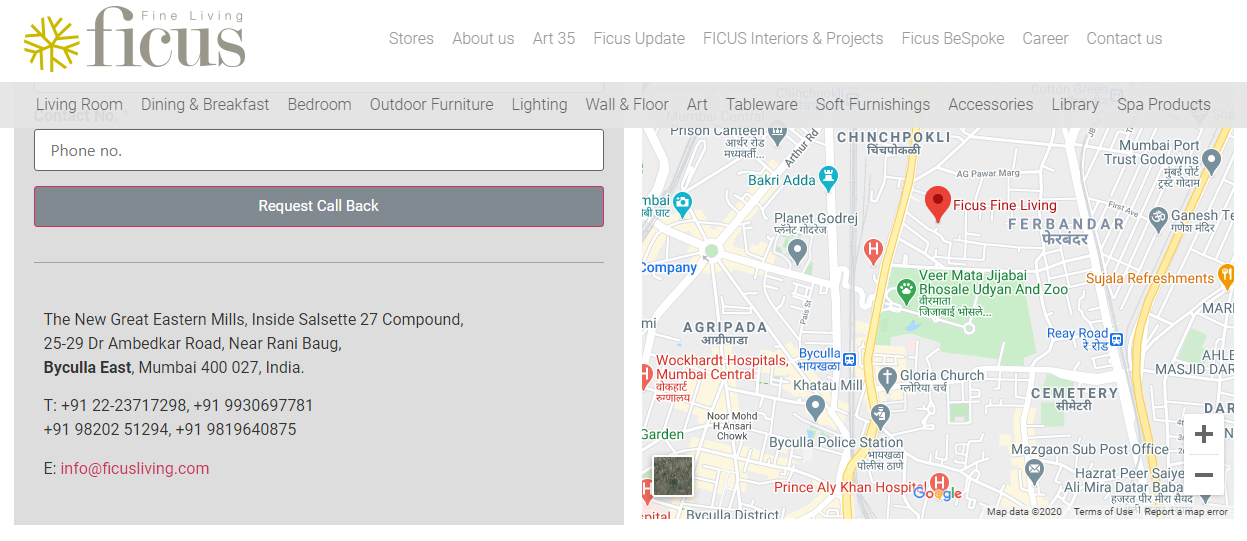
Here is an example of a business website with the correct use of NAP [Name, Address, and Phone] along with a Google Map embed:
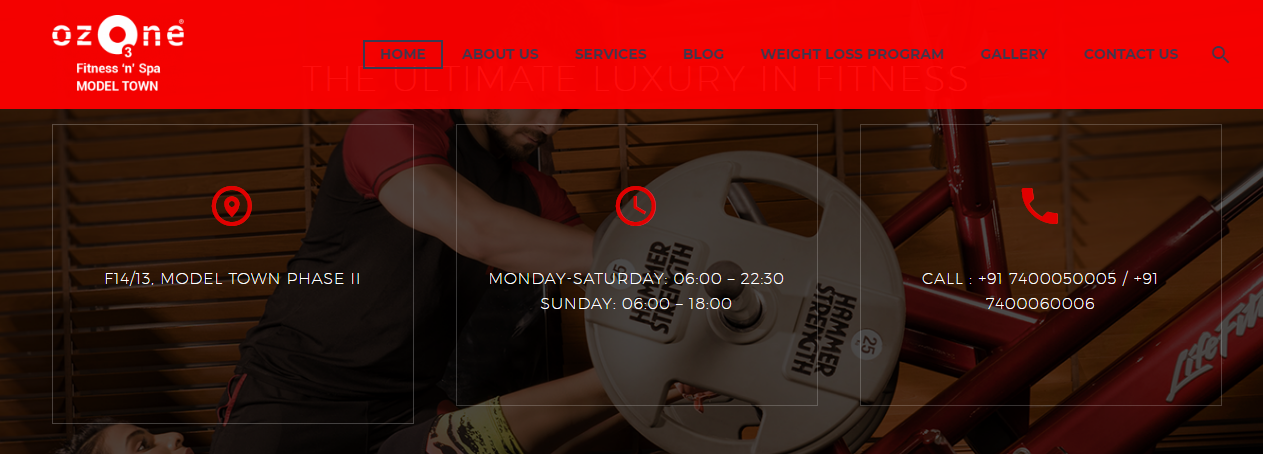
Here is another business website showing the use of NAHP [Name, Address, Hours, and Phone]:
6. Add Google Map to the Contact Us / Info Page
To make it easier for potential customers to locate your business, embed a Google Map on your Contact Us / Info page. Here’s how:
- Go to Google Maps
- Type in your address and click the Search button.
- Select Share from the top-left menu.
- Click the Embed map tab on the pop-up window.
- Copy the code from the box that begins with
<iframe. - In WordPress, go to the Block Editor and edit your Contact Us page.
- Create a new Custom HTML Block.
- Paste the embed code.
- Click Publish or Update.
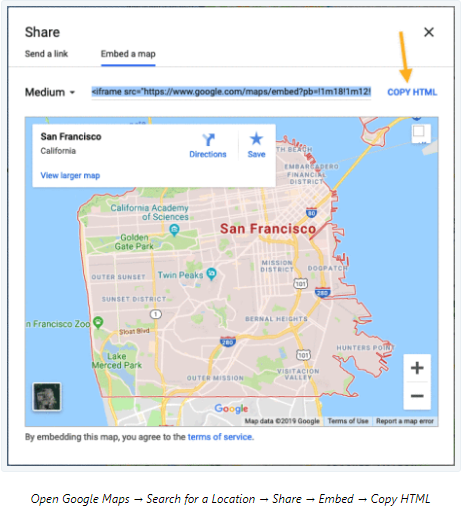
Image Source: WordPress Support
Google Maps showing your business location will now appear on your business website, helping customers find you and signalling your physical presence to Google’s local algorithm.
7. Build & Manage Local Citations
A local citation is any online mention of your business’s Name, Address, and Phone number (NAP). Citations are one of the most powerful signals Google uses to determine your business’s prominence — the third pillar of local rankings. The more consistent and authoritative your citations are, the more Google trusts that your business is legitimate.
Tier 1 Citations — Start Here (Highest Priority)
- ✅ Google Business Profile (most important)
- ✅ Bing Places for Business — Bing is the second most-used search engine on desktop and drives meaningful traffic, especially in the US and UK.
- ✅ Apple Maps — critical for iPhone users searching locally; claim at Apple Maps Connect.
- ✅ Facebook Business Page
- ✅ Yelp (especially for US-based businesses)
- ✅ LinkedIn Company Page
Tier 2 Citations — Industry & Regional Directories
- India: Indiamart, Sulekha, Just Dial, IndiaBizz, TradeIndia
- US: Better Business Bureau (BBB), Manta, Foursquare, Angi, Houzz (for home services)
- Middle East: AME Middle East Business Information, Arab Trade, Gulf Business, Arabian Yellow Pages
- All markets: Tripadvisor (hospitality), Healthgrades / Practo (medical), Avvo (legal), Houzz (home services)
- Yahoo! Small Business — relevant if your target audience is in Japan or markets where Yahoo has significant share.
Tier 3 Citations — Local & Niche
- Local Chamber of Commerce listings
- Local newspaper websites and community blogs
- Industry association directories
⚠️ NAP Consistency Is Non-Negotiable
Every citation must use exactly the same business name, address format, and phone number as your primary GBP listing. Use a tool like Moz Local or BrightLocal to audit and fix inconsistent citations. Even a discrepancy like “Road” vs “Rd” can suppress your local rankings.
8. Set Up Social Media Pages for Your Business
Platforms like Facebook Page for Business and Instagram Shop give local businesses more power to expand and grow by offering exclusive features to create business pages. Take advantage of all these opportunities to become more visible to your potential local customers and increase brand awareness.
You can also create your presence on Pinterest, YouTube, X (Twitter), and other social networks. To make the most of your Facebook Business Page, consider running ad campaigns targeting local keywords. Our Facebook Ads Guide can help you explore how to advertise on Facebook.
If you find it hard to rank for competitive keywords, try adding quality, optimised videos and images to your posts. Short-form video content (Instagram Reels, YouTube Shorts) is particularly effective for local brand discovery in 2026.
9. Earn Local Backlinks
Backlinks — links from other websites to yours — are one of the most powerful ranking signals in both organic and local SEO. For local businesses specifically, local backlinks tell Google that your business is trusted within your community, directly boosting your prominence score.
Here are five proven tactics to earn local backlinks:
- Get listed in local business directories and associations — your local Chamber of Commerce, trade associations, and neighbourhood business groups often offer free or low-cost directory listings that come with backlinks.
- Sponsor local events, nonprofits, or sports teams — sponsors are typically listed on the event or organisation’s website with a link back to their website.
- Contribute guest posts or expert quotes to local blogs and news outlets — reach out to local journalists or bloggers covering your industry and offer to be a resource. A single link from a local newspaper website can be extremely powerful.
- Partner with complementary local businesses — for example, a wedding photographer partnering with a local florist for a cross-promotional feature on each other’s websites.
- Claim unlinked brand mentions — use Google Alerts or a tool like Ahrefs to find mentions of your business name that don’t include a link. Reach out to the author and politely request they add one.
Quality over quantity: A handful of relevant, locally authoritative backlinks (from a local newspaper, a Chamber of Commerce, or a well-known regional blog) will outperform dozens of irrelevant generic links.
10. Implement Schema Markup (Structured Data)
Also known as Structured Data Markup, schema helps search engine crawlers understand the context of your content, not just its words. For local businesses, the right schema can unlock rich snippets in search results — displaying your star rating, opening hours, address, and price range directly in the SERP — dramatically increasing your click-through rate.
In 2026, schema is also a key input for Google’s AI Overviews (SGE) and voice search results. If your data isn’t structured, you are less likely to appear in these zero-click surfaces.
Schema Types to Implement for Local Businesses
- LocalBusiness (or a more specific subtype like Restaurant, MedicalClinic, AutoRepair, etc.) — the foundation of local SEO schema.
- FAQPage — marks up your FAQ section so Google can display answers directly in search results and voice responses.
- Review / AggregateRating — displays your star rating in search results.
- BreadcrumbList — helps Google understand your site structure.
Sample LocalBusiness JSON-LD Schema
Add this code to your website’s <head> section (or via Google Tag Manager):
{
  "@context": "https://schema.org",
  "@type": "LocalBusiness",
  "name": "Your Business Name",
  "address": {
    "@type": "PostalAddress",
    "streetAddress": "123 Main Street",
    "addressLocality": "Your City",
    "addressRegion": "Your State/Region",
    "postalCode": "000000",
    "addressCountry": "IN"
  },
  "telephone": "+91-XXXXXXXXXX",
  "url": "https://www.yourbusiness.com",
  "openingHours": "Mo-Fr 09:00-18:00",
  "priceRange": "$$",
  "areaServed": "Your City"
}
To learn more, visit schema.org/LocalBusiness or Google’s official Structured Data guide.
11. Build Your Online Review Strategy
Reviews are one of the top three local ranking factors Google considers, alongside proximity and relevance. Beyond rankings, nearly 90% of consumers read reviews before visiting a local business (BrightLocal Local Consumer Review Survey). A proactive review strategy is no longer optional — it is a core part of local SEO.
How to Generate More Positive Reviews
- ✅ Ask happy customers directly — the best time is immediately after a positive transaction, while the experience is fresh. Ask in person, via a follow-up SMS, or via email.
- ✅ Make it easy — create a short Google review link (generate one inside your GBP dashboard) and share it on receipts, follow-up emails, and your website.
- ✅ Add a “Leave a Review” button on your website’s footer or contact page linking directly to your Google review form.
- ✅ Set a review velocity goal — for example, aim for 5 new reviews per month to maintain recency signals.
How to Respond to Reviews (Positive & Negative)
- ✅ Respond to every review — Google sees response activity as a signal of an engaged, trustworthy business.
- ✅ For positive reviews: thank the customer genuinely and, where natural, include a relevant local keyword in your reply (e.g., “We’re so glad you loved your experience at our [City] location!”).
- ✅ For negative reviews: remain professional, acknowledge the issue, and offer to resolve it offline. Never argue publicly.
Showcase Reviews on Your Website
- Embed your Google reviews widget on your home page or a dedicated testimonials page.
- Use Review schema markup (AggregateRating) to display your star rating in search results.
💡 Pro Tip
Never offer incentives (discounts, gifts) in exchange for reviews — this violates Google’s policies and can result in your listing being suspended. Simply ask, make it easy, and respond consistently.
12. Optimise for Mobile & Core Web Vitals
In 2026, 50–70% of local searches happen on mobile devices, many conducted within 5 kilometres of the searcher (SeeResponse). Google uses mobile-first indexing, meaning it crawls and ranks the mobile version of your website — not the desktop version. If your site performs poorly on mobile, your local rankings will suffer regardless of how well you’ve done everything else.
Mobile Usability Checklist
- ✅ Responsive design that adapts to all screen sizes
- ✅ Tap-to-call button prominently displayed (phone number is clickable)
- ✅ One-tap direction button linking to Google Maps
- ✅ Font size of at least 16px for body text
- ✅ Buttons and links large enough to tap without zooming
- ✅ No content wider than the viewport (horizontal scroll is a penalty signal)
Core Web Vitals Targets (2026)
Core Web Vitals (CWV) are Google’s page experience metrics. Meeting these thresholds is a confirmed ranking signal:
| Metric | What It Measures | Good Threshold |
|---|---|---|
| LCP (Largest Contentful Paint) | How fast the main content loads | Under 2.5 seconds |
| CLS (Cumulative Layout Shift) | How stable the page layout is while loading | Under 0.1 |
| INP (Interaction to Next Paint) | How responsive the page is to user interaction | Under 200ms |
Use Google PageSpeed Insights (free) to test your page and get specific recommendations. For images, convert to WebP format and use lazy loading. Avoid render-blocking JavaScript where possible.
13. Optimise for Voice Search & AI-Powered Results (SGE)
Voice search and Google’s AI-powered Search Generative Experience (SGE) / AI Overviews are fundamentally changing how local businesses are discovered. When someone asks their phone “best plumber near me open now,” Google’s AI assembles an answer from the most structured, trustworthy, and locally relevant content it can find.
To show up in these results, your content needs to be conversational, question-based, and well-structured.
Voice & AI Search Optimisation Checklist
- ✅ Use question-based headings throughout your content (e.g., “How do I find a local electrician?” or “What areas do you serve?”).
- ✅ Add an FAQ section with concise, direct answers (see our FAQ section below as an example). Use FAQPage JSON-LD schema markup.
- ✅ Target conversational long-tail keywords — e.g., “best [service] in [city] open on weekends” rather than just “[service] [city]”.
- ✅ Ensure your GBP hours are always accurate — voice assistants frequently pull “open now” data directly from GBP.
- ✅ Use structured data (schema) — AI Overviews heavily favour content that is marked up in a machine-readable format.
- ✅ Aim for Local Pack inclusion — your GBP listing is the most common source for voice and AI local answers.
14. Track & Measure Your Local SEO Performance
Implementing this checklist without measuring results is like driving without a dashboard. You need to know what’s working so you can double down on it — and catch problems before they cost you rankings.
Essential Local SEO Tracking Tools
| Tool | What It Tracks | Cost |
|---|---|---|
| Google Search Console | Keyword rankings, impressions, clicks, Core Web Vitals | Free |
| Google Analytics 4 (GA4) | Organic traffic, user behaviour, conversions | Free |
| GBP Insights | Map searches, direction requests, calls, photo views | Free |
| BrightLocal | Local Pack rankings, citation audit, review monitoring | Paid (from $39/mo) |
| Moz Local | Citation consistency, listing management | Paid (from $14/mo) |
Three KPIs Every Local Business Should Monitor Monthly
- Local Pack / Google Maps ranking for your top 5 keywords — are you in the 3-pack?
- Organic traffic from local search (Google Search Console → filter by location-based queries)
- Review velocity — number of new Google reviews per month and your average rating trend
15. Don’t Forget On-Page Local SEO Fundamentals
Local SEO cannot be ignored if you are serious about ranking in local areas. Your website’s on-page optimisation is the foundation that everything else sits on. In 2026, the key on-page elements to focus on include:
- User-friendly website design — clean layout, intuitive navigation, fast loading
- Well-structured URLs with location signals — e.g.,
/plumber-new-delhi/ - Page speed — see Core Web Vitals in Section 12
- Optimised content (text, images, videos) with natural use of local keywords
- Header tags (H1, H2, H3) that include location + service keyword combinations
- Image alt text with location and descriptive keywords
- XML sitemap submitted to Google Search Console
- Canonical tags to prevent duplicate content issues
- Breadcrumbs for clear site structure and navigation
- Internal linking — connect your blog content to service pages and vice versa
- E-E-A-T signals — author bios, credentials, publication dates, and cited statistics all signal to Google that your content is created by a real expert
- Limited use of render-blocking JavaScript — keep crawlability high
Quick-Reference: 2026 Local SEO Checklist Summary
| # | Task | Category | Priority |
|---|---|---|---|
| 1 | Define industry, locations & target customers | Strategy | 🔴 Essential |
| 2 | Claim, verify & fully optimise Google Business Profile | GBP | 🔴 #1 Priority |
| 3 | Optimise logo (filename, alt text, title attribute) | On-Page | 🟡 Quick Win |
| 4 | Optimise title tags, meta descriptions & URLs with location | On-Page | 🔴 Essential |
| 5 | Add consistent NAHP in header, footer, & contact page | On-Page / Citations | 🔴 Essential |
| 6 | Embed Google Map on Contact / Info page | On-Page | 🟡 Quick Win |
| 7 | Build Tier 1, 2 & 3 citations with consistent NAP | Citations | 🔴 Essential |
| 8 | Set up & optimise social media business pages | Social / Citations | 🟠 High |
| 9 | Earn local backlinks (directories, sponsorships, PR) | Off-Page | 🟠 High |
| 10 | Implement LocalBusiness + FAQ + Review schema markup | Technical / Schema | 🔴 Essential |
| 11 | Build a review generation & response strategy | Reputation | 🔴 Essential |
| 12 | Pass Core Web Vitals (LCP < 2.5s, CLS < 0.1, INP < 200ms) | Technical | 🔴 Essential |
| 13 | Optimise for voice search & AI Overviews (FAQ schema + GBP) | Content / Technical | 🟠 High |
| 14 | Track rankings, traffic & reviews monthly | Analytics | 🟠 High |
| 15 | On-page SEO: H-tags, alt text, internal links, E-E-A-T | On-Page | 🔴 Essential |
Frequently Asked Questions About Local SEO for Small Businesses
What is local SEO and why does it matter for small businesses?
Local SEO is the process of optimising your website and online presence so that your business appears in search results when people nearby search for products or services you offer. Unlike national SEO, local SEO targets location-based queries like “plumber near me” or “best café in [city]”. For small businesses, it is the most cost-effective way to compete with larger brands — because you’re only competing in your geographic area, not nationally.
How long does it take to see results from local SEO?
Most small businesses begin to see measurable improvements in local rankings within 3 to 6 months of consistent optimisation. Quick wins — like fully completing your Google Business Profile and fixing NAP inconsistencies — can show results within 4–8 weeks. More competitive factors like building citations and earning local backlinks take longer to compound.
What is the single most important local SEO factor for small businesses?
Your Google Business Profile (GBP) is the single most impactful starting point. A fully completed, verified, and regularly updated GBP listing directly influences whether you appear in the Google Local 3-Pack — the most visible real estate in local search results. After GBP, review quantity and quality, and NAP consistency across directories, are the next most critical factors.
Do I need a physical address to rank in local search results?
No. If you are a service-area business (SAB) — such as a plumber, electrician, cleaner, or mobile pet groomer — you can hide your home address on GBP and instead define the cities or postcodes you serve. You can still rank in the Local Pack for your service areas without a storefront address.
What is NAP consistency and why does it matter?
NAP stands for Name, Address, and Phone number. Inconsistent NAP across directories (e.g., “Street” in one place and “St.” in another, or an old phone number on an old listing) sends conflicting signals to Google, reducing your business’s trustworthiness score. Use a tool like Moz Local or BrightLocal to find and fix inconsistencies across all your citations.
How much does local SEO cost for a small business?
Costs vary widely. Many foundational tasks — claiming your GBP, fixing citations, and adding schema markup — can be done at little to no cost beyond your time. Professional local SEO services typically range from ₹5,000–₹30,000/month in India or $300–$1,500+/month in the US, depending on the market’s competitiveness and the scope of work. Our local SEO packages are designed to be both effective and budget-friendly for small businesses.
Summing Up
Local SEO in 2026 is no longer just about being listed online — it is about being chosen. With AI-powered search results, voice assistants, and Google’s ever-evolving local algorithm, the businesses that follow a comprehensive and up-to-date local SEO checklist are the ones that get found, get called, and get customers.
Just using lots of hashtags in your social media posts alone is not going to benefit your local small business hugely. To get the best out of digital platforms and online presence, you have to take things to the next level — and that means following every step in this checklist systematically.
If you don’t have the time or the in-house expertise to work through this SEO checklist for your local small business website, you always have the option to get assistance from SEO professionals.
Rather than focusing on today’s budget constraints, consider the long-term benefits that Local SEO packages can offer your local business. After all, Local SEO is about making your business visible, recognisable, and accessible to the customers you are losing to competitors every single day.