Recently updated: May 20th, 2026
Google Search Console and Google Analytics 4 are tools that might seem similar; but they have different audiences and abilities, which results in collecting different types of data for your website.
Google Search Console (GSC) and Google Analytics 4 (GA4) are free tools offered by Google that help you measure and improve your website’s performance. Google Search Console mainly shows you how your website performs before the click — in Google’s search results. On the other hand, Google Analytics 4 collects data about how users behave on your website after the click.
Think of it this way: GSC tells you how users find you; GA4 tells you what they do once they arrive.
In this guide, we will give you a complete, up-to-date understanding of how Google Search Console and Google Analytics 4 are different, where they overlap, why their numbers never match, and how to use both together to get the full picture of your website’s performance.
Overview of Google Search Console and Google Analytics 4
Google Search Console:
Google Search Console is a free online service offered by Google that lets you monitor keyword rankings, indexing status, Core Web Vitals, and the overall search performance of your website.
Originally launched in 2006 as “Google Webmaster Tools” and rebranded to Search Console in 2015, GSC is Google’s direct communication channel with site owners. It allows you to identify crawl errors preventing your content from appearing in search results, submit XML sitemaps, inspect individual URLs, and monitor your site’s Page Experience signals.
Google Search Console provides search traffic analytics for all your pages, queries, countries, and devices. It offers tools and reports to fix indexing problems and request re-indexing of new or updated content.
You can also use the information in Search Console to influence technical decisions for the website and do intense marketing analysis in addition to other Google tools like Analytics, Google Trends, and Google Ads.
Key point: GSC only measures data related to Google organic search. It does not track paid traffic, social media referrals, or direct visits.
Google Search Console gives you valuable insights into the keywords that your website is appearing for. It helps in:
- Finding valuable keywords with lower ranks that can be quickly improved
- Optimizing relevant long-tail keywords that drive targeted traffic
- Finding competing keywords ranking on multiple URLs (keyword cannibalization)
- Identifying pages with high impressions but low CTR — a major optimization opportunity
- Spotting crawl errors, indexing gaps, and mobile usability issues before they hurt rankings
Benefits of Google Search Console:
- Provides direct search insights to assess your site’s visibility and ranking position in Google.
- Enables you to understand what people are searching for and optimize your content and meta data accordingly.
- Allows you to submit XML sitemaps so Google better understands your site’s structure and content hierarchy.
- Helps you identify and fix search-related technical issues — such as Core Web Vitals failures, mobile usability errors, and structured data problems — which directly impact rankings.
- Shows you which of your pages Google has indexed, and which are excluded and why.
Google Analytics 4:

Google Analytics 4 is a web and app analytics tool that focuses on tracking user behavior throughout their entire journey on your website or app. It gives you a complete overview of how users acquire, engage with, and convert on your digital properties.
GA4 was introduced in beta in 2020 and fully replaced Universal Analytics in July 2023. The upgrade was driven by a fundamental shift in how users browse — across multiple devices and platforms — and by tightening global data privacy regulations (like GDPR and CCPA) that required a more privacy-centric approach to analytics.
Unlike its predecessor (which was session-based), GA4 uses an event-based data model. Every user interaction — a page view, a scroll, a button click, a video play, a form submission — is captured as an event, giving you far more granular behavioral data.
It uses machine learning and AI-powered insights to surface trends automatically, fill in data gaps using predictive modeling, and help you understand your customers across devices and platforms — even when consent-based tracking gaps exist.
Benefits of Google Analytics 4:
- GA4’s event-based tracking lets you monitor and analyze virtually any user interaction — clicks, video views, form submissions, scroll depth, file downloads, and more.
- Predictive metrics (like purchase probability and churn probability) use machine learning to forecast future customer behavior, enabling proactive decision-making.
- GA4 allows flexible conversion tracking — you define what a “conversion” means for your business, whether that’s a purchase, a sign-up, or a phone call click.
- Cross-platform and cross-device tracking gives you a unified view of the user journey, from first touchpoint to final conversion.
- GA4 tracks data from all traffic sources — organic search (Google and other search engines), paid ads, social media, email, direct, and referral.
- Automatic anomaly detection alerts you when traffic or conversion patterns deviate significantly from the norm.
What Are The Differences Between Google Search Console and Google Analytics 4?
With the above information, you get a clear overview of the basic features of Google Search Console and Google Analytics 4. Now let’s look at exactly how both tools differ across the metrics that matter most.
Primary Purpose and Data Focus
The most fundamental difference between GSC and GA4 is what they measure and when they measure it.
Google Search Console captures pre-click data — everything that happens in Google’s search results before a user visits your site. This includes impressions (how many times your page appeared in results), clicks, average position, and click-through rate (CTR).
Google Analytics 4 captures post-click data — everything that happens after a user lands on your website. Sessions, engagement time, page paths, events, and conversions are all tracked within GA4.
A useful analogy: GSC is like measuring foot traffic and window displays outside your store. GA4 is like measuring what people do once they walk inside.
Metrics
In terms of metrics, Google Analytics 4 provides significantly more metrics than Google Search Console because it tracks a far broader scope of user activity.
Key metrics in Google Analytics 4 (on-site behavior):
- Users (new vs. returning)
- Sessions and engaged sessions
- Page views and unique page views
- Engagement rate (percentage of sessions that lasted 10+ seconds, had a conversion, or had 2+ page views)
- Average engagement time per session
- Bounce rate (redefined in GA4 as sessions with low engagement)
- Events and conversions
- Revenue and e-commerce data
- Audience demographics (age, gender, location, device)
- Traffic source breakdown (organic, paid, social, referral, direct)
Key metrics in Google Search Console (search visibility):
- Impressions — how many times your pages appeared in Google search results
- Clicks — how many times users clicked through to your site from Google
- Click-through rate (CTR) — clicks divided by impressions
- Average position — your average ranking for a given query or page
- Search queries — the actual keywords users searched before clicking to your site
- Index coverage — which pages Google has indexed and which are excluded (and why)
- Core Web Vitals scores (LCP, INP, CLS)
- Mobile usability issues
- Internal and external links
- Structured data and rich results status
Important distinction: GA4 does not show you the organic keywords users searched before finding your site — this data is only available in Google Search Console.
Reporting
In terms of reporting structure and flexibility, both tools take fundamentally different approaches.
Google Analytics 4 has a robust, multi-layered reporting interface on the left-hand side, organized into sections like Reports, Explore, Advertising, and Configure. It is significantly more flexible because it can receive data from multiple sources (websites, apps, CRMs) and supports custom explorations — you can build funnel reports, path analysis reports, cohort analysis, and more. GA4 also allows multiple properties under one account, meaning you can manage several websites and apps from a single dashboard.
Google Search Console has a simpler, more focused reporting structure with pre-built reports for Performance, Coverage, Experience, Enhancements, and Security. One key limitation: GSC only allows one domain (and its subdomains) per property. If you manage multiple websites, you need a separate GSC account for each one.
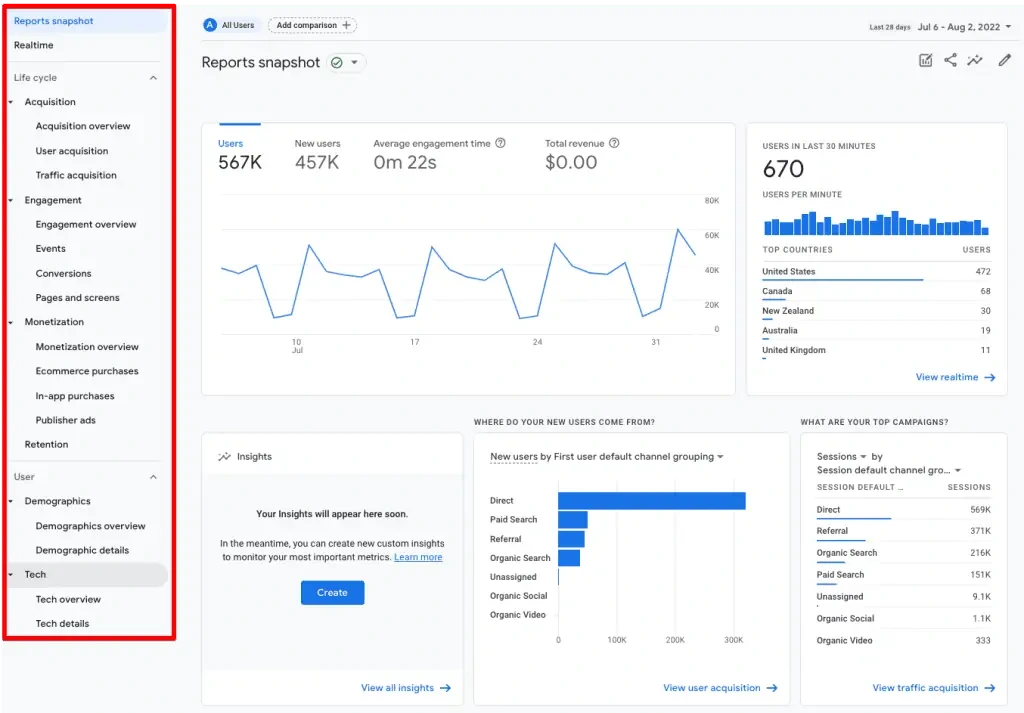
Source: Measureschool
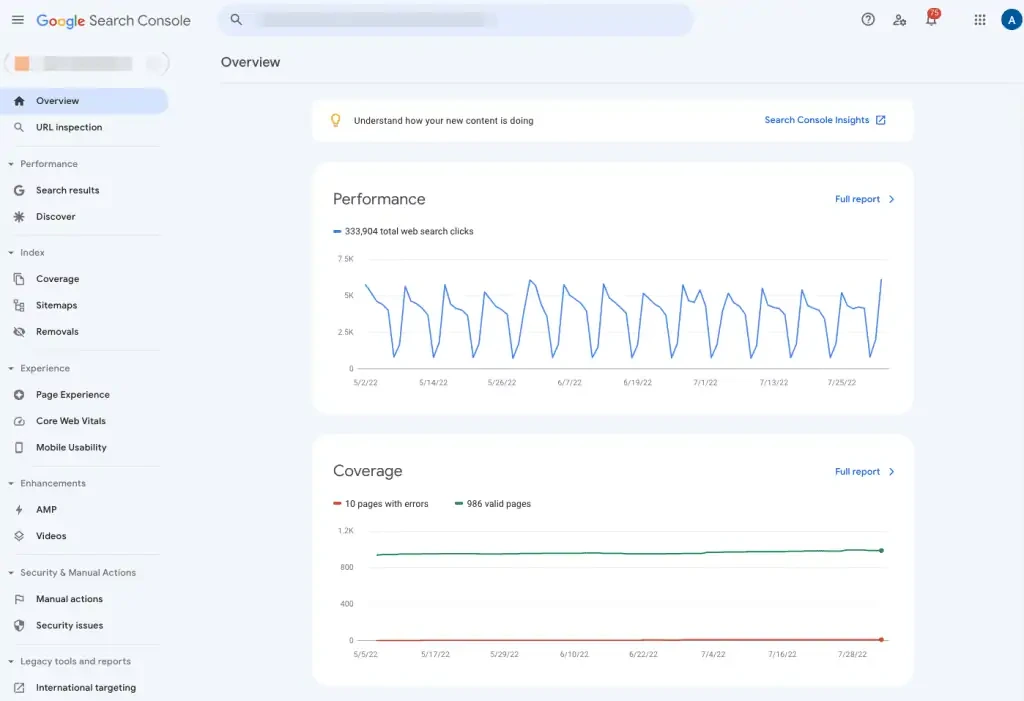
Source: Measureschool
Data Collection Method: How Each Tool Tracks Your Website
This is a critical but often overlooked difference. The way GSC and GA4 collect data is fundamentally different — and it explains why their numbers will never exactly match.
Google Analytics 4 relies on a JavaScript tracking snippet (the GA4 tag or Google Tag) installed on your website. This means:
- If a user has JavaScript disabled, GA4 cannot track them.
- If a user’s browser extension, ad blocker, or privacy settings block the GA4 script, the visit is not recorded.
- GA4 data can be affected by users opting out of tracking under GDPR/CCPA consent banners.
- GA4 data is also subject to data thresholds (sampling) in some reports for high-traffic properties.
Google Search Console does not rely on JavaScript or any client-side tracking. It collects data directly from Google’s search infrastructure — meaning it captures every impression and click that happens in Google’s search results, regardless of browser settings or ad blockers. This makes GSC data generally more complete for organic search than what GA4 can capture.
Why Do GSC Clicks and GA4 Sessions Never Match?
This is one of the most common questions for anyone using both tools: why is the number of clicks in Search Console always higher than organic sessions in GA4? There are several legitimate reasons for this discrepancy:
- Ad blockers and privacy settings: Many users block GA4’s tracking script, so their visit registers as a click in GSC but never appears in GA4.
- Different attribution models: GA4 uses a data-driven attribution model, while GSC uses last-click attribution focused solely on organic Google search.
- Time zone differences: GA4 lets you set a custom reporting time zone, but GSC always reports in Pacific Time (PT). This can cause day-to-day discrepancies.
- Canonical URL handling: GSC only reports on canonical URLs, whereas GA4 reports on all URLs including those with tracking parameters (e.g., UTM tags).
- Bot traffic: GA4 automatically filters out known bot traffic. GSC does not, meaning some GSC clicks may come from crawlers or bots.
- Click counting differences: GSC records a click every time a user clicks on your listing from search results — even if they click back and click again. GA4 counts this as a single session (as long as it occurs within 30 minutes).
- Non-HTML pages: If a user clicks on a PDF or other non-HTML file hosted on your server, GSC records the click. GA4 may not record it as a session unless you have file-download tracking set up.
Takeaway: A discrepancy between GSC clicks and GA4 sessions is completely normal and expected. It does not indicate a problem with either tool.
Errors and Security
Google Search Console is the superior tool for diagnosing technical SEO and security issues. Its Page Experience report provides detailed insights into:
- Core Web Vitals (LCP, INP, CLS) — rated as Good, Needs Improvement, or Poor, segmented by desktop and mobile
- HTTPS status — whether your site is served securely
- Mobile usability — specific errors affecting mobile users (e.g., text too small, clickable elements too close)
- Manual actions — if Google has penalized your site for policy violations
- Security issues — malware, hacked content, deceptive pages
Google Analytics 4 provides limited information on website errors. It can flag some data validation issues and track 404 pages if properly configured with custom events, but it cannot tell you whether your pages are indexed, whether they pass Core Web Vitals, or whether Google has flagged security issues.
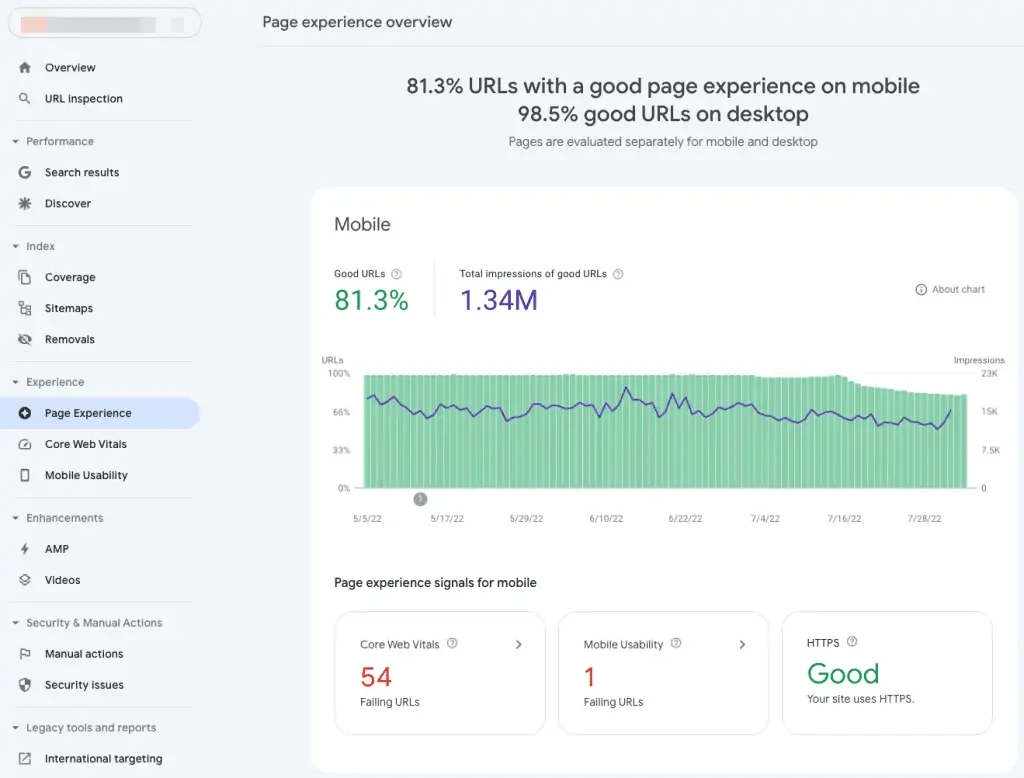

Source: Measureschool
Video Data
Both tools provide data on video content, but they measure entirely different things.
Google Analytics 4 tracks video engagement events on your website — play, pause, stop, share, or the percentage of a video watched — giving you a clear picture of how visitors interact with video content once they are on your page. However, GA4 cannot tell you how your videos rank in Google’s video search results.
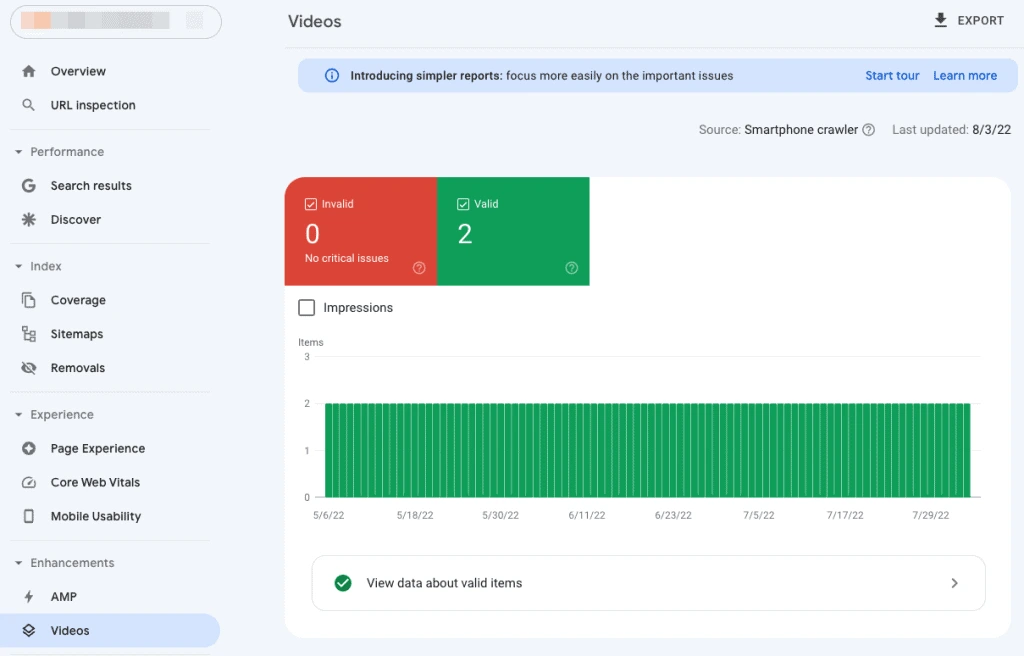
Google Search Console shows you how your videos perform in Google Search — which video pages are indexed, how many impressions and clicks they get in video search results, and any critical issues affecting video indexing. GSC also separates video performance data from regular web performance data, so you can clearly see how your video content is doing as its own entity in search.
Source: Measureschool
Query Limitations
Both tools have data reporting limits, but they differ in scope.
Google Analytics 4 can report on an unlimited number of URLs per day, making it the better tool for large websites with thousands of pages. However, GA4 reports may be subject to data thresholds (automatic sampling) in certain exploration reports for very high-traffic properties.
Google Search Console has a reporting limit of 1,000 URLs per day in its standard interface. For sites with a large number of pages, this means you may not see data for every URL in the GSC dashboard. However, you can access more complete data by using the Search Console API, which allows you to export up to 25,000 rows at a time.
Data retention also differs: GA4 retains user-level data for either 2 months or 14 months (depending on your settings). GSC retains performance data for the past 16 months.
Product Links and Integrations
Both tools are designed to integrate with the broader Google ecosystem, as well as third-party platforms.
Google Search Console associations and integrations include:
- Google Analytics 4 property
- Google Ads account
- Google Play Store app
- Google Assistant Actions Console project
- Search Console API for custom data exports
Google Analytics 4 can link with:
- Google Ads
- Google Ad Manager
- BigQuery (for raw data export and advanced analysis)
- Google Play
- Search Ads 360
- Google Search Console
- Display & Video 360
- Third-party platforms including Salesforce, Shopify, WordPress, HubSpot, Facebook, and many more
The BigQuery integration in GA4 is especially powerful for enterprises, as it allows you to export raw, unsampled event data and run SQL queries for custom analysis.
Measure Clicks, Sessions, and Non-HTML Pages
Both tools have fundamentally different ways of counting user interactions — and understanding this is key to interpreting your data correctly.
Clicks vs. Sessions:
- Google Search Console records a click every time a user clicks on your listing in Google Search results, even if they click back and click again in the same visit. This inflates GSC click counts relative to GA4.
- Google Analytics 4 counts one session per user for all activity within a 30-minute window, regardless of how many pages they visit or links they click during that time.
Example: A user clicks your result, browses your site, goes back to Google, and clicks again. GSC records 2 clicks. GA4 may count this as 1 or 2 sessions depending on the gap between interactions.
Non-HTML pages (PDFs, documents, etc.):
- Google Search Console does not count non-HTML pages (like PDFs) as page views, though it does record clicks if the PDF appears in search results.
- Google Analytics 4, with proper file-download tracking configured, can count PDF views and provide their URLs in the pages report.
Audience and Who Should Use Each Tool
Google Search Console is primarily used by:
- SEO professionals and consultants managing organic search performance
- Web developers monitoring crawl errors, indexing, and site health
- Content managers tracking keyword rankings and identifying optimization opportunities
- Any website owner who wants to understand how Google sees and indexes their site
Google Analytics 4 is primarily used by:
- Digital marketers tracking full-funnel performance across all traffic channels
- E-commerce businesses measuring revenue, product performance, and checkout funnels
- UX teams analyzing user behavior, engagement rates, and content performance
- Business owners and executives tracking conversions, ROI, and goal completion
Cost
Both Google Search Console and Google Analytics 4 are completely free to use for standard website tracking needs. There is no paid tier for GSC. GA4 has a premium version — Google Analytics 360 — which is available as part of Google Marketing Platform for enterprise-level organizations with very high data volumes and requirements for unsampled reporting, SLA guarantees, and advanced support. For the vast majority of websites, the free version of GA4 provides all the analytics capabilities needed.
Differences Between Google Search Console and Google Analytics 4 at a Glance
Here is a quick-reference table summarizing the key differences:
[TABLE — Do not modify]
Similarities between Google Search Console and Google Analytics 4
While their purposes differ, Google Search Console and Google Analytics 4 share several important characteristics:
- Both are free Google tools available to any website owner with a Google account.
- Both provide website performance data — including data related to page views, session information, and user interactions — that help you understand how users discover and engage with your site.
- Both show traffic source information, including organic search, though GSC focuses exclusively on Google organic while GA4 covers all channels.
- Both offer real-time or near-real-time data — GSC shows data with a 2–3 day delay in most cases, while GA4 has a real-time report that updates within seconds.
- Both can be integrated with each other so that Search Console data (queries, impressions, clicks, average position) appears directly inside your GA4 reports.
- Both exclude certain bot traffic — GA4 does so automatically; GSC applies its own Google-side filtering.
- Both support data exports — to Google Sheets, Looker Studio, BigQuery (GA4), or via API (both).
How to Link Google Search Console with Google Analytics 4?
Linking the two tools unlocks a powerful combined view — you can see organic search query data (normally only in GSC) directly alongside your GA4 behavioral data. Here’s exactly how to do it:
- Step 1: Make sure you are an Admin on both your GA4 property and a Verified Owner on your Google Search Console property. You need both permissions to create the link.
- Step 2: In Google Analytics 4, click the Admin gear icon in the lower-left corner of the screen.
- Step 3: Under the Property column, scroll down to Property Settings and click on Search Console Links.
- Step 4: Click the blue Link button in the top-right corner to begin the link setup process.
- Step 5: Click Choose accounts to select the Google Search Console property you want to link. You will see a list of GSC properties where you are a verified owner. Select the correct one and click Confirm.
- Step 6: Select the web data stream in GA4 that corresponds to your website, then click Next.
- Step 7: Review the details and click Submit. You should see a Link Created confirmation message.
Once linked, Search Console data will appear in GA4 under Reports > Acquisition > Search Console. This includes the Google Organic Search Queries report and the Google Organic Search Traffic report, where you can see queries, clicks, impressions, CTR, and average position alongside GA4 metrics like sessions and conversions — all in one view.
Note: It can take 24–48 hours for Search Console data to begin appearing in GA4 after the link is created.
When to Use Google Search Console vs. Google Analytics 4
Both tools answer different questions. Here’s a practical guide for when to turn to each:
Use Google Search Console when you want to:
- Check which keywords your pages rank for and at what average position
- Find pages with high impressions but low CTR (and improve their title tags and meta descriptions)
- Diagnose why a page is not appearing in Google’s index
- Monitor Core Web Vitals scores and resolve performance issues
- Submit a new sitemap or request re-indexing after publishing updated content
- Check if Google has flagged your site for manual actions or security issues
- Track how your video content performs in video search results
Use Google Analytics 4 when you want to:
- Understand where all your website traffic is coming from (all channels, not just Google organic)
- See what users do after they land on your site — which pages they visit, how long they stay, and what they click
- Track conversions, goal completions, and revenue
- Build audience segments for remarketing in Google Ads
- Analyze the full customer journey from first touch to conversion
- Compare the performance of different marketing campaigns
- Set up custom events to track specific user interactions unique to your business
Use both together when you want to:
- See which organic keywords drive not just traffic, but actual conversions
- Identify high-ranking pages that are losing traffic and diagnose whether the issue is a drop in rankings (GSC) or a change in user behavior (GA4)
- Connect SEO performance to business outcomes — the complete picture from search impression to sale
Conclusion
Google Search Console and Google Analytics 4 are not competitors — they are complementary tools that each reveal a different half of your website’s performance story.
Google Search Console emphasizes search-related data and gives you a direct window into how Google sees, crawls, indexes, and ranks your website in organic search results. It is the essential tool for SEO, technical site health, and understanding what drives users to click on your listing.
Google Analytics 4 has vast web analytics capabilities that tell you exactly how users behave on your website — from the moment they land on your site to the moment they convert or leave. It covers all traffic channels, not just Google organic, and gives you the behavioral and business performance data needed for holistic digital marketing strategy.
The most effective approach is to use both tools in tandem and integrate them. When you link GSC with GA4, you bridge the gap between pre-click search data and post-click behavioral data — giving you a complete, end-to-end picture of your user’s digital journey, from the search query they typed to the conversion they completed on your site.
If you are focused on improving your Google rankings and organic search visibility, start with Google Search Console. If you are focused on improving on-site experience, conversion rates, and multi-channel marketing performance, lean on Google Analytics 4. For a truly data-driven digital strategy, you need both.