Recently updated: May 20th, 2026
If you do not know how to measure your SEO ROI, you may not be getting the outcomes you are expecting from your SEO strategy. There is no useful purpose in spending hours learning SEO tactics if you cannot make better strategic decisions based on your SEO ROI calculations.
Google Analytics gives ways to calculate SEO return on investment (ROI), which involves two key factors – the cost of your SEO campaigns and key performance indicators (KPIs). You can track these key metrics on monthly basis to tweak and optimize your SEO strategies to make well-informed business decisions.
Google Analytics enables you to analyze your traffic, pinpoint where your audience is coming from, set realistic goals, and incorporate the most-valued keywords to track your performance and rank better in search results. By utilizing professional SEO services, businesses can ensure they are targeting the right audience and achieving optimal visibility.
So, when you want to measure ROI in SEO using Google Analytics with performance tracking, here’re some key ways where you need to focus more on the best results.
In this comprehensive guide, we cover everything from the core SEO ROI formula and GA4 conversion tracking setup to attribution models, forecasting methods, and real-world calculation examples — so you can prove the value of every rupee or dollar invested in organic search.
What Is SEO ROI and Why Does It Matter?
SEO ROI (return on investment) measures the profitability of your search engine optimization efforts. It answers a simple but critical question: is the revenue generated from organic search greater than the money and resources you spend on SEO?
Understanding your SEO ROI is important for several reasons. First, it helps you justify ongoing investment in organic search. Unlike paid advertising, SEO does not deliver instant results — it typically takes four to twelve months before meaningful improvements in traffic and revenue become visible. Without clear ROI data, stakeholders may question whether the investment is worthwhile.
Second, measuring SEO ROI allows you to allocate resources more effectively. When you know which campaigns, keywords, and content pieces generate the highest returns, you can redirect budget and effort toward what works and eliminate what does not. This is where integrating conversion rate optimization with your SEO strategy becomes essential — improving the percentage of organic visitors who convert directly increases your ROI without requiring additional traffic.
Third, SEO ROI benchmarking helps you compare organic search performance against other marketing channels such as PPC, social media advertising, and email marketing. Research consistently shows that organic search drives a significant share of total website revenue, making it one of the most cost-effective digital marketing channels available.
Whether you run an ecommerce store, a B2B service company, or a lead generation website, calculating your SEO return on investment is the foundation for data-driven decision-making and long-term growth. For businesses just getting started with search optimization, our SEO 101 beginner’s guide covers the fundamentals you need before diving into ROI measurement.
The SEO ROI Formula Explained
The standard formula for calculating SEO ROI is straightforward:
SEO ROI (%) = ((Revenue from SEO − Cost of SEO) ÷ Cost of SEO) × 100
For example, if your SEO campaign generated ₹5,00,000 in organic revenue over a quarter and your total SEO investment was ₹1,00,000, the calculation would be:
((5,00,000 − 1,00,000) ÷ 1,00,000) × 100 = 400% ROI
This means that for every ₹1 you invested in SEO, you earned ₹4 in return. A positive ROI indicates that your SEO strategy is profitable, while a negative ROI signals a need for strategic adjustments.
To use this formula accurately, you need two data points: the total cost of your SEO investment and the total revenue attributable to organic search. Let us break each one down in the sections that follow.
Step 1 — Calculate Your Total SEO Investment
Before you can measure returns, you need an accurate picture of what you are spending. Many businesses undercount their SEO costs by only including agency or freelancer fees while ignoring internal costs. Here is a comprehensive breakdown of what to include:
Agency or consultant fees: If you work with an external SEO services provider, include the full monthly retainer or project-based fees. This is typically the largest line item.
In-house team costs: Calculate the portion of employee salaries dedicated to SEO. If a content writer spends 50% of their time on SEO-driven blog posts, include half their salary plus benefits.
SEO tools and software: Include subscriptions for tools such as SEMrush, Ahrefs, Screaming Frog, Surfer SEO, and any other platforms used for keyword research, rank tracking, site audits, and competitive analysis. Our guide to the top SEO analysis tools can help you choose the right stack for your needs.
Content production costs: Factor in blog writing, infographic design, video production, and any other content created specifically to support organic search performance. This is a core part of any content marketing strategy tied to SEO goals.
Link building expenses: Include outreach campaigns, digital PR, guest posting costs, and any investment in earning high-quality backlinks. Quality link building services are an essential part of off-page SEO that contributes directly to ranking improvements.
Technical SEO costs: Include site speed optimization, schema markup implementation, mobile usability fixes, and any development work done to improve crawlability and indexing. Use our technical SEO checklist to identify areas that may need investment.
Add all these costs together for the time period you are measuring — whether monthly, quarterly, or annually. This total becomes the “Cost of SEO” in your ROI formula. Keep in mind that these costs may fluctuate from month to month, so account for any variations when calculating ROI across longer periods.
Step 2 — Set Up Conversion Tracking in Google Analytics 4
Google Analytics 4 (GA4) has replaced Universal Analytics as the standard web analytics platform. If your business has not yet migrated, our guide to mastering Google Analytics 4 walks you through the complete setup process.
To measure SEO ROI accurately, you need to track conversions — the specific actions on your website that generate revenue or move prospects through your sales funnel. The setup process differs depending on your business model.
Ecommerce Conversion Tracking in GA4
For online stores, ecommerce tracking provides the most precise revenue data. Here is how to set it up:
Step 1: Install Google Tag Manager (GTM) on your website if you have not already. GTM allows you to add tracking tags without editing your site’s code directly.
Step 2: Set up ecommerce events using GTM. The critical events to configure include view_item, add_to_cart, begin_checkout, and purchase. These events track the complete buyer journey from product discovery to completed transaction.
Step 3: In GA4, navigate to Admin → Events and verify that your ecommerce events are firing correctly. Mark the purchase event as a Key Event (formerly called a “Conversion” in GA4) so it appears in your conversion reports.
Step 4: If you use Shopify, WooCommerce, or another ecommerce platform, install the platform’s GA4 integration to automatically send purchase and revenue data. For Shopify SEO users, you can add your GA4 Measurement ID directly in Shopify Settings → Customer Events. For WordPress and WooCommerce sites, plugins such as MonsterInsights or Google Site Kit handle this integration.
Once configured, GA4 logs each sale as a purchase event and attributes it to the correct traffic source — so revenue from someone who found your store via Google organic search will appear under the “Organic Search” channel.
Lead Generation Conversion Tracking in GA4
For service businesses, B2B companies, and lead generation websites, tracking ROI is more involved because you do not make direct sales on your site. Instead, you track lead-capturing actions and assign estimated dollar values to them.
Step 1: Identify your key conversion actions. Common lead generation events include contact form submissions, quote requests, phone call clicks, newsletter sign-ups, and demo bookings.
Step 2: Create custom events in GA4 for each action using Google Tag Manager or GA4’s built-in event creation. For example, set up a form_submit event that fires when a visitor completes your contact form, or a call_click event when someone taps your phone number.
Step 3: Mark these events as Key Events in GA4 (Admin → Events → toggle the Key Event switch).
Step 4: Assign a monetary value to each Key Event. The most practical formula for calculating lead value is:
Lead Value = Customer Lifetime Value (CLV) × Lead-to-Customer Conversion Rate
For example, if your average customer is worth ₹2,00,000 over their lifetime and 10% of your leads convert into paying customers, each lead is worth ₹20,000. Enter this value in GA4 by navigating to the Key Event, clicking the three-dot menu, and selecting “Set default monetary value.”
Understanding how to perfect your SEO for higher conversions can significantly improve these numbers by ensuring that the traffic you attract actually converts into qualified leads.
Step 3 — Measure Organic Revenue and Conversion Value
With conversion tracking in place, you can now measure the revenue your SEO efforts generate. GA4 provides several reports to access this data.
How to Track Organic Revenue in GA4
Navigate to Reports → Acquisition → Traffic Acquisition in your GA4 dashboard. This report breaks down your sessions and conversions by traffic channel. Look for the “Organic Search” row to see how many sessions, conversions, and how much revenue came from organic search during your selected time period.
For ecommerce sites, you can also access Reports → Monetization → Ecommerce Purchases and apply a filter for the “Organic Search” channel to see product-level revenue data from organic traffic only.
For lead generation sites, check Reports → Engagement → Events and filter by your Key Events to see how many organic leads you generated. Multiply the number of organic conversions by your assigned lead value to calculate your total organic revenue.
Assigning Dollar Values to Non-Ecommerce Conversions
If your business does not sell products directly online but generates leads that convert into sales offline, you need a reliable method to assign revenue values to your organic conversions. Here are three approaches:
1. CLV-based calculation: As described above, multiply your Customer Lifetime Value by your lead-to-customer conversion rate. This gives you the expected revenue per lead.
2. Average deal size method: If CLV data is not available, use your average transaction value multiplied by close rate. For instance, if your average project is worth ₹50,000 and you close 15% of leads, each lead is worth ₹7,500.
3. CPC equivalency method: Calculate what you would have paid for the same traffic through Google Ads. If SEO generates 5,000 monthly clicks for keywords that cost ₹45 per click on average, your SEO program is delivering ₹2,25,000 worth of equivalent paid traffic per month. This method is especially useful during the early months of an SEO campaign before conversion data matures.
Step 4 — Calculate Your SEO ROI
Now that you have both your total SEO costs and organic revenue figures, apply the formula:
SEO ROI (%) = ((Organic Revenue − Total SEO Cost) ÷ Total SEO Cost) × 100
Here is a practical example for an ecommerce business:
Suppose your monthly SEO investment totals ₹1,50,000 (agency fees + tools + content). GA4 shows that organic search generated ₹7,50,000 in purchase revenue during the same month.
SEO ROI = ((7,50,000 − 1,50,000) ÷ 1,50,000) × 100 = 400%
For every ₹1 invested in SEO, you earned ₹4 back — a strong return that justifies continued investment. Selecting the right SEO packages for your business ensures your investment is optimized for maximum ROI.
For a lead generation business, if you generated 50 organic leads at an assigned value of ₹20,000 each (total ₹10,00,000) against a monthly SEO spend of ₹2,00,000:
SEO ROI = ((10,00,000 − 2,00,000) ÷ 2,00,000) × 100 = 400%
We recommend calculating SEO ROI on a monthly and quarterly basis to identify trends and seasonal patterns. Use a spreadsheet or dashboard to track these figures over time for clear performance visualization.
Page Value
Page value is a key factor when talking about SEO ROI for the most effective SEO tactics. Page value is like measuring the monetary value of all your web pages viewed in a session where a successful conversion to a sale took place to bring some revenue to your business. It becomes a key metric when we talk about SEO tactics and outcomes for e-commerce sites.
Page value helps assign a value to both transactional and non-transactional pages to help you focus more on pages where a transaction takes place. A blog page or landing page will not necessarily produce revenue, but it doesn’t mean they don’t contribute to a customer’s buying decision. It is all about identifying pages of more value to make future strategies.
Lead generation pages such as the contact form and product page can be assigned with a page value to track your performance more accurately to measure whether or not you are near your goals. Investing in the right SEO packages ensures that your website structure and content are optimized for better conversions and higher page values.
According to Google,
“Page Value is the average value for a page that a user visited before landing on the goal page or completing an E-commerce transaction (or both). This value is intended to give you an idea of which page in your site contributed more to your site’s revenue. If the page wasn’t involved in an e-commerce transaction for your website in any way, then the Page Value for that page will be $0 since the page was never visited in a session where a transaction occurred.”
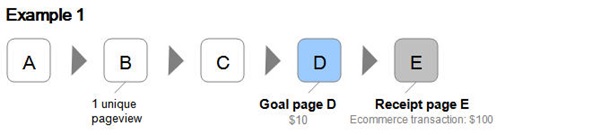
Here’s a visual that will help you better understand the scenario and how page value works.
Image Source: Google Support
In example 1, a user visits Page B (with a unique pageview = 1) before continuing to Goal page D (with an assigned value of $10) and Page E (where an e-commerce transaction of $100 is made). It means a single page view of Page B results in $110 revenue, which helps you measure its page value.
The Page Value equation is like this:
Ecommerce Revenue ($100) + Total Goal Value ($10)
Number of Unique Pageviews for Page B (1)
=$110, which is the page Value for Page B since the user visits only once during the session to generate the transaction value of $110.
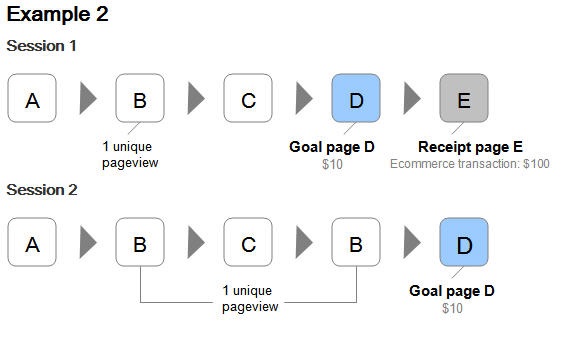
However, not all page views result in a successful conversion. The page value is affected when we combine data from multiple sessions. We can better understand with the second example.
Image Source: Google Support
In example 2, we see two sessions, and only one (session 1) of them leads to a conversion. Though we have two unique pageviews for Page B, the revenue generated remains the same. Now when we recalculate Page B’s Page Value using this data, we have:
Page Value for Page B =
e-commerce revenue ($100) + Total Goal Value ($10 x 2 sessions)
Number of Unique Pageviews for Page B (2)
= $60. Which is the page value for Page B in two sessions.
That’s why you need to keep track of every data and interaction on pages to recalculate and readjust your page value with more information comes in. More data from more sessions will give a clearer picture of pages contributing most to your business revenue.
In GA4, you can analyze page-level revenue contribution using the Reports → Engagement → Pages and Screens report. Add a secondary dimension for “Session source / medium” and filter by organic traffic to see which pages generate the most value from SEO-driven visitors. Combine this with data from keyword research tools to understand which search queries are driving traffic to your highest-value pages.
E-commerce Settings
This section is for those who manage an e-commerce business. Google Analytics has a more advanced feature that could be very useful to e-commerce business owners. As an owner of e-commerce owners, you can turn on the e-commerce settings in your GA account to track the number of orders received, sales amount, billing locations, and average order value to measure your ROI. It helps you connect sales information to website usage to better understand which pages or campaigns are leading to most revenue generation and performing the best with your ongoing tactics.
How to turn on e-commerce settings in Google Analytics?
Go to your left sidebar panel in your Google Analytics account and follow these steps to turn on e-commerce settings:
Step 1- ADMIN > under the VIEW panel (rightmost panel)
Step 2- Click on “E-commerce Settings”
Step 3- Enable E-Commerce
Step 4- Enable Enhanced E-commerce Reporting.
To finalize things, go to “Checkout Labelling” underneath the Enhanced E-commerce settings and “funnel steps” to fill in the following information:
- Checkout view
- Billing info
- Proceed to payment
If you have Woocommerce or Shopify platform for your e-commerce business, make sure to turn on tracking settings over there too, so that Google Analytics can track and communicate crucial information to your GA dashboard.
After setting up the E-commerce tracking, you can access the following data:
- An overview of your revenue
- E-commerce conversion rate
- Transactions
- Average order value
- Product and sales performance
- Shopping and checkout behavior
These data for your sales performance give a better understanding of your customers’ behavior and interaction with your site. It lets you track the products that are selling the most. This information is extremely useful in terms of measuring the SEO ROI. When you know pages your potential customers view and the steps they take before the final purchase, it helps you analyze the value of all your pages and their effectiveness in your overall SEO strategy and performance.
GA4 update: In Google Analytics 4, enhanced ecommerce has been replaced by a unified event-based tracking model. Instead of enabling separate ecommerce settings, you configure purchase events through Google Tag Manager. The data then appears in Reports → Monetization → Ecommerce Purchases, where you can analyze revenue, items sold, and average purchase value by traffic source. For businesses building or upgrading their online stores, professional ecommerce SEO services ensure your tracking infrastructure and site structure are optimized from the ground up. You can also explore our detailed ecommerce SEO strategy guide for a complete optimization roadmap.
Sales Performance
Again, this section is for e-commerce businesses only. The sales performance metric helps you track all sources and mediums from where you are getting all your sales. The section shows the data only for organic traffic and successful conversions to revenue generation.
How to view and track your sales performance?
Again, go to the left panel in your Google Analytics account and click on “Conversions” > “E-commerce” > “Sales Performance” to view your sale performance.
You will have access to an overview of your revenue and the breakdown of each transaction for each sale. This information helps you determine trends in recent times for your content strategy. It tells a lot about your customers and average transaction value across sessions. You can use this data to optimize your pages and tweak your campaigns to see whether or not it impacts your revenue.
Customers’ shopping behavior is another set of data that contributes to calculating SEO ROI and optimize your content strategy accordingly.
How to view your customers’ shopping behavior in Google Analytics?
Go to the left panel in your GA account and follow the following steps:
Click on “Conversions” > “E-Commerce” > “Shopping Behavior” to view the customers’ shopping behavior.
The shopping behavior and interactions of your customers let you understand the effectiveness of your purchase funnel. You can see how many sessions are leading from one step to the next and close to the Goal Page D and Receipt Page E. It helps your measure data associated with:
- People who went to your page but didn’t purchase.
- People who added products in their shopping but didn’t go to the transaction/billing page and complete the payment.
- People who successfully make a purchase.
Your customers’ shopping behavior helps you identify areas that need more attention while creating SEO tactics. You can also draw a projection of your sales and revenue forecasting so that you can tweak and optimize your SEO strategies to boost organic traffic and get a better idea of your SEO ROI.
For instance, let assume that a high percentage of visitors on your pages are not going to the next steps through the buying cycle. Maybe a little tweak in your campaign by including more searchable keywords that best suit your customers’ online behavior and search patterns.
The only downsides of the whole process are that it shows sales and revenue performance only for organic traffic, and you cannot identify keywords that led to particular sales. However, you can increase your SEO efforts to boost organic traffic through Google searches for more sales.
A quick tip: You can analyze the information from your Google Search Console and Google Analytics to connect the dots to get an idea of which keywords bring the most organic traffic to identify specific keywords leading to the successful sale.
Remember that people may be interested in your business due to some amazing keywords and your online visibility in the appropriate search terms. They might not be interested in your products. So, when you know which keywords are working for your business, it becomes easy to measure the ROI of your SEO. Identifying the keywords with purchase intent is the key to attract more qualified leads and successful sales to hit your goals.
GA4 equivalent: In GA4, sales performance data is accessible through Reports → Monetization → Ecommerce Purchases. To analyze the user purchase journey, navigate to Reports → Monetization → User Purchase Journey, which shows the step-by-step funnel from first visit through checkout completion. This report replaces the legacy Shopping Behavior and Checkout Behavior reports. You can also combine GA4 with goal tracking setup to monitor micro-conversions throughout the buying cycle.
Engagement Events
We are now in the section where both e-commerce and lead generation sites can focus to follow up their SEO ROI. They can make the best use of engagement events in their favor to achieve specific business goals.
You can align with your sales team to assign a value and goal based on:
- Average order value
- The average number of sign-ups
- Conversion rate
These analytics are the most beneficial for sale and lead generation sites with longer sales cycles where a transaction occurs after multiple sessions or off-site. For example, B2B businesses, marketing agencies, and service providers can also make the most of it.
The most common engagement events include:
- Newsletter sign up
- Contact form submission
- Downloads
- Adding to a cart
To view your campaign engagement data, go to “Behavior” > “Events” > “Top Events” in your Google Analytics dashboard.
Tracking your engagement events gives you better insight into how your site visitors are interacting with parts of the sales cycle. It helps you set goals for lead/sale generation and determine whether or not your SEO tactics are paying off.
GA4 update: In Google Analytics 4, all user interactions are tracked as events by default. To monitor engagement events for SEO ROI, navigate to Reports → Engagement → Events to see event counts, and filter by the “Organic Search” channel to isolate SEO-driven engagement. Key events you should track for ROI measurement include form_submit, file_download, scroll (for content engagement depth), click (for outbound or CTA clicks), and video_start / video_complete for video content performance.
If you want to explore how engagement metrics connect to broader digital marketing performance, GA4’s cross-channel analysis is invaluable for understanding how organic search works alongside your paid and social campaigns.
Using Attribution Models to Uncover SEO’s True Impact
One of the biggest challenges in measuring SEO ROI is attribution — giving organic search proper credit for conversions it influences, even when it is not the final touchpoint before purchase. A customer might discover your website through a Google search, leave, return later through a social media post, and finally convert after clicking an email link. Under last-click attribution, SEO gets zero credit for that sale even though it initiated the journey.
GA4 addresses this challenge with its data-driven attribution (DDA) model, which uses machine learning to distribute conversion credit across all touchpoints based on their actual contribution to conversions. This model is significantly more accurate for measuring SEO’s true impact than the older last-click approach.
To access attribution data in GA4, navigate to Advertising → Attribution → Conversion Paths. This report shows how organic search participates in conversion journeys — whether as the first interaction, an assisting touchpoint, or the final click before conversion. Compare the data-driven attribution model with last-click attribution to see how much additional credit SEO deserves.
For a deeper understanding of attribution, use Advertising → Attribution → Model Comparison in GA4 to compare how different models allocate credit to organic search. SEO typically performs significantly better under data-driven attribution than under last-click models, revealing value that was previously hidden.
Another practical attribution approach is self-reported attribution. Add a “How did you hear about us?” field to your contact forms. This captures qualitative data about how customers first discovered your business, providing insights that no analytics tool can offer. Businesses that combine GA4 data-driven attribution with self-reported data get the most complete picture of their SEO ROI.
How to Forecast SEO ROI
Forecasting SEO ROI is essential for budget planning, setting realistic expectations, and securing stakeholder buy-in. While past performance data is useful, SEO ROI forecasting involves projecting future organic traffic growth, conversion improvements, and revenue gains based on your planned SEO activities.
Here is a simple framework for forecasting SEO ROI:
1. Establish your baseline metrics: Record your current monthly organic sessions, organic conversion rate, average conversion value (or average order value for ecommerce), and total monthly SEO costs.
2. Estimate traffic growth: Based on your keyword strategy, competitor analysis, and historical trends, project realistic monthly traffic increases. A well-executed SEO campaign targeting competitive keywords might aim for 15–30% organic traffic growth over six months. Use data from Google Search Console and the best SEO tools to model keyword ranking improvements and their traffic impact.
3. Project revenue: Multiply your projected organic sessions by your conversion rate and average conversion value. For example, if you expect 20,000 organic sessions per month, have a 2% conversion rate, and each conversion is worth ₹5,000, your projected monthly organic revenue is ₹2,00,000.
4. Apply the ROI formula: Use your projected revenue and planned SEO costs to calculate expected ROI. Build optimistic, moderate, and conservative scenarios to present a range rather than a single number.
5. Account for the compounding effect: Unlike paid advertising that stops generating returns when you stop spending, SEO compounds over time. Content you publish today continues generating traffic and revenue for months or years. This is why SEO typically shows a 5x return or higher (500%+ ROI) over 12 to 18 months for established domains. Understanding the top SEO trends for 2026 will also help you forecast more accurately by anticipating algorithm changes and search behavior shifts.
Common Challenges in Measuring SEO ROI (and How to Solve Them)
Calculating SEO ROI is not always straightforward. Here are the most common challenges businesses face and practical solutions for each:
Challenge 1: Long time to results. SEO is a long-term strategy. It can take four to twelve months to see meaningful ranking improvements and traffic growth. During this period, your ROI may appear negative. Solution: Track leading indicators such as keyword ranking improvements, organic impressions, and click-through rate during the early months. Present these as progress metrics alongside ROI to demonstrate that the campaign is on track.
Challenge 2: Attribution complexity. Customers interact with multiple channels before converting, making it difficult to attribute revenue accurately to SEO. Solution: Use GA4’s data-driven attribution model and supplement it with self-reported attribution data from your contact forms. Present ROI as a range rather than a precise figure to acknowledge attribution limitations honestly.
Challenge 3: Separating branded vs. non-branded traffic. Branded searches (people searching for your company name) are often attributed to SEO but do not represent true SEO growth. Solution: Use Google Search Console to segment branded and non-branded queries. Calculate separate ROI figures for each to give stakeholders a clearer picture of SEO’s incremental impact.
Challenge 4: Offline conversions. For service businesses, conversions often happen offline — via phone calls, in-person visits, or after multiple email exchanges. Solution: Implement call tracking software to attribute phone leads to organic search. Use CRM data to track offline conversions back to their original online touchpoint.
Challenge 5: Disconnected tech stack. When your analytics platform, CRM, and marketing tools do not share data, it becomes difficult to track the full customer journey. Solution: Integrate GA4 with your CRM (such as HubSpot, Salesforce, or Pipedrive) and ensure UTM parameters are consistent across all campaigns. A connected on-page SEO strategy combined with proper tracking infrastructure eliminates most data gaps.
How Long Does It Take to See SEO ROI?
SEO is fundamentally a long-term investment. Unlike PPC campaigns that generate traffic immediately, organic search performance builds gradually as content gets indexed, backlinks accumulate authority, and keyword rankings improve over time.
As a general benchmark, most businesses should expect to see meaningful ROI from SEO within six to twelve months of consistent effort. In year one, breaking even or achieving a 100–200% ROI is considered a strong start, particularly for newer websites or businesses entering competitive markets.
The real power of SEO ROI emerges in year two and beyond. Content published in year one continues generating traffic at minimal incremental cost, and the compounding effect of authority building means that new content ranks faster and higher than it did at the beginning. Well-executed SEO campaigns often achieve 400–700% ROI by month 18.
Several factors influence how quickly you will see positive ROI from SEO: your website’s existing domain authority, the competitiveness of your target keywords, the quality and consistency of content production, your technical site health (assessed through a thorough technical SEO audit), and whether you are working with experienced professionals or handling SEO in-house.
Reporting SEO ROI to Stakeholders
Effectively communicating SEO ROI to executives, clients, or team members requires more than just presenting a percentage. Here are best practices for building compelling SEO ROI reports:
Lead with business outcomes: Start with revenue and profit, not rankings or traffic. Stakeholders care about money, not metrics. Show the ROI percentage alongside actual revenue figures.
Use a monthly dashboard: Create a simple dashboard that tracks total SEO costs, organic revenue, ROI percentage, organic traffic trend, conversion rate, and top-performing keywords and pages. GA4’s custom reporting features or Looker Studio (formerly Google Data Studio) are excellent for this purpose.
Present ROI with context: Attribution is inherently imperfect. Instead of claiming exact ROI figures, present a range. For example, “SEO ROI this quarter is between 300% and 400% depending on attribution model” is more credible than claiming exactly 347.5%.
Factor in cost avoidance: If SEO generates 5,000 organic clicks per month for keywords that would cost ₹50 per click on Google Ads, your SEO program is saving ₹2,50,000 per month in advertising spend. This is real financial value worth including in ROI reports.
Segment ROI by content type: Measure ROI separately for blog content, product pages, and landing pages. You will often find that 20% of your pages drive 80% of organic revenue — this insight helps prioritize future content investments.
Show the trend, not just the snapshot: A 200% ROI in month six is less impressive in isolation than a chart showing progression from -50% in month two to 200% by month six. Trends demonstrate momentum and validate the long-term strategy.
Frequently Asked Questions About SEO ROI
Q: What is a good SEO ROI?
A: There is no universal benchmark because ROI varies by industry, investment level, and business model. However, a positive ROI within the first 6 to 9 months is considered a strong start. Well-executed SEO campaigns often achieve 400–700% ROI (a 5x to 8x return) over 12 to 18 months. The key is consistent tracking and optimization over time.
Q: How do you calculate SEO ROI?
A: Use the formula: SEO ROI (%) = ((Revenue from SEO − Cost of SEO) ÷ Cost of SEO) × 100. Track organic revenue through Google Analytics 4 and calculate your total SEO investment including agency fees, tools, content, and labor costs.
Q: Can I measure SEO ROI without ecommerce tracking?
A: Yes. For lead generation businesses, assign a dollar value to each conversion event (such as form submissions or phone calls) using the formula: Lead Value = Customer Lifetime Value × Lead-to-Customer Conversion Rate. Then use these values to calculate total organic revenue for your ROI formula.
Q: How long does it take to see ROI from SEO?
A: SEO typically takes four to twelve months to deliver measurable results. Most businesses see positive ROI within 6 to 12 months of consistent effort. The compounding nature of SEO means returns grow significantly in year two and beyond.
Q: What is the difference between SEO ROI for ecommerce and lead generation?
A: Ecommerce businesses can track exact revenue through GA4 purchase events, making ROI calculation very precise. Lead generation businesses must estimate conversion values based on average deal size and close rates, introducing some margin of error. Both approaches are valid — the key is consistency in methodology.
Q: How do I track SEO conversions in Google Analytics 4?
A: In GA4, set up conversion events using Google Tag Manager or GA4’s event configuration. Mark important events (like purchases, form submissions, or call clicks) as Key Events. Then view organic conversion data in Reports → Acquisition → Traffic Acquisition, filtering by the Organic Search channel. For a complete GA4 walkthrough, see our guide to mastering Google Analytics 4.
Q: What costs should I include when calculating SEO investment?
A: Include all costs related to your organic search efforts: agency or consultant fees, in-house staff salaries (pro-rated for SEO time), SEO software subscriptions, content creation costs, link building expenses, and any technical development work done for SEO purposes.
Q: How do I prove SEO ROI when multiple marketing channels overlap?
A: Use GA4’s data-driven attribution model, which algorithmically distributes conversion credit across all channels based on their actual contribution. Supplement this with self-reported attribution from contact forms and CRM data to build a complete picture.
Q: Is SEO still profitable in 2026?
A: Yes. Despite the rise of AI-powered search features and zero-click searches, organic search remains one of the most profitable digital marketing channels. The key is adapting your strategy to align with current SEO trends, focusing on high-intent keywords, creating genuinely helpful content that demonstrates E-E-A-T (Experience, Expertise, Authoritativeness, Trustworthiness), and measuring performance rigorously through GA4.
Final Thoughts
Ultimately, measuring your SEO ROI helps make better strategic and well-informed decisions to achieve your business goals. When you start using Google Analytics to track your SEO outcomes, it is important to align your business goals with key metrics for long-term and sustainable growth. SEO is a powerful tool for online businesses and making an actionable plan that best suits your business goals can lead you to success.
The shift from Universal Analytics to Google Analytics 4 has made SEO ROI measurement more powerful and nuanced than ever. With event-based tracking, data-driven attribution, and cross-platform analysis capabilities, GA4 gives you the data infrastructure needed to connect every organic click to real business revenue.
Start by setting up proper conversion tracking, calculate your true SEO costs, and apply the ROI formula consistently. As your data matures over months and quarters, you will gain increasingly clear insights into which SEO tactics deliver the highest returns — enabling you to invest with confidence and scale your organic growth sustainably.
If you need expert guidance in building a measurable, results-driven SEO strategy, explore our SEO services or browse our SEO packages to find the right fit for your business goals.