If your business isn’t showing up in Google’s Local 3-Pack, you’re invisible to the majority of local customers searching for your services right now. With 46% of all Google searches carrying local intent and over 8.5 billion searches happening daily, your Google Business Profile (formerly known as Google My Business) is no longer optional — it’s the single most powerful free tool available for local visibility in 2026.
This step-by-step guide covers everything from creating and verifying your profile to advanced optimization strategies that align with Google’s 2026 algorithm, including AI Overviews, category ranking signals, review strategy, and LocalBusiness schema markup. Whether you’re setting up from scratch or optimizing an existing listing, this guide will help you rank higher, earn more trust, and convert local searchers into paying customers.
What Is Google Business Profile and Why It Matters in 2026
A Google Business Profile (GBP) is a free business listing that controls how your business appears across Google Search and Google Maps. Your profile displays your business name, address, phone number, hours, photos, reviews, and services — all within the prominent Local Pack (the map-based results block that appears above organic listings).
Think of it as your digital storefront on Google. For many potential customers, it’s the first — and sometimes only — thing they see before deciding whether to contact your business.
Google Business Profile vs. Google My Business: What Changed
In 2021, Google rebranded “Google My Business” (GMB) to “Google Business Profile.” The core functionality remains the same, but management has moved directly into Google Search and Maps, making it faster to update your listing. References to GMB and GBP refer to the same platform throughout this guide.
How Google’s AI (Gemini) Uses Your Business Profile in 2026
In 2026, Google’s Gemini AI actively reads your Business Profile to generate answers in AI Overviews — the AI-generated summaries that now appear above traditional search results for many local queries. This means your profile is no longer just a listing: it’s a data source that feeds Google’s AI engine.
To be cited in AI Overviews, your profile must use clear, natural-language descriptions that directly answer common customer questions. Gemini cross-references your GBP description, services tab, and your website to verify your expertise and relevance. Profiles with complete, consistent, and conversational content are significantly more likely to be surfaced in AI-generated answers and zero-click searches.
The Real-World Impact of a Well-Optimized Google Business Profile
Consider how people search for businesses today. When someone types “best coffee shop near me” or “emergency plumber in [city],” Google instantly pulls up local businesses. A well-optimized Google Business Profile can be the difference between being found or being overlooked.
The advantages are significant and measurable:
- Increased Visibility: Your business appears in local search results and Google Maps.
- Customer Trust: Verified profiles and customer reviews build credibility.
- Direct Customer Interaction: Customers can call, message, or get directions directly from your profile.
- Free Marketing Tool: It’s a completely free way to promote your business online.
- AI Overview Inclusion: Complete profiles are more likely to be cited by Google’s Gemini AI in search results.
Why Google Business Profile Matters for Every Business
Your digital presence matters whether you are a multinational corporation or a local family-run business. The Google Business Profile levels the playing field, giving smaller businesses the same opportunity to appear alongside larger competitors in local search. It’s not about having the biggest budget — it’s about being the most visible and accessible to local customers at the exact moment they are searching.
To fully leverage this opportunity, investing in professional GMB management services ensures your profile stays optimized, updated, and consistently drives more local visibility, leads, and customer trust.
Step-by-Step: How to Set Up Your Google Business Profile (2026)
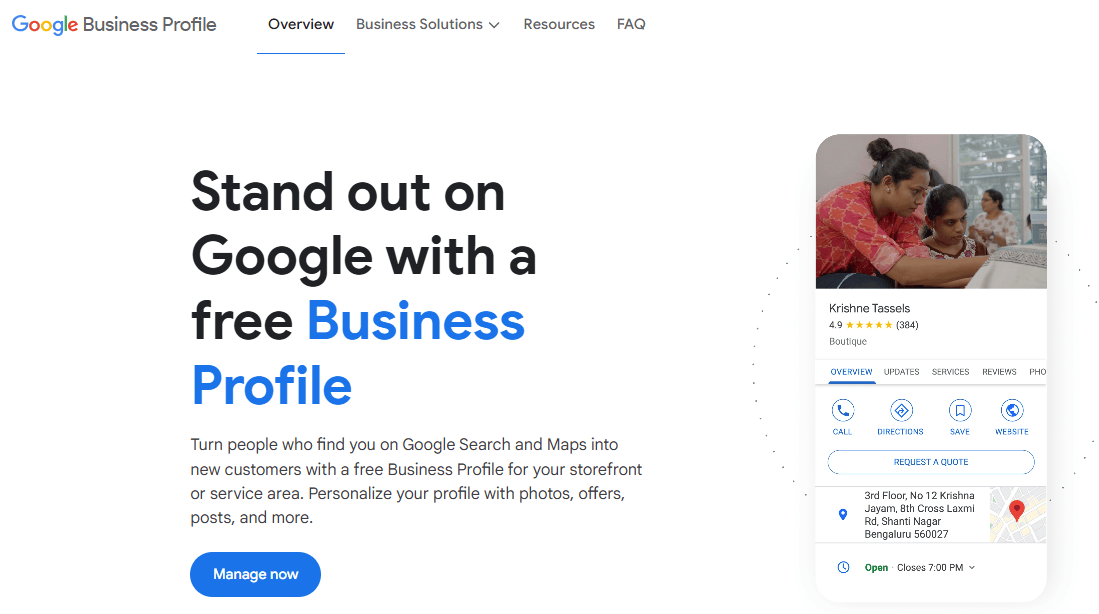
Setting up a Google Business Profile is the foundation of your entire local SEO strategy. Before you begin, gather the following information to ensure a smooth setup process:
- Your exact legal business name (as it appears on official documents and signage)
- Physical address or service areas
- Primary phone number
- Business website URL
- Business category
- Operating hours
Step 1: Create or Claim Your Google Business Account
Navigate to google.com/business and sign in with a Google account. Use a business email address — not a personal Gmail — for maximum professionalism and to keep your account separate from personal activity.
Once signed in, search for your business name. Two scenarios:
- Your business already exists: Click “Claim this business.” This happens when Google has auto-generated a listing from online mentions. Claiming it gives you management control.
- Your business doesn’t exist yet: Click “Add your business to Google” and enter your details from scratch.
Important 2026 warning: Google now enforces strict business name policies. Your business name must match your real-world signage and legal documents exactly. Do not add keywords, city names, or phrases like “Best” or “#1” to your name — this is a suspension trigger that can get your entire listing removed.
Step 2: Enter Your Business Name and Type
Enter your business name exactly as it appears on your storefront, invoices, and website. Next, select whether you are a:
- Physical location business: Customers visit you at a fixed address.
- Service area business (SAB): You travel to customers — e.g., plumbers, cleaners, or mobile services. For SABs, hide your home address and instead define the cities or postal codes you serve.
- Hybrid business: You have a physical location and also travel to customers.
Tip: Even if you’re a service area business, having a verified physical office address — such as a commercial unit or co-working space — typically improves your ranking, because Google trusts verifiable locations more than hidden addresses.
Step 3: Choose the Right Business Category (The #1 Ranking Factor)
Your primary business category is the single most impactful setting in your entire Google Business Profile. According to BrightLocal’s 2026 Local Search Ranking Factors study, category selection accounts for approximately 32% of your service relevance ranking weight. Get it wrong and you will struggle to rank regardless of how much effort you put into the rest of your profile.
How to choose your primary category:
- Search Google for your main service + city (e.g., “electrician London”). Look at the categories used by the top 3 listings in the Local Pack.
- Choose the most specific descriptor available. “Computer support and services” outperforms “Computer service.”
- Your primary category must match your core revenue-generating service.
Secondary categories: Google allows up to 9 secondary categories. Use them to rank for every relevant service you offer — but only add a secondary category if your website has a dedicated, optimized service page for it. Google cross-references your GBP categories with your website. If you list a category with no supporting page, you lose authority and risk a soft suspension.
Example: A bakery might choose “Bakery” as the primary category, with secondary categories like “Cake Shop” or “Wedding Cake Bakery” to capture more specific search intents — but only if those pages exist on the website.
Step 4: Add Your Address or Service Area
Your address determines your proximity score — Google’s #1 local ranking factor. Enter your full street address accurately and ensure it matches exactly what appears on your website and all other online directories. Even minor discrepancies (e.g., “St” vs “Street”) can create NAP inconsistency issues that suppress rankings.
If you’re a service area business, specify realistic service boundaries. Setting an aggressive service radius beyond your actual operating area can result in negative feedback signals when you fail to serve those customers.
Step 5: Set Your Business Hours Strategically
Business hours influence visibility. When your listing shows as “Open” during a search, it receives a significant ranking and click-through advantage over closed competitors.
Strategic tip: Check what time your top competitors close. If most close at 5:00 PM, set your hours to 6:00 PM or 7:00 PM — and actually answer calls during that window. Between 5–7 PM, your profile will appear as one of the only open options, dramatically increasing inbound calls.
Always add special/holiday hours in advance. Profiles that show incorrect hours receive negative engagement signals from customers who arrive at a closed location.
Step 6: Add Phone Number, Website and Booking Link
Enter your primary business phone number — the same number that appears consistently on your website and all directories. For your website link, add a UTM tracking parameter (e.g., ?utm_source=google&utm_medium=gbp&utm_campaign=local) so you can accurately measure GBP-driven traffic in Google Analytics 4.
If you offer appointments or reservations, integrate a booking system directly into your GBP. In 2026, Google prominently displays booking buttons for eligible profiles, enabling customers to take action without ever leaving the search results page — a critical conversion advantage.
Step 7: Verify Your Google Business Profile (All 4 Methods in 2026)
Verification is mandatory. Google must confirm you legitimately operate the business before your listing becomes fully active and eligible to rank. In 2026, four verification methods are available:
- Postcard verification (most common): Google mails a postcard with a unique verification code to your business address. This typically arrives within 5–14 days. Do not make major changes to your profile while waiting.
- Phone verification (SMS or call): Available for eligible businesses. Google sends a verification code to your listed phone number instantly.
- Email verification: Available for some service area businesses. A code is sent to your registered business email address.
- Video verification (new in 2025–2026): Google may request a short video of your storefront, interior, and any business signage. This expedited option was added to combat fraudulent listings and is increasingly common for new profiles in competitive categories.
Once verified, your profile becomes eligible to appear in Google Search and Maps. Do not skip or delay this step — an unverified profile has no ranking potential.
How to Optimize Your Google Business Profile for Local SEO Rankings
Setup gets you listed—but that’s only the beginning. Optimization is what truly drives rankings and consistent visibility. The following strategies are aligned with Google’s 2026 local ranking algorithm, which evaluates your profile based on three core signals: Relevance (how well your profile matches the search), Distance (proximity to the searcher), and Prominence (how well-known and trusted your business is online).
Many businesses struggle to balance all three effectively, which is why working with a reliable local SEO company in the middle of your growth journey can make a significant difference—helping you fine-tune your presence, improve visibility, and outperform nearby competitors.
Write a Business Description That Ranks and Converts
Your 750-character business description does not directly influence rankings, but it massively impacts click-through rate, dwell time, and customer decisions — all of which are indirect ranking signals. In 2026, Gemini AI reads your description to verify your expertise when generating local answers.
Description optimization formula:
- Front-load the most important keywords and services in the first 250 characters (this is what appears before “More” is clicked).
- Include 1–2 location-based keywords naturally (e.g., “serving downtown Portland since 2012”).
- Highlight unique selling points and customer benefits — not just what you do, but why customers choose you.
- Avoid spammy claims (“best,” “#1,” “cheapest”) and keyword stuffing. Google’s AI recognizes and penalizes these patterns.
- Write in plain, conversational language — the same way a satisfied customer would describe your business.
Add Services and Products to Your Profile
The Services and Products tabs are among the most under-utilized features of Google Business Profile — and one of the most powerful for ranking. Adding structured service listings helps Google cross-reference your GBP with your website, reinforcing your category relevance and expertise.
For each service, include a descriptive name and a 1–3 sentence description written in natural language. Use the same terminology your customers use when searching. Google’s AI parses these descriptions to match your profile against specific service queries, including long-tail searches and conversational AI queries like “who does emergency boiler repair near me.”
Upload Photos and Videos the Right Way
Photos are not cosmetic — they are ranking and trust signals. Businesses with 100+ photos receive 42% more direction requests and 35% more website clicks than those with fewer than 10 images. In 2026, with Google Lens and image-based search growing rapidly, high-quality, optimized photos directly impact your visibility beyond traditional text search.
Photo optimization checklist:
- File naming: Name your image files descriptively before uploading (e.g., google-business-profile-setup-london-office.webp) — not IMG_4521.jpg.
- Geotagging: Use a tool like GeoImgr to embed your business’s GPS coordinates into image metadata before uploading. This associates your photos with your exact service area.
- Upload frequency: Add new photos weekly or bi-weekly. Consistent visual activity signals to Google that your profile is active and managed.
- Photo types: Include exterior shots, interior workspace, team photos, products/services in action, and behind-the-scenes content. No stock images — Google’s AI can detect them.
- Videos: Upload short (30–90 second) real-world clips directly to GBP — not YouTube links. Office walkthroughs, service demonstrations, and team introductions all perform well.
Use Google Business Profile Attributes
Attributes are checkboxes that highlight specific features of your business: “Women-led,” “Free Wi-Fi,” “EV Charging,” “Wheelchair accessible,” “Appointment required,” “Outdoor seating,” and more. In 2026, attributes have become a direct ranking factor because they answer AI-generated filtered queries like “coffee shops with outdoor seating open now near me.”
Log into your GBP dashboard weekly to review available attributes — Google frequently adds new ones based on emerging search trends. Missing a newly added attribute that’s relevant to your business means missing visibility for an emerging query category.
Publish Google Posts: Your Weekly Ranking Signal
Google’s 2026 algorithm treats weekly posting as a top-tier activity signal. Profiles that post consistently outrank inactive profiles even when other factors are equal. Google Posts function like mini-ads that appear directly in your listing in Search and Maps.
What to post and how often:
- Post a minimum of 1–2 times per week. Consistency over volume — weekly posts year-round outperform irregular bursts.
- Mix post types: operational updates (new hours, staff), offers and promotions, events, and helpful tips relevant to your services.
- Every post should include a high-quality photo or short video and a clear call-to-action (“Book now,” “Call today,” “Learn more”).
- Keep post text under 150 characters for mobile readability.
- Use natural language — avoid keyword-stuffed posts. Google’s AI flags repetitive or spammy patterns.
- Delete expired posts to maintain a clean, active-looking profile.
Seed and Manage Your Q&A Section
The Q&A feature on your GBP listing is now a direct source for Google’s AI Overviews. When Gemini generates an AI answer about a local business, it frequently draws from the Q&A section — making this a powerful but widely overlooked ranking opportunity.
Q&A strategy for 2026:
- Pre-seed your own Q&A section with the 10 most common questions your customers ask — including questions about pricing, service areas, booking, and specializations.
- Write answers using service-specific and location-specific language (e.g., “Yes, we offer emergency plumbing services across [City], available 7 days a week”).
- Monitor your Q&A section regularly and respond to any questions posted by the public within 24 hours.
- Upvote the most important Q&As to improve their visibility in the listing.
- Avoid keyword-stuffed answers — write as if responding to a real customer.
Google Business Profile SEO: Advanced Ranking Strategies
Local SEO is more than just adding your business to online directories. It’s a sophisticated approach to making your business discoverable, credible, and attractive to local customers in the digital marketplace. The following advanced strategies address the remaining top-ranking factors beyond your profile itself.
Build a Review Acquisition and Response System
Reviews represent 19–27% of local ranking weight for top positions in the Local 3-Pack. The data is clear: businesses with 200+ reviews generate twice the revenue of competitors with fewer reviews. Reviews containing relevant service keywords provide up to 26% additional ranking power. And 73% of consumers ignore reviews older than one month — recency matters as much as volume.
Review acquisition strategy:
- Create a direct review link (via your GBP dashboard under “Get more reviews”) and send it to satisfied customers via email or SMS within 24 hours of service completion.
- Train your team to verbally ask for reviews after positive interactions.
- Never incentivize or purchase reviews — Google’s AI detects unnatural review patterns and can suspend your listing.
- Aim for a 4.5-star average or above. A perfect 5.0 rating with no negative feedback is often flagged as suspicious by Google’s AI filters.
Review response strategy:
- Respond to ALL reviews — positive and negative — within 24 hours.
- For negative reviews, address the specific complaint by name (e.g., “We’re sorry about the wait time you experienced…”). Google’s AI now summarizes review responses, and addressing specific issues shows active improvement.
- Naturally weave 1–2 service keywords into your responses (e.g., “Thank you for choosing us for your roof repair in [City]”). This adds keyword context without stuffing.
NAP Consistency and Citation Building
Your NAP — Name, Address, and Phone number — must be perfectly identical across every online platform where your business is listed. Even minor inconsistencies (abbreviated street names, old phone numbers, outdated addresses) send conflicting signals to Google and suppress your ranking.
Citation strategy:
- Ensure your NAP is consistent on: your website, Yelp, Apple Maps Connect, Bing Places, Facebook, and all industry-specific directories.
- Prioritize citations from authoritative local sources: Chamber of Commerce websites, local news sites, industry associations, and community partnerships.
- Use citation audit tools such as BrightLocal or Moz Local to identify and correct conflicting listings.
- In 2026, brand mentions (unlinked references to your business name online) carry almost as much weight as traditional backlinks for local prominence signals.
Add LocalBusiness Schema Markup to Your Website
Schema markup is structured data code that you add to your website to help search engines understand your business information with precision. In 2026, Google cross-references your website’s LocalBusiness schema against your GBP data. Mismatches between the two suppress rankings. Alignment between them reinforces your prominence signal.
Implement the following schema types:
- LocalBusiness schema (JSON-LD): Include your exact business name, address, phone, website URL, geographic coordinates, opening hours, and service areas. Validate using Google’s Rich Results Test.
- HowTo schema: Apply to your step-by-step setup sections. This can trigger rich results displaying your steps directly in SERPs.
- FAQPage schema: Apply to your FAQ section. This can generate People Also Ask boxes directly in search results, capturing additional real estate.
Add structured data to your website to help search engines understand your business better. This technical SEO strategy is one of the highest-leverage improvements you can make for both local search visibility and AI Overview inclusion.
Hyperlocal Keyword Optimization
Imagine your business as a local beacon. Hyperlocal keywords are like precise GPS coordinates that guide potential customers directly to you. Instead of generic terms like “bakery,” use specific phrases like “artisan bakery in downtown [City Name]” or “wedding cake specialist in [Neighborhood].”
Apply hyperlocal keywords in your: GBP business description, service descriptions, Google Posts, Q&A answers, website title tags, and location-specific landing pages. Consistency of location language across your GBP and website reinforces Google’s understanding of your geographic relevance.
Mobile Optimization: The Local Search Cornerstone
With over 60% of local searches happening on mobile devices, mobile optimization is non-negotiable. A slow or non-responsive website creates negative engagement signals that directly suppress your local ranking.
Mobile SEO checklist:
- Responsive website design that adapts to all screen sizes
- Page load speed under 2.5 seconds (LCP) on mobile — test with Google PageSpeed Insights
- Easy navigation with large, tappable buttons
- Prominent click-to-call functionality on all pages
- Location-based mapping integration on your Contact page
Track, Measure and Improve Your GBP Performance
Regularly check your Google Business Profile Insights to understand how customers are finding and interacting with your profile. In 2026, you can’t manage what you don’t measure — and GBP performance data directly informs where to focus your optimization efforts.
Key metrics to monitor monthly:
- Discovery searches vs. branded searches: Discovery searches (people who found you without searching your name) signal growing local authority. A healthy profile shows growth in discovery searches over time.
- Direction requests: The number of users who clicked for directions to your location. A strong proxy for foot traffic intent.
- Phone calls: Direct calls initiated from your GBP listing. Track these alongside your UTM-tracked website visits.
- Photo views: Indicates profile engagement. Rising photo views often correlate with increased listing visibility.
- Website clicks: Set up UTM parameters on your GBP website link so all traffic is labeled correctly in Google Analytics 4.
Track your target keywords weekly in a rank tracking tool and set up a dedicated Google Search Console performance report for your website URL. For most businesses, consistent optimization efforts yield meaningful ranking improvements within 30–90 days, with stable Local 3-Pack positions typically achieved within 4–6 months.
Google Business Profile Setup: Common Mistakes to Avoid
Avoid these common errors that can suppress your rankings or trigger a listing suspension:
- Keyword-stuffing your business name: Adding “Best Plumber London” to your name instead of your real business name is a suspension trigger in 2026.
- Using a virtual office or mailbox address: Google now verifies addresses more rigorously. Virtual offices frequently lead to suspension.
- Selecting too many irrelevant categories: Category stuffing confuses Google’s relevance signals. Only add categories your website actively supports.
- Ignoring or deleting negative reviews: Responding professionally to negatives is now monitored by Google’s AI as an engagement quality signal.
- Creating duplicate listings: Multiple listings for the same location can result in ranking splits or suspension. Use Google’s support to merge duplicates.
- Setting it and forgetting it: An inactive profile — no posts, no photo updates, no review responses — loses visibility to actively managed competitors over time.
- Inconsistent NAP information: Even a single inconsistency between your GBP, website, and directory listings can suppress rankings.
Frequently Asked Questions About Google Business Profile Setup
Is Google Business Profile free to use?
Yes. Creating and managing a Google Business Profile is completely free. Google does offer paid advertising options (Local Services Ads) separately, but the core GBP listing, optimization features, and insights are all free.
How long does Google Business Profile setup take?
Initial setup takes 15–30 minutes. Verification via postcard takes 5–14 days. Video verification (available for some businesses in 2026) can be completed same-day. Full optimization — including photos, services, posts, and descriptions — takes a few hours spread over the first week.
How long does it take to rank in the Local 3-Pack?
Most businesses see meaningful ranking improvements within 30–90 days of consistent optimization. Stable top-3 positions typically require 4–6 months of active management, including regular posts, new reviews, and photo uploads.
How many photos should I add to my Google Business Profile?
Start with at least 15–30 high-quality photos covering your exterior, interior, team, and services. Aim for 100+ over time — businesses with 100+ photos receive significantly more direction requests and website clicks. Upload new photos weekly to maintain activity signals.
How do I optimize my Google Business Profile for ranking?
Focus on five core areas: (1) accurate and complete business information including primary and secondary categories, (2) a keyword-optimized description, (3) consistent weekly Google Posts, (4) a systematic review acquisition and response strategy, and (5) full NAP consistency across all online directories. Pair these with LocalBusiness schema on your website for maximum impact.
What is the difference between a service area business and a physical location on GBP?
A physical location business shows its address and allows customers to visit. A service area business hides its address and lists the cities or regions it serves instead. Physical locations generally rank better because Google assigns higher trust to verifiable addresses.
Your Path to Local Digital Success
A well-managed Google Business Profile is the cornerstone of local digital marketing in 2026. By following the strategies in this guide — from correct setup and verification to advanced optimization, review management, and schema markup — you position your business to rank in the Local 3-Pack and be cited in Google’s AI-generated answers.
The businesses that dominate local search in 2026 are not the ones with the biggest budgets. They’re the ones with the most complete, most active, and most consistent Google Business Profiles.
For businesses looking to maximize their digital potential, Media Search Group offers comprehensive Google My Business Management and local SEO services:
- Comprehensive Profile Setup
- Advanced Local SEO Strategies
- Ongoing Support and Optimization
Your digital presence is not just a passive listing — it’s a dynamic opportunity to connect, engage, and grow your business in the digital marketplace. Start optimizing today, and your Google Business Profile will work as your hardest-working, always-on salesperson.


