

Writing great content is only half the battle. The other half — the part most bloggers and marketers quietly struggle with — is finding the right topic at the right time. Publish too early and no one cares. Publish too late and you are buried under hundreds of competing articles. This is where Google Trends gives you a real edge.
Google Trends is a free tool from Google that shows you how search interest for any keyword or topic changes over time. It analyses data from billions of searches, giving you a real-time window into what people are actually looking for — by region, time period, category, and even platform (web, YouTube, news, shopping). Used correctly, it can transform the way you plan content, research keywords, and time your publishing schedule.
In this guide, we will cover everything: how Google Trends works, how to navigate the 2026 dashboard, a step-by-step process for finding hot trending topics, advanced strategies most marketers overlook, and the common mistakes you should avoid. Whether you are a blogger, an SEO professional, or a business owner, this guide will show you exactly how to get the most out of this powerful — and completely free — tool.
What Is Google Trends and How Does It Work?
Google Trends is a free service offered by Google that visualises the relative search interest for any keyword or topic over a chosen time period. Rather than showing raw search volume numbers, it works on a normalised scale of 0 to 100 — where 100 represents the peak popularity of a term within the selected time range, and 0 represents a negligible level of interest.
The data comes from a random, anonymised sample of billions of daily Google searches. This means the numbers are proportional and directional — ideal for spotting trends, comparing topics, and identifying seasonal patterns — but they should always be paired with a keyword research tool (like Google Keyword Planner or Semrush) for absolute search volume figures.
Google Trends has historical data going back to 2004, which means you can study over two decades of search behaviour to find reliable, repeating patterns. And the best part? You do not need to sign up or log in to use it. Simply visit trends.google.com and you can start exploring immediately.
Key Features of Google Trends at a Glance
- Explore: Your main research tab — enter any keyword or topic and analyse interest over time, by region, and discover related queries.
- Trending Now: Real-time trending topics updated every 10 minutes across 4-hour, 24-hour, 48-hour, and 7-day windows.
- Year in Search: Google’s annual summary of the most searched topics, events, and people worldwide — a goldmine for seasonal planning.
- Compare: Analyse up to five keywords side-by-side in the same graph to identify the strongest opportunity.
- Category Filter: Narrow results to a specific industry (e.g. Health, Technology, Travel) for more accurate niche research.
- Search Type Filter: Switch between Web Search, YouTube Search, News Search, Image Search, and Google Shopping to tailor insights to your platform.
Navigating the Google Trends Dashboard (2026)
When you first open Google Trends, the homepage shows you a snapshot of what is trending right now worldwide. Here is a quick orientation of the main areas you will use:
At the top of the page, you will find the search bar — this is where you enter your keyword or topic. Below it, four filters appear: Location (default: Worldwide), Time Range (default: Past 12 months), Category (default: All categories), and Search Type (default: Web Search). Adjusting these filters dramatically changes your results, so always set them intentionally.
The main chart — called the Interest Over Time graph — shows how search interest has moved across your selected period. Below that, you will see an Interest by Region map, and at the bottom of the page, two of the most valuable sections: Related Topics and Related Queries.
Using the Explore Tab for Keyword Research
The Explore tab is where you will spend most of your time. Enter a keyword, set your filters, and study the Interest Over Time chart. A rising line tells you interest is growing — a great signal to create content now and capture early traffic. A declining line suggests the topic is fading, so you may want to look for a fresher angle or alternative keyword.
For example, if you want to write a blog on wedding planning for a US audience, entering “wedding planning” into Google Trends for the past 12 months reveals when search interest peaks — helping you publish at exactly the right moment.
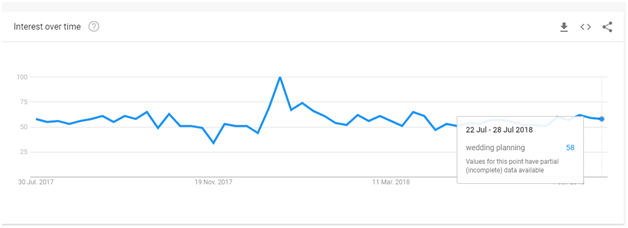
As you can see above, search interest for “wedding planning” spikes between December and January — which tells you that is the best time to publish or promote content on this topic.
Using the “Trending Now” Tab for Real-Time Topic Ideas
The Trending Now section shows topics that have seen a rapid surge in search interest in the past few hours or days. You can filter by 4 hours, 24 hours, 48 hours, or 7 days — and by category (Sports, Entertainment, Business, Technology, and more).
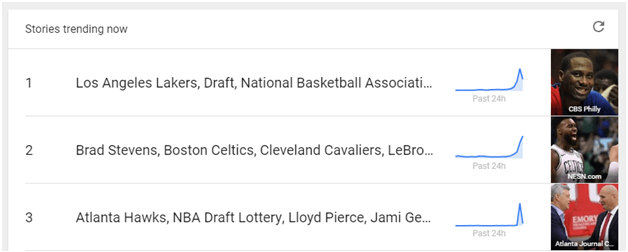
This feature is particularly powerful for reactive content strategy — also known as news-jacking. When you spot a trending topic relevant to your niche, you can publish a blog post, social media thread, or short video quickly to ride the wave of existing search demand. Many viral pieces of content start exactly this way.
Click any trending topic for deeper details, including the Interest Over Time chart and estimated search volume for that trend.
Step-by-Step: How to Find Hot Trending Topics Using Google Trends
Here is the exact workflow we use at Media Search Group to find content ideas that rank and drive traffic for our clients. Follow these seven steps consistently and you will never run out of high-potential topic ideas.
Step 1: Start With a Seed Topic or Niche Keyword
Go to trends.google.com and type a broad keyword related to your niche into the search bar. Do not over-think this — start wide. For example, if you run a fitness blog, begin with “home workout” or “weight loss.” You will narrow down as you go.
Step 2: Set Your Time Range and Region
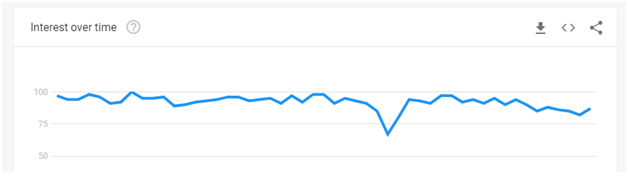
This is one of the most important — and most overlooked — steps. Always set your time range to at least 5 years when you are trying to identify a real trend versus a short-term spike. A single spike could be a one-off news event. Recurring spikes across multiple years confirm a genuine seasonal or long-term trend.
Set your location to match your target audience. If you are writing for a US audience, switch from “Worldwide” to “United States.” If you target a specific city or state, you can narrow down even further.
Step 3: Distinguish Between Seasonal Trends and Real Trends
Not every spike in Google Trends represents a lasting opportunity. Some topics surge predictably at specific times of the year — these are seasonal trends. Others show consistent, growing interest over time — these are real trends worth building a content strategy around. Understanding the difference is essential.
For example, searches for “gift items” spike every year around Valentine’s Day and Christmas in the US. Searches for “ethnic wear” spike around Diwali in India. These are predictable seasonal patterns you can plan your content calendar around.
Let us look at a more nuanced example. Suppose you run a sports gear blog focused on running shoes. You might assume interest is steady all year. But Google Trends reveals something more useful:
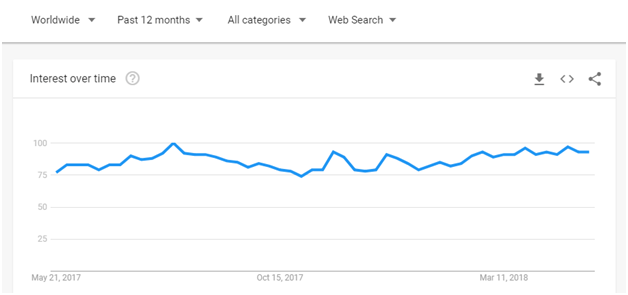
Even though interest in running shoes appears fairly steady throughout the year, a closer look reveals two annual spikes — near April and August. This means publishing your running shoes content just before these months gives you a significant advantage in search traffic.
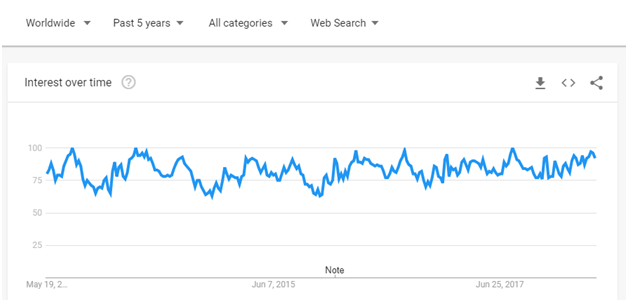
But do not rely on a single year of data. Expand the range to five years to verify the pattern is real and repeating:
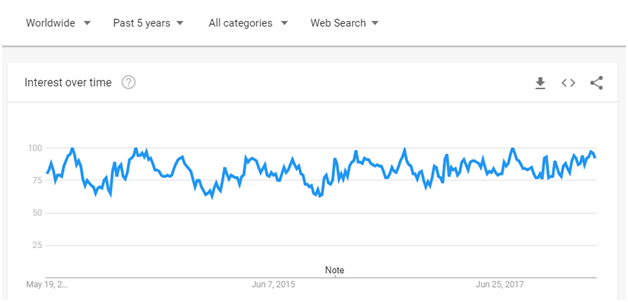
The five-year view confirms the pattern: interest in running shoes consistently peaks at the end of July and into August, every single year. This is a verified seasonal trend you can confidently plan around.
Key rules to remember:
- A single spike does not confirm a trend.
- Multiple spikes at the same time each year across 4 to 5 years confirms a real, plannable seasonal trend.
- A continuously rising line across years signals a growing trend to prioritise immediately.
- A continuously declining line signals a fading topic to avoid or pivot away from.
Step 4: Explore Related Queries and Related Topics
Scroll down below the Interest Over Time graph and you will find two sections that most people ignore: Related Topics and Related Queries. These are among the most valuable features in Google Trends for content ideation.
Related Topics shows broader subject areas that people also search for alongside your keyword. Related Queries shows the specific search phrases being used. Both sections can be sorted by “Top” (highest overall interest) or “Rising” (fastest-growing right now).
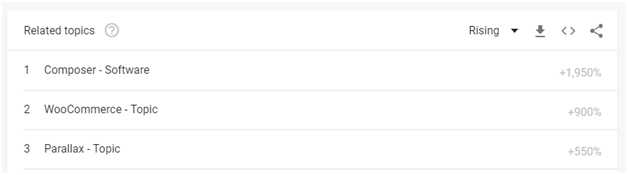
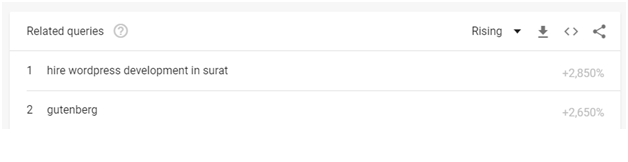
“Rising” queries are especially powerful because they represent emerging interest — topics gaining momentum before the competition catches on. If a related query is labelled “Breakout,” it means interest has grown by more than 5,000% in the selected period. That is a signal to act fast.
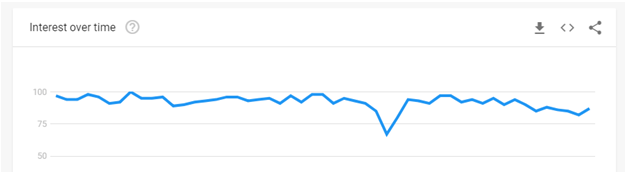
In the example above, we searched for “WordPress.” The overall interest graph looked stable and hard to analyse. But scrolling down to Related Topics revealed fast-rising related searches that were far more specific — and far easier to write targeted, high-ranking content around.
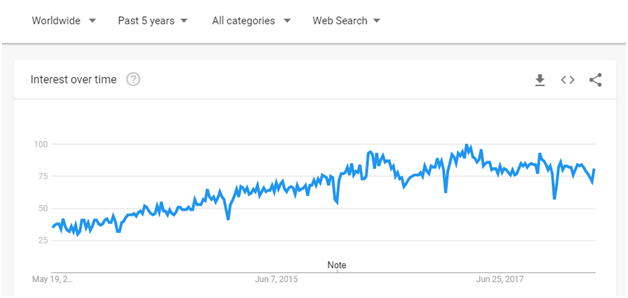
Clicking into a related topic reveals its own Interest Over Time graph, helping you decide whether it represents a real opportunity or a short-lived spike.
Drilling further into the related queries of that related topic gives you highly specific, long-tail keyword ideas — exactly the kind of focused content that ranks well in competitive niches.
Step 5: Identify Breakout Keywords Early
As mentioned above, the “Breakout” label in Google Trends marks queries where search interest has surged by more than 5,000% compared to the previous period. These are not mainstream topics yet — which means competition is still low and you have a real opportunity to rank quickly by publishing quality content before everyone else discovers the trend.
Think of Breakout keywords as early signals. When a topic is growing that fast, it usually means something has happened — a product launch, a viral moment, a news story — that is about to become a much bigger conversation. Being one of the first authoritative pieces of content on a Breakout topic can drive significant organic traffic in a short time.
Step 6: Compare Multiple Keywords to Find the Strongest Opportunity
One of Google Trends’ most underused features is the ability to compare up to five keywords in the same graph. This is incredibly useful when you are deciding between two or three content ideas and want to pick the one with the best current momentum.
To compare, click the + Compare button next to the search bar and add your additional keywords. Google Trends will display all of them on the same Interest Over Time chart using different colours, making it easy to see which keyword is rising, which is stable, and which is declining. Always pick the rising or stable keyword over the declining one, even if the declining keyword has a higher overall historical volume.
Step 7: Validate With a Keyword Research Tool
Google Trends shows you relative interest — not absolute search volume. A keyword trending at 100 might represent 50,000 monthly searches or 500. That is why it is essential to validate what you find in Google Trends using a dedicated keyword research tool such as Google Keyword Planner, Semrush, or Ahrefs.
Once you spot a rising trend or Breakout keyword in Google Trends, take it into one of these tools to check the monthly search volume, keyword difficulty score, and related keyword variations. This two-step process — trend discovery in Google Trends, validation in a keyword tool — gives you both the directional confidence and the quantitative data you need to make smart content decisions.
Using Google Trends for Local SEO and Regional Content
A keyword that trends strongly in the United States may have very low interest in Australia or India — and vice versa. If you are targeting a specific geographic audience through local seo, Google Trends’ Interest by Region feature is one of the most valuable tools available to you.
In the Location filter at the top of the Explore page, you can drill down from Worldwide to Country to State or Region to City. This level of granularity is particularly powerful for local businesses, regional publishers, and any marketer running location-specific campaigns.
In the example above, the Interest by Region map shows which countries or states have the highest search interest for our keyword. The darker the colour on the map, the higher the relative search interest in that area.
To show how dramatically regional filtering can change your strategy: using the same “running shoes” keyword but filtering the location to England reveals a completely different seasonal pattern compared to the US data.
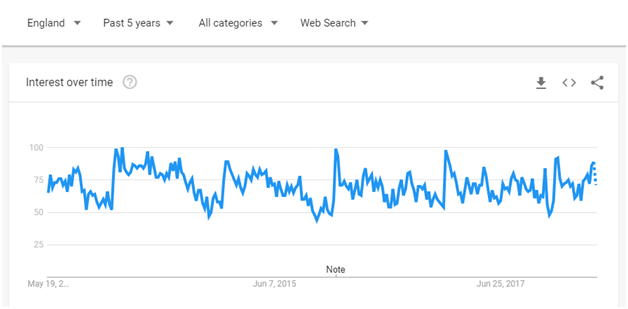
With the location set to England, interest in “running shoes” actually spikes in the last week of December — a completely opposite pattern to the US summer peaks. This reflects a cultural difference: UK consumers buying running gear as post-Christmas resolution purchases, not summer fitness purchases. Without the regional filter, you would have missed this insight entirely.
Finding Region-Specific Trending Topics
For local businesses and regional content publishers, use the Trending Now tab combined with location filtering to find what is trending specifically in your city or country right now. This is especially powerful for local news sites, regional eCommerce stores, and service businesses targeting customers in a specific area.
Using Google Trends for YouTube Content Ideas
Google Trends is not just for blog content — it is an equally powerful tool for YouTube SEO and video content planning. The process is almost identical to web search research, with one key difference: you switch the Search Type filter from “Web Search” to “YouTube Search.”
This shows you how interest in a topic specifically behaves on YouTube — which can differ significantly from web search patterns. For example, “how to” and tutorial-style queries often perform very differently on YouTube versus Google Search. By researching both, you can tailor your content format to match audience behaviour on each platform.
Once you switch to YouTube Search, scroll down to the Related Queries section and look for Rising queries. These are your best video content ideas — topics with growing demand on YouTube but not yet saturated with competition.
Advanced Google Trends Strategies for 2026
Building a Content Calendar from Seasonal Trend Data
One of the highest-value applications of Google Trends is building a data-driven content calendar. Instead of guessing when to publish, you use five years of trend data to schedule your content in advance — publishing 2 to 4 weeks before a seasonal spike, so your content has time to be indexed and ranked before the surge arrives.
Here is a simple workflow: make a list of your top 10 to 20 content topics. Enter each one into Google Trends, set the time range to 5 years, and note the month or months when interest peaks each year. Build a 12-month editorial calendar around these peaks. This approach consistently outperforms guesswork-based content planning and is one of the simplest ways to increase your content’s organic reach.
Using Google Trends for Competitor Research
Most marketers use Google Trends only for keyword research — but it is also a surprisingly effective competitive intelligence tool. Use the Compare feature to enter your brand name alongside a competitor’s brand name. The resulting graph shows you how relative search interest has shifted between the two brands over time.
More usefully, look at the Related Queries for your competitor’s brand name. These show you what topics and questions people associate with your competitor — revealing content gaps, audience interests, and keyword opportunities you can target to capture their audience.
Google Trends in the Age of AI Search (2026)
Search behaviour has evolved significantly with the rise of AI-powered search features. According to Google’s Year in Search 2025 data, “Tell me about…” queries surged 70% year-over-year, and “How do I…” searches hit an all-time high — growing 25% compared to the previous year. People are asking more conversational, intent-driven questions than ever before, and Google Trends captures this shift in real time.
This makes Google Trends even more valuable in 2026: it shows you not just what people search for, but increasingly how they search. Use the Related Queries section to identify the natural-language question formats your audience uses, then structure your content to answer those questions directly. This is one of the strongest signals for appearing in both traditional search results and AI-generated answers.
The Google Trends API (2025 Update)
In July 2025, Google launched the Google Trends API, which allows developers and advanced marketers to access trend data programmatically and integrate it directly into their marketing tools, dashboards, and automated workflows. While currently in limited availability, this represents a significant step forward for teams that want to scale their trend monitoring without manual research. If you work with large content operations or data-driven marketing teams, it is worth keeping a close eye on this development.
Best Tools to Use Alongside Google Trends
Google Trends works best as part of a wider research toolkit. Here are the tools that pair most effectively with it:
- Google Keyword Planner: A free tool that adds absolute search volume data to the relative interest signals from Google Trends. Use both together for the most complete picture of a keyword’s opportunity.
- Semrush / Ahrefs: Provides keyword difficulty scores, competitive analysis, and SERP feature insights to validate whether a trending topic is genuinely worth targeting.
- Exploding Topics: Identifies emerging trends before they appear in mainstream keyword tools — a great complement to Google Trends for early-mover content opportunities.
- Google News: A near real-time radar for news stories gaining traction. Cross-referencing Google News with Google Trends helps you anticipate search spikes before they peak, giving you time to publish first.
- BuzzSumo: Identifies which content formats and headlines are driving the most engagement around a trending topic — helping you shape your content for maximum shares and backlinks.
Common Google Trends Mistakes to Avoid
Even experienced marketers make these errors. Knowing them in advance will save you significant time and effort:
- Relying on a single spike: One spike could be a news event, a viral moment, or a data anomaly. Always check at least 4 to 5 years of data before concluding that a trend is real and actionable.
- Mistaking relative interest for absolute volume: A score of 100 in Google Trends does not tell you the actual number of searches. Always validate with a keyword volume tool before investing significant time in a topic.
- Low-sample data traps: Very niche or obscure keywords sometimes show dramatic spikes simply because the baseline search volume is so low that any increase looks enormous on the graph. If a term has consistently near-zero interest, a spike may not represent a real opportunity.
- Only checking Worldwide data: Always filter by your target region. A global trend may have zero traction in your specific market — or the seasonal pattern may be completely different.
- Building your entire strategy on trending topics: Trending content drives short-term traffic but fades quickly. The best content strategies balance trending topics with evergreen content that generates consistent traffic over months and years.
- Ignoring the Related Queries section: Most people look at the main Interest Over Time chart and stop there. The Related Queries and Related Topics sections are where the real long-tail keyword and niche content ideas are found.
Frequently Asked Questions About Google Trends
Is Google Trends free to use?
Yes, Google Trends is completely free. You do not need to create an account or sign up to use most features. Simply visit trends.google.com and start exploring immediately. Signing in with a Google account gives you access to a few additional features, including the Daily Trending Newsletter.
How accurate is Google Trends data?
Google Trends data is highly reliable for identifying directional patterns, seasonal trends, and comparative interest between keywords. It is based on a random, anonymised sample of billions of real Google searches. However, because it shows relative interest on a 0 to 100 scale rather than absolute search volumes, it should always be used alongside a keyword volume tool for complete insight into a keyword’s opportunity.
What does “Breakout” mean in Google Trends?
When a related query or topic is labelled “Breakout” in Google Trends, it means search interest for that term has grown by more than 5,000% compared to the previous period. This is a signal that the topic is emerging very rapidly and may represent a low-competition, high-opportunity content target — especially if you act before the competition notices.
Can I use Google Trends for YouTube keyword research?
Yes. In the Search Type filter on the Explore page, switch from “Web Search” to “YouTube Search.” This shows you how interest in a topic behaves specifically on YouTube, allowing you to identify rising video content ideas tailored to the YouTube audience and distinct from standard web search patterns.
How is Google Trends different from Google Keyword Planner?
Google Keyword Planner provides absolute monthly search volume estimates — how many searches a keyword receives per month. Google Trends provides relative interest over time — whether interest in a keyword is rising, stable, or declining, and how it compares to other keywords. They serve complementary purposes: use Google Trends for trend direction and timing, and Google Keyword Planner for volume and competition data.
How far back does Google Trends data go?
Google Trends has data going back to January 2004 for web search. This gives you over 20 years of search behaviour history — more than enough to identify reliable seasonal patterns and long-term trends for almost any topic or niche.
How many keywords can I compare in Google Trends?
You can compare up to five keywords or topics simultaneously in the Google Trends Explore tab using the “+ Compare” button. Each keyword is displayed in a different colour on the same Interest Over Time graph, making it straightforward to identify which term has the best current momentum and is worth prioritising in your content strategy.
Final Thoughts: Making Google Trends Part of Your Content Strategy
Google Trends is one of the most powerful — and most underused — free tools available to content creators, bloggers, and digital marketers. When used strategically, it removes the guesswork from content planning and replaces it with data-driven decisions rooted in real search behaviour.
To summarise the key takeaways from this guide: always verify trends over at least five years of data before committing to a topic. Use the Related Queries and Related Topics sections to uncover long-tail opportunities your competitors may have missed. Filter by region to find location-specific insights that change your seasonal strategy. Combine Google Trends with a keyword volume tool for complete research. And balance trending content with evergreen topics to build sustainable, long-term organic traffic growth.
Start small — pick your top five content topics, run them through Google Trends today, and see what the data reveals. You may be surprised how much useful information has been hiding in plain sight.
Need help building a data-driven content strategy for your business? Our content marketing team at Media Search Group specialises in turning trend insights into traffic-driving content that ranks. Get in touch with us today to find out how we can help grow your online visibility.