Recently updated: September 16th, 2026
The top-searched keywords on Google right now are dominated by AI tools, YouTube, Amazon, and a handful of navigational brand names, and none of them are worth targeting for your SEO strategy. That sounds like a contradiction, but it is the single most important thing to understand before you start keyword research. This guide shows you what people actually search for most on Google in 2026, then walks through every method, free and paid, for finding the keywords that will actually grow your traffic.
Google still holds roughly 92% of global search engine market share, so it remains the only platform that matters at scale for most keyword research. Whether you are starting your first content plan or auditing a site that has stalled, the methods below apply at every stage.
We cover the actual data first: what the most searched terms on Google are today, and why they rarely help your business. Then we move into the free tools, the AI-assisted methods, the paid platforms, and the clustering and intent techniques that turn raw keyword data into a content plan that ranks. If you already know the basics, skip ahead to the advanced section, since several of these methods have changed meaningfully in the past year.
Try it yourself, free
Two of our own tools cover exactly this workflow: generate the candidate list, then filter it down to what you can actually win.
See all 10 free SEO tools →
What Are the Top Searched Keywords on Google Right Now?
The most searched terms on Google change from month to month, but a few patterns hold steady. AI tools, video platforms, shopping sites, and utility queries like weather and maps consistently take the top spots, alongside whatever sport or event is in season.
As of July 2026, Ahrefs reports that “chatgpt” is the single most searched term on Google in the United States, followed by “youtube,” “amazon,” “gmail,” “wordle,” and “facebook.” Similarweb’s global data tells a slightly different story: across worldwide search volume, “ipl” (the Indian Premier League cricket tournament) leads with roughly 620 million monthly searches, well ahead of any other query, while “nba” tops the trending list during playoff season. Both data sets are correct. They simply measure different things: US-only search behavior versus worldwide volume, where cricket’s audience size changes the entire ranking.
| List |
Top Term |
Source |
What It Reflects |
| US Search Volume |
chatgpt |
Ahrefs (July 2026) |
AI tool discovery now outranks even YouTube in raw US demand |
| Global Search Volume |
ipl |
Similarweb (May 2026) |
Live sport events dominate worldwide volume, especially cricket and basketball |
| Trending / Seasonal |
nba |
Similarweb (May 2026) |
Playoff and tournament timing drives short-term spikes |
| Utility Queries |
weather, maps, translate |
Glimpse (2026) |
Everyday, recurring practical needs that never disappear from the charts |
Glimpse’s 2026 keyword data adds another useful signal for anyone planning content: AI tools have moved firmly into mainstream search behavior. ChatGPT and Gemini both sit in the top 20 searched terms, with Claude appearing in the top 50, while everyday utility searches like weather, translate, maps, and calculator continue to rank highly alongside them. Most of the remaining top 100 terms fall into shopping and retail, which explains why brand and product names dominate so much of the list.
Here is the part that matters for your SEO strategy: none of this is a target list. “Chatgpt,” “ipl,” and “youtube” are navigational and entertainment queries with search demand that only the destination brand itself can capture. A local dentist, a SaaS company, or an ecommerce store gets zero practical value from knowing that “wordle” is a top 10 search term. What these lists are genuinely useful for is understanding search behavior patterns, seeing how AI tools are reshaping query volume, and confirming that the keywords worth chasing live much further down the demand curve, in your specific niche.
Why “Most Searched” Is the Wrong Question for Your SEO Strategy
For SEO, the useful question is not “what are the most searched keywords on Google globally” but “what does my specific audience search, and which of those terms can I realistically rank for.” The keyword types below map directly to different strategies, and mixing them up is the most common reason content plans fail to produce traffic.
| Keyword Type |
Example |
Typical Volume |
Competition |
Best Strategy |
| Head Term |
keyword research |
Very high (100k+/mo) |
Very high |
Long-term authority building only |
| Mid-Tail |
keyword research tools 2026 |
High (10k-100k/mo) |
High |
Requires a strong backlink profile |
| Long-Tail |
free keyword research tools for small businesses |
Low to medium (100-1k/mo) |
Low |
Primary focus for most sites |
| Question-Based |
how to find keywords on Google for free |
Medium (1k-10k/mo) |
Medium |
Featured snippets and PAA boxes |
| Trending / Seasonal |
top Google searches today |
High (seasonal spikes) |
Low to medium |
Timely content published before the peak |
| Local Intent |
keyword research agency in Dubai |
Low (under 500/mo) |
Low |
Highest conversion rate of any type; see our local SEO services |
Why Keyword Research Still Matters
Keyword research is the process of finding the exact words and phrases your audience types into Google. Done properly, it tells you what people actually want rather than what you assume they want, and those two things diverge more often than most businesses expect. A supplement brand optimizing for “vitamin C benefits” when its audience mostly searches “vitamin C dosage for adults” has gotten the research wrong, and its content will struggle to convert regardless of how well it is written.
It shows you the language your audience actually uses
Real keyword data reveals the specific vocabulary your target audience uses, which is often different from how people inside your industry talk about the same topic. A plumber’s customers search “how to fix a leaking pipe,” not “plumbing remediation services.” Matching your content’s language to the words your audience actually types improves engagement signals like time on page and return visits, which in turn helps rankings climb.
It uncovers content gaps your competitors have already closed
Every keyword a competitor ranks for that you do not is a specific, measurable traffic opportunity. The Keyword Gap tools in Semrush and Ahrefs show exactly which queries send traffic to competitor sites while producing zero impressions for yours. Our team at Media Search Group has applied this approach across more than 2,000 client campaigns since 2009, and closing gap keywords consistently produces faster traffic growth than optimizing pages that already exist. For a deeper walkthrough of this process, see our SEO competitive analysis guide.
It identifies your fastest ranking wins
Pages sitting in positions 8 to 20 on Google are your highest-return optimization targets. Google already considers them relevant, so a focused improvement to content depth, internal links, and the title tag can push them onto page one without starting from scratch. Google Search Console surfaces these opportunities for free. Based on our analysis of GSC data across client accounts, moving a page from position 15 to position 5 for a keyword with 2,000 monthly searches typically adds 60 to 120 extra clicks a month from that keyword alone.
It tells you where content budget actually pays off
Not every keyword deserves a page. A single keyword with 50 monthly searches and high competition will produce less traffic than one well-optimized page targeting a cluster of 20 long-tail terms averaging 100 searches each. Keyword data tells you where to concentrate effort before you spend time and budget on production, which matters even more once you connect it to on-page SEO, where intent should drive every structural decision on the page.
Free Ways to Find the Keywords That Matter for Your Site
Google Search Console: your most valuable free tool
Google Search Console is the best free keyword research tool available, and most sites use only a fraction of what it offers. Unlike everything else in this guide, it shows the exact queries people used to reach your site, straight from Google’s own systems, with no estimation or sampling. If your site is live and verified, this is where keyword research should always start.
The full workflow for pulling keyword opportunities out of Search Console:
- Open Performance, then Search Results. Turn on the Average Position metric using the toggle at the top of the screen.
- Sort by Impressions, highest first. This surfaces queries where Google is already showing your pages to searchers, even if users are not clicking yet. You have implicit permission to rank for these terms.
- Filter for positions 8 to 30. Add a Position filter to isolate queries where your average position sits in this range. These pages need a push, not a rebuild.
- Flag low-CTR pages. Any query with more than 300 impressions and a click-through rate under 3% signals a title tag or meta description problem. The keyword is reaching the right audience; your listing is failing to earn the click.
- Filter by individual page URL. Select one page at a time to see exactly which queries drive its impressions. This often reveals what the page is actually about in Google’s view, which can differ from the keyword you originally targeted.
- Compare date ranges. Set the range to compare this month against the same month last year. Any keyword with a 30%+ drop in impressions is worth investigating, since it points to either a ranking drop or a genuine shift in demand.
The single highest-value query to run today: filter for positions 11 to 20 with more than 500 impressions. For each page that surfaces, check whether the title tag contains the exact query phrasing and confirm the content directly answers the intent behind it. In most cases, fixing the title and adding one paragraph that addresses the query’s specific intent is enough to push the page into the top 10 within 4 to 8 weeks.
Google Autocomplete: real queries as they happen
Google Autocomplete predictions are built from real searches people have actually typed, so each suggestion represents a keyword cluster with genuine demand behind it. The alphabet trick is the fastest way to extract value from it: type your seed keyword followed by each letter of the alphabet in turn (“keyword research a,” “keyword research b,” and so on) to surface dozens of real query variants in minutes.
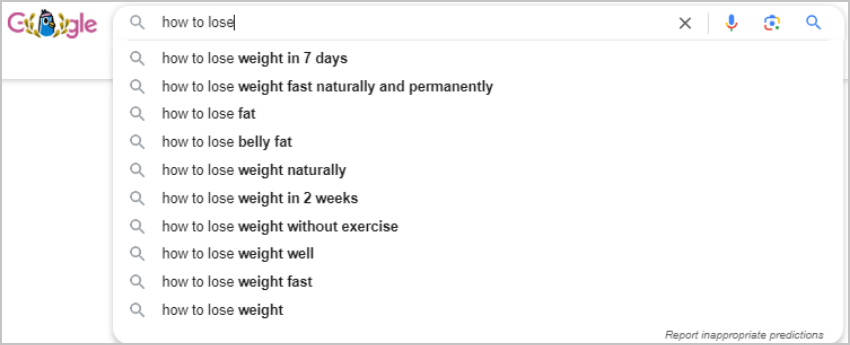
Three extra Autocomplete tricks most people miss. Use an underscore as a wildcard, typing something like “how to ___ keywords on Google,” and Google fills the blank with real search patterns. Search from a private browsing window to strip out personalization from your suggestions. And change your Google country setting in search settings to see autocomplete results from other markets if you target international audiences.
Google Trends: is demand growing or fading?
Google Trends shows relative search interest for any term over time, broken down by geography, category, and related queries. It does not show absolute volume, but it is the best free tool for telling whether a keyword is growing, fading, or purely seasonal, which raw volume numbers alone will not tell you.
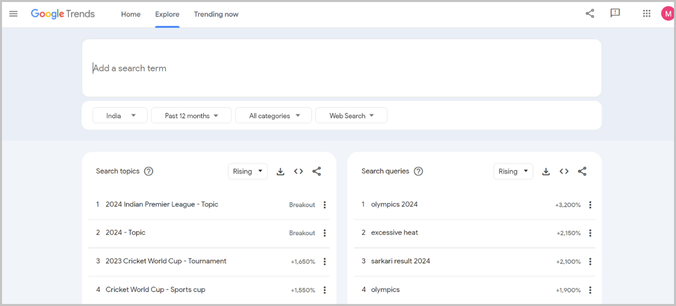
Four practical ways to use it:
- Check the five-year view for direction. A keyword with steady upward interest over five years is worth investing in. One that has been declining since 2022 is not, whatever its current volume figure says.
- Compare up to five keywords at once. Use this to settle phrasing decisions, such as “digital marketing agency” versus “online marketing agency,” to see which term your target market actually prefers.
- Filter by country or region. Interest in the same topic can vary enormously between the US, India, and the UAE, even for identical English-language queries.
- Watch the Rising Queries section. This surfaces emerging terms before they appear in keyword planner databases. Publishing on a rising query before it peaks is how new pages build authority ahead of the competition.
Google Keyword Planner: volume ranges without a paid tool
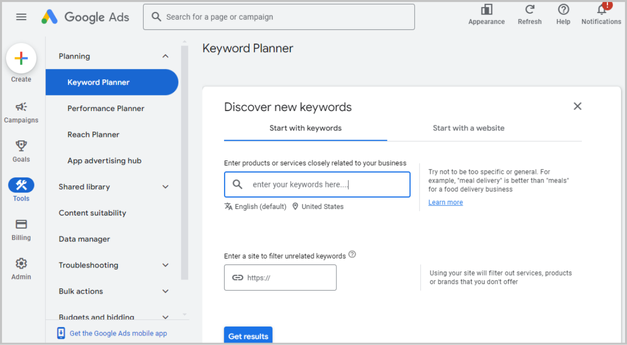
Google Keyword Planner, accessed free through a Google Ads account, provides monthly search volume ranges (shown as brackets like 1,000-10,000 unless you are running active ad spend), competition levels, and bid estimates. For SEO purposes, the ranges are precise enough for prioritization even though they are less exact than paid tools.
Its most useful feature for SEO is “Discover new keywords” using your own website URL as the input. Google analyzes your existing content and suggests keyword ideas based on what it understands your pages to already be about, often surfacing opportunities in areas your site covers only tangentially.
People Also Ask and Related Searches
The People Also Ask (PAA) boxes and Related Searches at the bottom of results pages contain real questions people search alongside your main query. They are valuable for two reasons: they reveal the supporting questions your content needs to address, and structured FAQ content built around them is a reliable path to featured snippets.
To mine PAA for keyword ideas, search your main term, note every PAA question, then click one to expand it. Expanding a question triggers new related questions, which you can click again to surface further ones. Running through three or four levels of expansion on a single query typically surfaces 20 to 30 genuine question-based keywords in under 10 minutes, with no tools required.
How to Use AI Tools for Keyword Research in 2026
AI tools have added a genuinely useful layer to keyword research since 2024, though they work best for ideation rather than data validation. ChatGPT, Perplexity, and Gemini can speed up brainstorming significantly, but none of them provide real search volume, so every AI-generated idea still needs checking in Search Console, Trends, or a paid tool before you build content around it.
ChatGPT for keyword ideation
ChatGPT is particularly strong at generating long-tail variations and surfacing the specific vocabulary your audience uses. A prompt structure that works well: “Act as an SEO specialist. List 30 specific search queries someone would type into Google when trying to [specific user goal] for [specific context or industry]. Include a mix of question-based, comparison, and how-to queries, focused on phrasing real people would use rather than industry jargon.”
This kind of prompt often surfaces angles that seed-keyword databases miss, while a database expert can uncover valuable search opportunities. Take the resulting list into Google Search Console and Keyword Planner to confirm real demand before prioritizing anything.
Perplexity for competitive research
Perplexity’s strength is summarizing what competitors and authoritative sources say about a topic, with citations attached. Searching a keyword and reviewing which sites get cited shows you which domains an AI system already treats as authoritative for that subject, and that increasingly correlates with what shows up in Google’s AI Overviews for the same query. If your site never appears among Perplexity’s sources for your core topics, that is a signal your content lacks the structure and attributed data these systems tend to pull from. Our guide to the latest AI search updates from Google covers how this shift is affecting visibility more broadly.
AI for keyword clustering
Clustering, grouping related queries by intent so they can be targeted with a single page, has traditionally been slow, manual work. ChatGPT and Claude now speed this up considerably. Paste 50 to 100 keyword variants into a prompt asking the AI to group them by intent and flag which should share a page versus live on separate ones. The groupings will not always be perfect, but they give you a working framework in minutes, which you then verify against actual SERP results for each cluster’s core term.
What AI tools still cannot do
AI tools cannot provide real search volume, cannot show what competitors actually rank for, and cannot track your rankings over time. For professional SEO campaigns, they work as a useful supplement to traditional research, not a replacement for it. Using AI for ideation and Google’s own tools for validation produces better keyword strategy than either approach alone.
Paid Keyword Research Tools
Paid tools add absolute search volume estimates, keyword difficulty scores, competitor ranking data, and rank tracking, none of which free tools provide. For any site beyond a personal blog, the time saved and the depth of data usually justify the cost. For a broader rundown of platforms beyond keyword research alone, see our list of SEO analysis tools.
Semrush
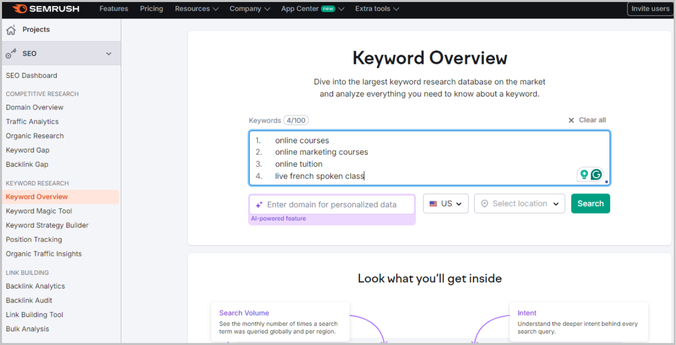
Semrush is used by more than 10 million marketing professionals according to the company’s own figures, making it the most widely adopted paid SEO platform. Its Keyword Magic Tool generates keyword ideas from a seed term along with volume, difficulty, cost-per-click, and intent classification. Organic Research shows which keywords any competitor domain ranks for, sorted by traffic contribution, which is the fastest way to see which terms are actually driving results for the sites outranking you.
Pricing: Pro at $139.95/month (500 tracked keywords), Guru at $249.95/month (1,500 keywords), Business at $449.95/month (5,000 keywords). A limited free tier allows 10 keyword searches a day.
Ahrefs
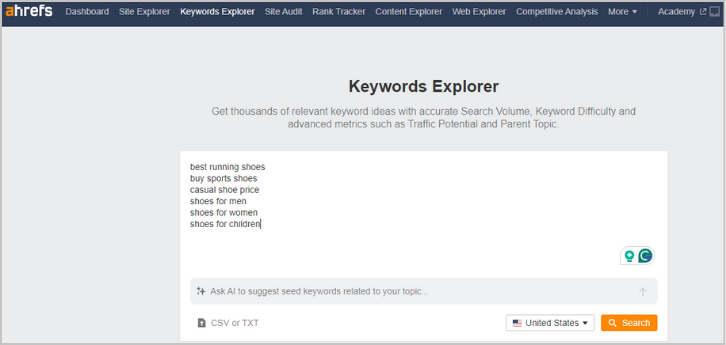
Ahrefs holds one of the largest crawled backlink databases in the industry alongside a keyword database covering tens of billions of terms across 190 countries. Keywords Explorer includes click data alongside volume, distinguishing between keywords where searchers actually click a result and zero-click queries that Google answers directly in the SERP. That click data is unique to Ahrefs and useful for judging whether a keyword’s volume will produce any real traffic even if you rank for it.
Pricing: Lite at $129/month, Standard at $249/month, Advanced at $449/month. Ahrefs Webmaster Tools offers limited free access for verified site owners.
SE Ranking
SE Ranking covers keyword research, rank tracking, site auditing, and backlink analysis at a lower price point than Semrush or Ahrefs. For agencies and small businesses tracking under 500 keywords, it handles the core keyword workflow at roughly half the cost of the larger platforms. Its database is smaller but sufficient for most non-enterprise needs, and it holds a 4.8 out of 5 rating on G2 from over 1,200 verified reviews.
Pricing: Essential at $65/month, Pro at $119/month, Business at $239/month.
Tool comparison at a glance
| Tool |
Best For |
Free Tier |
Starting Price |
Keyword Database Size |
| Google Search Console |
Existing site keyword data |
Fully free |
Free |
Your site only (Google-direct) |
| Google Keyword Planner |
Volume ranges and ad data |
Free with Ads account |
Free |
Google’s full index |
| Semrush |
Competitor research, agencies |
10 searches/day |
$139.95/mo |
25+ billion keywords |
| Ahrefs |
Backlink and keyword data combined |
Webmaster Tools (own site) |
$129/mo |
110+ billion keywords |
| SE Ranking |
Agencies and SMBs on a budget |
14-day trial |
$65/mo |
Large, sufficient for most uses |
Advanced Keyword Research Techniques
Match search intent before you pick a keyword
Search intent, the underlying purpose behind a query, is the single most important factor most guides underemphasize. Google’s algorithm is sophisticated enough to match content format and depth to the intent it detects behind a query. Publishing the wrong format for a keyword’s intent is the most common reason well-optimized pages still fail to rank. For a deeper framework on structuring content around this, see our guide to next-generation keyword research strategy.
The four intent types and what each requires from your content:
- Informational (the user wants to learn): queries like “how to find keywords on Google” or “what is keyword research.” Content should be a guide or tutorial. Targeting an informational query with a services page will not rank, no matter how well written, because Google has already determined that a guide serves the intent better.
- Navigational (the user wants a specific site): queries like “Google Keyword Planner login” or “Ahrefs Keywords Explorer.” These carry no SEO value unless you are the destination being searched for.
- Commercial (the user is researching before deciding): queries like “best keyword research tools 2026” or “Semrush vs Ahrefs.” Comparison content, feature breakdowns, and review-format pages serve this intent well.
- Transactional (the user is ready to act): queries like “buy Semrush Pro plan” or “keyword research service pricing.” These need pricing pages, clear CTAs, and trust signals rather than educational content.
Before writing any page, search the target keyword and study the format and depth of the top five results. If they are all listicles, write a listicle. If they are all step-by-step guides, write a step-by-step guide. This is not a creative constraint. It is the fastest route to ranking for content that already has a proven format in that SERP.
Long-tail keywords should be your primary focus
Long-tail keywords make up the overwhelming majority of all Google searches. Ahrefs’ analysis of its own keyword database finds that roughly 94.74% of all keywords receive fewer than 10 monthly searches. In practical terms, most search activity happens across millions of specific, low-volume queries rather than a small number of high-volume terms.
Three reasons long-tail keywords deserve priority, especially on newer or mid-authority sites. They face far less competition, since a page targeting “free keyword research tools for Shopify stores” competes against fewer established pages than one targeting “keyword research tools.” They attract more qualified traffic, since someone searching “keyword research for real estate agents in Dubai” has a specific need your content can directly address, producing far higher conversion rates than broad traffic. And they produce results faster, since a new site can realistically rank for a long-tail keyword within 2 to 4 months, while competing for a head term can take years of authority building.
The fastest way to build a long-tail strategy: enter your primary keyword into Semrush’s Keyword Magic Tool or Ahrefs’ Keywords Explorer, filter for difficulty under 30 and volume between 100 and 1,000 monthly searches, and group the results into intent clusters. Each cluster becomes a page. For businesses working with professional SEO packages, this clustering step is usually one of the first deliverables, since it maps the entire content architecture before a single page is written.
Competitor keyword analysis
Competitor analysis is the fastest way to find keywords already proven to drive traffic in your industry. Identify three to five sites that consistently outrank you for your target topics, then pull their top 100 organic keywords in Semrush or Ahrefs, sorted by estimated traffic. Focus on keywords where they rank between positions 4 and 15, since these are beatable with a well-executed page, whereas position-one terms usually require significant existing authority to displace.
The Keyword Gap or Content Gap feature in both platforms takes this further. Input your domain alongside three competitors and the tool shows keywords where all three rank but your site produces zero impressions. These are validated content opportunities: the traffic exists, competitors are capturing it, and you have not built the page yet. Closing five to ten meaningful gaps is usually worth more than optimizing 50 existing pages already stuck below position 30. If link building is part of your strategy, competitor keyword analysis also reveals which content types in your niche earn the most backlinks, useful for planning content that builds authority rather than just traffic.
Keyword clustering
Keyword clustering groups related queries by intent so they can be addressed together on one page rather than spread across separate thin pages for each variation. This prevents keyword cannibalization, where multiple pages compete against each other for the same intent, and builds the topical depth that helps a single page rank for a broader set of related searches.
A practical example: “google keyword search,” “keyword search google,” “google search keywords,” and “find keywords google” all express the same intent, finding keywords using Google’s own tools. These belong on one detailed guide, not four thin pages. The guide you are reading targets exactly this kind of cluster.
The process: pull 50 to 100 keyword variants for your topic, search the primary version of each in Google, and group keywords that return the same or very similar top 10 results. Keywords whose top 10 results differ substantially have different intents and belong on separate pages. This SERP-based method is more reliable than clustering by semantic similarity alone, since it reflects how Google actually categorizes intent rather than how keywords appear to relate linguistically.
What Categories of Searches Dominate Google
Beyond individual keywords, it helps to understand the broad categories driving search volume, since this shapes which niches face the steepest competition and which SERP features you are likely to encounter.
- Entertainment and media: streaming series, celebrity news, sports results, and music generate the highest query volumes of any category. For most business sites, these are irrelevant for keyword targeting.
- Technology: new device releases, software troubleshooting, and app help see massive spikes around product launches. Tech companies and review sites benefit most from tracking these in Google Trends.
- Health and wellness: symptom queries, diet advice, mental health topics, and fitness routines sit under Google’s YMYL (Your Money, Your Life) standards and demand strong E-E-A-T signals to rank at all.
- Finance: stock information, cryptocurrency prices, how-to-invest queries, and banking help generate steady high-volume traffic, and financial content needs attributed expert authorship to rank effectively.
- How-to guides: across every industry, how-to queries are the most actionable opportunity, since they carry clear informational intent and are frequently served by featured snippets and AI Overviews.
For digital marketing purposes, the most valuable category in any niche combines moderate volume (1,000 to 10,000 monthly searches), informational or commercial intent, and a difficulty score your domain authority can realistically compete for. Globally trending keywords are interesting to watch but rarely relevant to most websites’ actual strategy.
How to Track Keywords Once You Have Found Them
Finding keywords is the first step. Tracking whether your content actually ranks for them, and how that changes over time, is what turns keyword research into a measurable program rather than a one-time exercise.
Google Search Console for rank tracking
Search Console tracks your average position for every query producing an impression, updated roughly every 2 to 3 days. It is the most accurate free rank tracker available, since the data comes directly from Google. Its limitation is that it shows averages rather than daily snapshots, which can smooth out ranking volatility that happened between checks.
For basic tracking, filter the Performance report by a specific page URL and sort by average position for a functional weekly review at no cost. Compare the previous 28 days to the same period last month to see which keywords are improving, declining, or holding steady. Any keyword moving from position 20 to position 10 is approaching the point where traffic starts to appear meaningfully.
Paid rank tracking tools
For active campaigns where daily rank changes matter, after publishing content, following a link-building push, or in the aftermath of a Google algorithm update, paid rank trackers offer the granularity Search Console’s averages cannot. Semrush, Ahrefs, SE Ranking, and AccuRanker all provide daily automated checks with historical trend lines, competitor position monitoring, and SERP feature tracking. See our complete guide to keyword rank tracker tools for a full comparison of features and pricing.
Connecting keywords to business outcomes
Rankings in isolation are a vanity metric. What matters is whether improving a keyword’s position produces measurable traffic and conversions. Linking Google Search Console to Google Analytics 4 shows which keyword-driven sessions produce form completions, purchases, or other conversion events. That chain, from keyword to ranking to traffic to conversion, is what justifies SEO investment to any stakeholder who reasonably asks why rankings should matter to revenue.
How to Apply Keywords to Improve Search Rankings
A keyword list only becomes useful once it is applied to specific pages. The on-page elements that carry the most weight for keyword relevance in 2026:
- Title tag: include your primary keyword within the first 60 characters, and have it answer the query directly rather than sound clever or vague. “How to Find Keywords on Google: Free and Paid Methods for 2026” will outperform “Your Complete Keyword Discovery Guide” because it matches the query phrasing exactly.
- First 100 words: use the primary keyword naturally in the opening paragraph. Google weighs keywords that appear early in the content, particularly in the first sentence or two, more heavily.
- H2 and H3 subheadings: include keyword variants and related terms in your subheadings. Each heading should stand alone as an answer to a specific sub-question, which feeds both featured snippets and AI Overview extraction.
- Meta description: 150 to 160 characters including the primary keyword and a concrete reason to click. Questions tend to outperform statements, so “Wondering which free keyword tools actually work? Here is exactly what Google’s own tools show you, step by step” beats “A guide to finding keywords on Google.”
- Internal links: add contextual links from related pages with keyword-rich anchor text. A post about keyword research should link to relevant service pages using descriptive anchors rather than generic phrases like “learn more here.”
- Content freshness: update pages with new tools, current pricing, and recent statistics at least every six months. Google’s quality systems assess whether content still looks current, and outdated pricing or deprecated tool references are visible signals that a page has been left unmaintained.
The single most impactful fix for pages stuck between positions 8 and 20 is almost always aligning the title tag and opening paragraph with the exact query phrasing driving impressions. Before touching anything else, confirm your title tag contains the exact phrasing your Search Console data shows is generating impressions, and that your opening paragraph addresses that intent within the first two sentences.
Frequently Asked Questions About Finding Keywords on Google
What is the most searched thing on Google in 2026?
+
It depends on whether you look at US or worldwide data. Ahrefs reports “chatgpt” as the top search term in the United States as of July 2026, followed by YouTube, Amazon, Gmail, Wordle, and Facebook. Similarweb’s global data shows “ipl” (the Indian Premier League) leading worldwide with around 620 million monthly searches, since cricket’s global audience size outweighs any single country’s search behavior. Neither list is a realistic keyword target for a typical business, since these are navigational and entertainment queries that only the destination brand can capture.
How do I find the most searched keywords for free?
+
The best free tools are Google Search Console, which shows the exact queries already driving impressions to your site, Google Autocomplete for real-time search suggestions, Google Trends for interest over time and seasonal patterns, and Google Keyword Planner for volume estimates through a free Google Ads account. Combining these four gives a full picture of keyword demand with no subscription cost. People Also Ask boxes and Related Searches add question-based keyword ideas on top.
How do I use Google Search Console to find keywords?
+
Go to Performance, then Search Results, and enable Average Position with the metric toggle at the top. Sort the Queries table by Impressions to find terms where Google already shows your pages but users are not clicking. Any query with over 300 impressions and a click-through rate below 3% is a keyword where your title tag or content needs work. Filtering by a specific URL shows exactly which queries drive impressions to that individual page.
What is keyword difficulty and why does it matter?
+
Keyword difficulty is a score from 0 to 100 estimating how hard it is to rank in the top 10 for a given term. Tools like Semrush and Ahrefs calculate it from the backlink authority and content quality of pages already ranking there. Keywords under 30 difficulty are generally achievable for mid-authority sites within 3 to 6 months, while keywords above 70 typically need significant domain authority and a strong backlink profile. Targeting keywords your site can realistically rank for given its current authority is far more effective than chasing high-difficulty terms and seeing no movement.
Can I use ChatGPT or AI tools for keyword research?
+
Yes, though AI tools work best for ideation rather than as a data source. ChatGPT and Perplexity are strong at generating long-tail variations and surfacing audience-specific language that traditional keyword databases often miss. They do not provide real search volume, though, so every AI-generated idea needs validation in Google Search Console, Google Trends, or a paid tool like Semrush or Ahrefs before you build content around it. The most effective approach in 2026 is using AI for rapid ideation, then validating the output with verified data.
What are long-tail keywords and why are they valuable?
+
Long-tail keywords are specific, multi-word phrases that typically carry lower search volume but higher conversion intent than broad terms. Ahrefs’ analysis of its own database finds that around 94.74% of all keywords receive fewer than 10 monthly searches, making long-tail the dominant form of search activity by volume of unique queries. They are valuable because they face less competition, attract more qualified visitors further along in their decision-making, and let newer sites build organic traffic far sooner than competing for broad head terms against established competitors would allow.
What is search intent and how does it affect keyword research?
+
Search intent is the underlying purpose behind a query: whether the user wants to learn (informational), reach a specific site (navigational), compare options (commercial), or make a purchase (transactional). Google’s algorithm matches content format to intent, so a page targeting a how-to query with a commercial services page will struggle to rank no matter how well optimized it is technically. Before targeting any keyword, search it and study what format the top five results use. That format is what Google has determined best serves the searcher’s intent.
How often should I update my keyword research?
+
Review keyword strategy every 3 to 6 months for active campaigns, or immediately after a major Google algorithm update. Search trends shift as new tools emerge, industry terminology evolves, and competitor content strategies change. Google Search Console date comparisons let you spot rising and falling keyword trends monthly without any paid tools. Any keyword where impressions drop more than 20% month over month deserves investigation before the next formal audit.
What is keyword clustering and should I use it?
+
Keyword clustering groups queries with the same intent into a single, in-depth page rather than a separate thin page for each variation. It prevents keyword cannibalization, where multiple pages on a site compete against each other for the same query, and builds the topical depth that helps pages rank across a broader set of related searches. The best way to cluster is to search each keyword in Google and group the ones returning very similar top-10 results, since matching SERP results signal that Google treats them as the same intent.
What is the best free keyword tool for beginners?
+
Google Search Console is the best free tool for any site that is already live and indexed, since it shows real Google data rather than estimates. For new sites without traffic, Google Keyword Planner gives monthly search volume ranges at no cost through a free Google Ads account. Autocomplete and People Also Ask need no account and surface real search patterns instantly. Using all three together covers the core keyword research needs of most small websites without a subscription, and adding Google Trends rounds out the free toolkit by showing which keywords are growing versus fading over time.
Finding Keywords That Actually Drive Results
Finding the top searched keywords on Google requires a combination of tools, not a single platform. Google Search Console is your most reliable starting point for any live site. Autocomplete, Trends, and Keyword Planner extend that with volume context and seasonal patterns. AI tools speed up ideation. And paid platforms like Semrush and Ahrefs provide the competitive intelligence that determines which keywords are worth your time based on what your competitors are actually ranking for.
The most important shift in keyword research for 2026 is applying intent analysis before choosing a target, not after. A keyword with 5,000 monthly searches that requires a content format your site cannot realistically produce is worth less than a cluster of 500-search long-tail queries that match your existing content structure and authority level.
If you want professional keyword research applied to your site’s specific competitive landscape, Media Search Group has conducted keyword strategy work across more than 2,000 client campaigns since 2009. Our team analyzes your existing GSC data, competitor keyword gaps, and industry search patterns to build a priority list connected directly to ranking timelines and traffic projections. Explore our SEO services or review our SEO packages to see how keyword research fits into a complete organic growth program.
For more on the tools side of this topic, our guides to keyword rank tracker tools and backlink checker tools cover the monitoring and authority-building work that sits downstream from the keyword research phase covered here.