

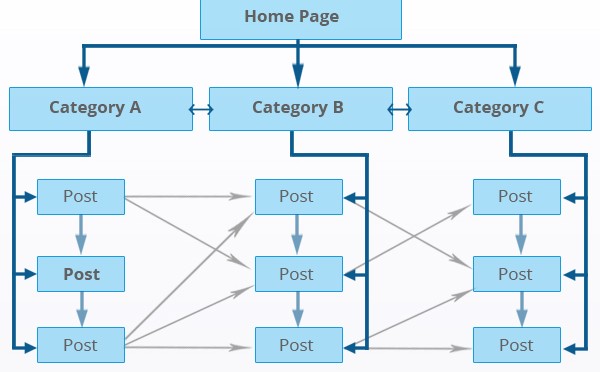
If you have been wondering why some pages on your website receive consistent organic traffic while others seem completely invisible to search engines, the answer often comes down to one thing — interlinking in SEO. Internal linking is one of the most powerful and most underutilised elements of a strong SEO strategy. It shapes how Google crawls and indexes your site, how authority is distributed across your pages, and how users navigate your content. In this complete guide, we will cover everything you need to know about interlinking in SEO — what it is, why it matters, how it directly impacts user experience, and the step-by-step best practices that can help your website rank higher in 2026.
What Is Interlinking in SEO?
Interlinking in SEO — also referred to as internal linking — is the practice of placing hyperlinks within your website’s content that connect one page on your domain to another page on the same domain. Unlike external links, which point users away from your site, internal links keep both users and search engine crawlers within your own web of content.
For example, if you have a blog post about SEO services and you link it to another post about on-page optimisation, that connection is an internal link. It tells Google: “These two pages are related, and they are both part of our site’s content ecosystem.”
A well-planned interlinking strategy does three essential things simultaneously:
- It helps search engine crawlers discover and index all pages on your site
- It distributes PageRank and link equity from authoritative pages to newer or weaker pages
- It guides users through a logical content journey, increasing engagement and reducing bounce rates
In 2026, with Google placing increasing emphasis on topical authority, semantic relevance, and content structure, internal linking has evolved from a technical nicety to a core ranking mechanism. Studies suggest that poorly structured websites with orphaned pages waste up to 40% of their internal link value — a significant loss that can suppress rankings across an entire domain.
Impact of Interlinking on SEO
Internal linking is a critical component of improving your website’s search engine optimization because it makes it easier for search engine crawlers to discover all your pages — including older and less prominent ones. When strategic interlinking exists between all pages on your website, they are indexed faster and are far more likely to rank. It also enhances the link authority of your website because it makes each section easily accessible, allowing PageRank and link equity (often called “link juice”) to flow throughout your site’s architecture.
Google’s own John Mueller has described internal links as one of the biggest levers you can pull in SEO, saying they guide Google to the pages you consider most important. When executed correctly, interlinking becomes the backbone of your entire SEO architecture.
How Internal Links Help Googlebot Crawl and Index Your Website
Search engines like Google use automated programs called crawlers — most famously, Googlebot — to discover, read, and index content across the web. Googlebot navigates your website by following links from one page to the next. This makes your internal linking structure one of the primary pathways through which your content gets discovered.
Pages that have no internal links pointing to them are called orphan pages. These pages are effectively invisible to search engines because crawlers have no clear path to reach them. Even if an orphan page is listed in your XML sitemap, the absence of internal links signals to Google that the page is not considered important enough to link to — and it will typically rank poorly or not at all.
For larger websites, this also ties into the concept of crawl budget — the finite number of pages Google will crawl on your site within a given timeframe. A strong internal linking structure ensures Googlebot’s crawl budget is focused on your most important and valuable pages, rather than being wasted on thin or duplicate content.
Best practice: Ensure every important page on your site is reachable within three clicks from your homepage. This “three-click rule” keeps your content accessible to both users and crawlers.
PageRank Flow and Link Equity — How Interlinking Distributes Authority
PageRank is Google’s foundational algorithm for measuring the authority and importance of a web page. Although Google stopped publicly publishing PageRank scores years ago, it remains a core part of how the algorithm evaluates and ranks pages. The key insight for SEO practitioners is this: internal links are the pipes through which PageRank flows across your website.
When a page on your site earns high-quality backlinks from external sources — say, your homepage or a popular blog post — that page accumulates significant authority. By strategically placing internal links from that high-authority page to newer or weaker pages, you pass a portion of that authority along, effectively boosting the ranking potential of those linked pages without acquiring a single new external backlink.
This is why the homepage, which typically carries the most external backlinks on any website, should always be used to link to your most commercially important pages. Authority flows downward through your site’s hierarchy — from homepage to category pages, from category pages to individual posts — and every internal link in that chain is a deliberate decision about where to concentrate your ranking power.
Building Topical Authority Through Topic Clusters and Pillar Pages
One of the most significant shifts in SEO strategy over the past few years is the move from optimising individual pages in isolation to building interconnected topic clusters. This is now considered the gold standard for interlinking in SEO in 2026.
A topic cluster consists of two components:
- A pillar page — a comprehensive, long-form page that covers a broad topic (for example, “SEO Services”) at a high level
- Cluster pages — individual blog posts or articles that dive deep into specific subtopics related to the pillar (for example, “On-Page SEO”, “Technical SEO”, “Link Building”)
All cluster pages link back to the pillar page, and the pillar page links out to all cluster pages. This creates a closed authority loop that tells Google: “This website comprehensively covers this entire topic.” The result is significantly improved topical authority — one of the most important ranking signals Google evaluates in 2026.
A Semrush case study from August 2025 illustrated this powerfully: a software startup that implemented a well-organised, contextually relevant internal linking strategy built around topic clusters achieved over four times the monthly organic traffic of a competitor with a similar domain authority score but unrelated cross-linking. Structure, not just authority, drives rankings.
Types of Internal Links in SEO
Not all internal links carry the same SEO weight. Understanding the different types of internal links — and their relative value — allows you to build a more intentional and effective interlinking strategy.
Contextual Links — The Most Powerful Type of Internal Link
Contextual links are hyperlinks embedded within the body text of your content. They are the most valuable type of internal link from an SEO perspective because they appear within relevant, topically related content, use descriptive anchor text, and are treated by Google as genuine editorial signals of relevance and importance.
Google places the highest weight on contextual links, especially those positioned in the top 30% of a page’s content. When you link from a section discussing “crawl budget optimisation” to a dedicated page about Technical SEO services, that link passes far more meaning and authority than a link buried in a footer or sidebar.
Do: Use descriptive, keyword-rich anchor text (1–4 words). Link from contextually related content. Place high-value links early in the article.
Don’t: Use generic anchor text like “click here” or “read more”. Overlink a single page with the same anchor text repeatedly.
Navigational Links — Structural Foundation of Your Site
Navigational links include your main menu, header navigation, footer links, and breadcrumb trails. These links form the structural backbone of your website and help both users and crawlers understand your site’s hierarchy. While they carry less contextual SEO weight than in-content links, they are essential for establishing your site architecture and ensuring all top-level pages remain crawlable.
Breadcrumb navigation deserves special attention: it improves user experience by showing visitors exactly where they are within your site, and it also generates rich breadcrumb results in Google’s search results when implemented with BreadcrumbList schema markup — adding a visual credibility signal directly on the SERP.
Image Links — How to Interlink Images for SEO
Images can serve as powerful internal links, particularly for connecting visual content to call-to-action pages, product pages, or detailed guides. When a user clicks an infographic, a banner, or a product image and is taken to a relevant internal page, that is an image link working as intended.
The critical SEO consideration for image links is the alt text attribute. Since images have no visible anchor text, Google reads the alt text as the equivalent of anchor text for that link. Always write descriptive, keyword-relevant alt text for any image that also serves as an internal link. For example, an infographic linking to your link building services page should have alt text like “internal link building strategy infographic” — not just “image1.jpg”.
Image interlinks work especially well in sidebars, at the end of articles, and within content sections where a visual break also serves a navigational purpose.
Keeping Old Pages Alive with Interlinks
One of the most underappreciated benefits of a strong interlinking strategy is its ability to keep older content alive and ranking. As your website grows and new content is published, older pages can become buried — pushed deeper into your site architecture and progressively forgotten by both users and crawlers. Without active internal links pointing to them, these pages lose crawl frequency, lose link equity, and ultimately lose their organic ranking potential.
The solution is a deliberate interlinking strategy that connects older, high-quality pages to your newest content — and vice versa. When you publish a new article, identify 3–5 existing pages on your site that are contextually related and add internal links from those pages to the new content. Simultaneously, link from the new article back to the most relevant older pages. This two-way interlinking approach keeps both old and new content in Google’s active crawl cycle.
Fetching More Traffic from Fewer Backlinks
One of the most practical advantages of smart interlinking is the ability to amplify the impact of every backlink you earn. Rather than needing a backlink to every single page on your website, you can concentrate your external link building efforts on a handful of high-authority pages — and then use internal links to distribute that authority throughout your entire site.
Consider this example: your homepage earns 50 high-quality backlinks from reputable external websites, making it the most authoritative page on your domain. By linking strategically from your homepage to your most important service pages and blog posts, you pass a portion of that accumulated PageRank to each of those pages. Those pages, now stronger, can link further to supporting content — creating a cascading flow of authority that reaches every corner of your website.
In other words, if you concentrate your external backlinking efforts on your most important pages, you should ensure that all other pages are linked to those high-authority pages through a logical and relevant interlinking structure. In this way, traffic and authority flow from one page to another, multiplying the ranking impact of every single backlink you earn.
How Internal Links Speed Up Indexing of New Pages and Backlinks
One of the most common questions in SEO is: “How do I get new pages or new backlinks indexed faster?” The answer lies in internal linking.
When you publish a new page, Googlebot may not discover it immediately — especially if it has no internal links pointing to it. However, if you immediately link to the new page from 2–3 existing, frequently crawled pages that already have strong authority, Google will follow those internal links and index the new page within hours or days rather than weeks.
The same principle applies to backlinks. When a new external backlink is built to a page, that page gets indexed faster if it already has a strong internal linking profile — because Google regularly revisits well-linked pages. After publishing new content or acquiring a new backlink, use Google Search Console’s URL Inspection Tool to submit the URL for indexing, ensuring the fastest possible discovery.
Quick-action checklist to speed up indexing:
- Publish new content
- Immediately add internal links from 2–3 existing high-authority pages on your site
- Submit the URL via Google Search Console’s URL Inspection Tool
- Confirm your XML sitemap is up to date and re-submitted if necessary
How to Improve the Chances of a Dynamic Page Being Indexed
Dynamic pages — such as filtered search results, parameterised URLs, or pages generated from user inputs — present a specific indexing challenge. Without careful management, they can either go completely unindexed or cause index bloat by generating thousands of near-duplicate URLs, wasting your crawl budget.
Here is how to improve the indexing of important dynamic pages using interlinking and technical SEO:
- Add internal links to important dynamic pages from static, high-authority pages. This signals to Google that these URLs are worth crawling.
- Use canonical tags on parameterised versions to indicate the preferred URL and consolidate link equity.
- Selectively include important dynamic URLs in your XML sitemap. Only include pages you genuinely want indexed.
- Use your robots.txt file carefully to block low-value parameter variations from being crawled at all.
How Interlinking Impacts UX (User Experience)
Coming to the critical second dimension of interlinking, we cannot ignore how internal linking strategy directly shapes user experience — and, in turn, your SEO performance. Google has made it increasingly clear that user experience metrics are significant ranking signals. Engagement data such as bounce rate, dwell time, and pages per session all directly influence how Google evaluates the quality and relevance of your content.
A user who lands on your page and finds well-placed, clearly relevant internal links is far more likely to stay and explore. They will naturally follow links to related content that answers further questions, deepens their understanding, or guides them toward a solution. This extended exploration increases time on page, reduces bounce rate, and signals to Google that your website is delivering genuine value.
Conversely, a page with no internal links is a dead end. Regardless of how high-quality the content is, users who finish reading have nowhere to go — and they leave. That exit registers as a bounce, sending a negative signal to Google about the page’s user experience.
Reducing Bounce Rate with Smart Internal Links
Bounce rate measures the percentage of users who visit a single page on your website and then leave without interacting further. A high bounce rate on a content page often indicates that users either did not find what they were looking for, or they found it but had no obvious path to explore more.
Strategically placed internal links solve both problems. When a relevant internal link appears within the first few paragraphs of an article — linking to a related page that naturally extends the reader’s understanding — it immediately reduces the chance of a bounce by creating a compelling reason to stay. Each click on an internal link registers a second pageview, which counts as an active session rather than a bounce.
As a benchmark: aim for 2–5 contextual internal links per 1,000 words of content, increasing to 5–10 links for long-form content above 2,000 words. Avoid over-linking, which can overwhelm users and dilute the value of each individual link.
Site Navigation Structure and UX — Menus, Breadcrumbs and Site Architecture
Beyond contextual links in your content, the structural navigation of your website plays an enormous role in both SEO and user experience. A well-organised navigation menu, clear category structure, and functional breadcrumbs collectively create a site architecture that users can understand intuitively and crawlers can map efficiently.
If your website features a functional drop-down menu and navigation bar with links to relevant topics on the home page, you are well-positioned to maximise the benefits of interlinking. Every user who lands on your homepage will reach your menu and navigate toward the section most relevant to their needs. Breadcrumbs take this further by showing users their exact location within your site hierarchy at all times — improving navigation, reducing frustration, and reducing the likelihood of users leaving prematurely.
From an SEO perspective, breadcrumbs also enable BreadcrumbList schema markup, which generates rich breadcrumb results in Google’s search results — improving your click-through rate before a user even arrives on your page.
Internal Linking Strategy — A Step-by-Step Approach for 2026
Building an effective interlinking strategy is not about randomly adding links wherever they fit. It requires deliberate planning, regular auditing, and consistent execution. Here is a practical six-step approach you can implement today.
Step 1 — Audit Your Existing Internal Links
Before making any changes, understand your current state. Use Google Search Console (navigate to Links → Internal Links) to see which pages on your site currently receive the most internal links. Use a tool like Screaming Frog SEO Spider to run a full crawl of your website and export a complete map of all internal links, their anchor text, and their link depth (how many clicks from the homepage).
Step 2 — Identify and Fix Orphan Pages
Cross-reference your crawl data with your sitemap to identify orphan pages — pages that exist on your site but have zero internal links pointing to them. These pages are almost certainly not ranking for anything. Fix them by identifying 2–3 contextually related pages on your site and adding a relevant internal link to the orphan page from each of them.
Step 3 — Build Your Topic Cluster Architecture
Map your content into topic clusters. Identify your most important broad topics and designate a pillar page for each. List all related subtopic content that supports each pillar. Ensure every cluster page links to its pillar, and the pillar links back to all cluster pages. This structure reinforces your topical authority and creates a logical, hierarchical linking framework that Google rewards.
Step 4 — Optimise Your Anchor Text
Anchor text is the visible, clickable text in a hyperlink. It is one of the most important signals Google uses to understand what the linked page is about. Follow these anchor text best practices:
- Use descriptive, keyword-relevant anchor text (ideally 1–4 words)
- Vary your anchor text across multiple links to the same page — avoid using the identical phrase every time
- Never use vague phrases like “click here”, “this page”, or “read more”
- Avoid over-optimising with exact-match keywords on every link — use natural language variations
Step 5 — Prioritise High-Authority Pages as Link Sources
Use Semrush or Ahrefs to identify the pages on your site that currently receive the most external backlinks — your “backlink magnets”. These are your most powerful internal link sources. Strategically add internal links from these high-authority pages to the pages you most want to rank, and you will immediately begin passing authority to those target pages.
Step 6 — Schedule Regular Internal Link Audits
Internal linking is not a one-time task. Conduct a targeted audit every month to fix broken internal links, identify new orphan pages, and link new content to relevant older articles. Every quarter, perform a broader structural review: refine your topic clusters, reassess your pillar pages, and adjust anchor text distribution as your content library grows. This combats “link decay” — the natural deterioration of site architecture over time as new content is added without strategic interlinking.
Providing a Savvy Interlinking Structure
A technically sound interlinking strategy is only as effective as the relevance and clarity of the links themselves. It should not be ignored that only relevancy-inspired interlinks with clear navigation labels deliver real value. Interlinks that are difficult to find, buried in excessive text, or labelled ambiguously lose their purpose entirely.
Every internal link you add should pass a simple test: does this link genuinely help the user understand the current topic more deeply, or does it guide them toward something they are naturally likely to want next? If the answer is yes, the link belongs. If it is purely for SEO manipulation, it will do more harm than good — to both user experience and your search rankings.
Other Forms of Interlinks on Pages
Besides drop-down menus and navigation bars, there are two primary forms of interlinks used within page content. The first is contextual content links — hyperlinks embedded directly in the text — and the second is image links, where clickable images point to relevant internal pages. Both encourage further exploration of your website.
Either form of interlink on a specific page encourages further website interaction with the user, which also has significant SEO value. Without optimised anchor text or deep links to index pages properly, users may struggle to locate the content they need — and search engines may never find it at all.
Relevancy Is the Foundation of Effective Interlinking
Content is the most powerful place to insert internal site links, precisely because the surrounding text provides rich contextual signals to both users and search engines. A contextual link placed mid-paragraph signals to the reader: “There is more information on this specific point — here is where to find it.” That relevance signal is what makes contextual links so valuable from both a UX and an SEO standpoint.
Images serve a different but equally important role. Image interlinks — particularly banners and infographics at the end of articles or in sidebars — are highly effective at directing users toward call-to-action pages, service pages, and visually rich content. They complement text links without disrupting the reading flow, and they significantly improve the chances of users discovering key pages they might otherwise miss.
Best Practices for Website Indexing Through Interlinking
Interlinking and indexation are more closely connected than most website owners realise. Here is a consolidated checklist of indexing best practices that rely directly on your internal linking strategy:
- Eliminate all orphan pages — ensure every page on your site has at least one contextual internal link pointing to it
- Keep all important pages within 3 clicks of your homepage — deep pages are crawled less frequently and rank poorly
- Use internal links and XML sitemap together — both work as complementary pathways for Google to discover your content
- Fix all broken internal links immediately — broken links waste crawl budget and create a negative user experience
- Monitor your Index Coverage report in Google Search Console — identify and resolve “Discovered — Currently Not Indexed” pages, often a symptom of weak internal linking
- Refresh older content with new internal links regularly — updated pages with fresh internal links get recrawled faster
Internal Linking Tools to Audit and Improve Your Strategy
Managing your internal linking structure manually becomes impractical as your site grows. The following tools can streamline your interlinking audits and help you build a more effective strategy at scale:
- Google Search Console — Free. Use the Links report to see which pages receive the most internal links and identify gaps.
- Screaming Frog SEO Spider — Industry standard for full site crawls. Identifies orphan pages, link depth, broken links, and anchor text distribution.
- Semrush Site Audit — Provides an internal linking report with authority flow visualisation, orphan page detection, and link opportunity suggestions.
- Ahrefs Site Audit — Similar to Semrush, with excellent internal link depth analysis and link equity flow mapping.
- Link Whisper — WordPress plugin that suggests contextual internal link opportunities as you write content, reducing manual effort significantly.
- Yoast SEO — WordPress plugin that highlights internal linking opportunities within the editor, particularly useful for blog-heavy websites.
Common Internal Linking Mistakes to Avoid
Even experienced SEOs make mistakes with internal linking. Here are the five most common errors that undermine the effectiveness of an interlinking strategy — and how to fix them:
- Generic anchor text (“click here”, “read more”, “learn more”) — provides no contextual signal to Google. Fix: always use descriptive, keyword-relevant anchor text.
- Leaving orphan pages unfixed — pages that receive no internal links rarely rank. Fix: audit quarterly and add relevant internal links to all orphan pages.
- Too many links per page diluting equity — adding dozens of internal links to a single page spreads link equity too thin and overwhelms users. Fix: keep total page links under 150; limit contextual links to 2–5 per 1,000 words.
- Irrelevant cross-linking — linking between pages that have no topical connection confuses Google’s understanding of your site’s structure. Fix: only link where a genuine contextual relationship exists.
- Broken internal links — dead links waste crawl budget and damage user experience. Fix: run a monthly Screaming Frog crawl to catch and repair broken links immediately.
How AI Search and LLMs Are Changing Interlinking in SEO in 2026
The emergence of AI-powered search — including Google’s AI Overviews, Bing Copilot, and independent AI search engines like Perplexity — has added a new dimension to the importance of internal linking. Large language models (LLMs) that power these AI search tools use your site’s internal link structure to understand not just what individual pages are about, but how topics relate to one another across your entire content ecosystem.
Websites with clear, semantically coherent internal linking structures are better understood by AI search systems — and are therefore more likely to be cited, surfaced, or quoted within AI-generated answers. Strong internal linking helps LLMs identify which of your pages is the most authoritative source on a given topic, increasing the probability of your content being referenced in AI Overviews and generative search results.
In 2026, the websites that dominate both traditional and AI search share one common structural trait: a deeply interconnected, topically coherent internal linking strategy built around pillar pages and topic clusters. This is no longer optional — it is the baseline standard for competitive SEO.
Frequently Asked Questions About Interlinking in SEO
What is interlinking in SEO?
Interlinking in SEO (also called internal linking) is the practice of placing hyperlinks within your website that connect one page to another page on the same domain. These links help search engines discover and index your pages, distribute PageRank and link equity across your site, and guide users through a logical content journey that improves engagement and reduces bounce rates.
How does interlinking affect user experience?
Interlinking directly improves user experience by providing users with clear pathways to related content. When users can easily navigate from one relevant page to another, they spend more time on your site, view more pages per session, and are far less likely to leave without engaging further. This results in lower bounce rates, higher dwell time, and stronger user engagement signals — all of which positively influence your search rankings.
How do I get backlinks indexed faster using internal links?
Once a new backlink is built to a page on your site, internal linking can significantly speed up Google’s discovery of that page. Ensure the page that received the backlink has 2–3 contextual internal links pointing to it from other well-crawled, high-authority pages on your site. Then use Google Search Console’s URL Inspection Tool to request indexing manually. Pages that are well-integrated into your internal linking structure are revisited by Googlebot more frequently, which means new backlinks are discovered and indexed faster.
What is the difference between internal links and backlinks?
Internal links connect pages within the same website domain and are used to distribute authority internally, improve crawlability, and guide users through your site. Backlinks are links that point to your website from an external domain — they are a primary signal of external authority and credibility. Both types of links are essential for SEO: backlinks build your domain’s overall authority, while internal links distribute that authority to the pages where it is most needed.
How many internal links should a page have?
As a general guideline, aim for 2–5 contextual internal links per 1,000 words of content. For longer articles of 2,000 words or more, 5–10 contextual internal links is appropriate. Keep your total number of links on any single page — including navigational links, footer links, and content links — below 150 to maintain link equity and avoid overwhelming users.
How do I improve the chances of a dynamic page being indexed?
To improve indexation of dynamic pages: add contextual internal links from static, well-crawled pages to important dynamic URLs; use canonical tags to designate your preferred URL for pages with parameter variations; include important dynamic pages selectively in your XML sitemap; and use robots.txt to block low-value parameterised variations from being crawled. Combining internal links with proper technical configuration gives Google the clearest possible signal about which dynamic pages deserve to be indexed.
What are the best practices for website indexing through interlinking?
The key indexing best practices for interlinking are: eliminate all orphan pages; keep all important pages within 3 clicks of your homepage; use internal links alongside your XML sitemap; fix broken internal links promptly; monitor your Index Coverage report in Google Search Console; and regularly refresh older pages with new internal links to encourage more frequent recrawling.
Conclusion
As we have explored throughout this guide, having a clean site architecture with a strategic, relevance-driven interlinking structure is not just an SEO best practice — it is one of the most impactful levers available for improving both your search rankings and your user experience simultaneously. In 2026, with Google placing greater emphasis than ever on topical authority, semantic content structure, and engagement signals, internal linking is the connective tissue that holds a high-performing website together.
You may use the form of interlink that works best for your content — contextual body links, navigational menus, image links, or breadcrumbs — but you must ensure that every link on your website is working properly, every important page is reachable, and every link is placed with genuine relevance and user intent in mind. Broken links, orphan pages, and irrelevant cross-linking actively devalue your site’s user experience and suppress your rankings.
All interlinks must be working properly to preserve both the user experience and your website’s ranking potential. Interlinking of pages boosts the performance of every backlink you earn and helps you extract the maximum possible value from your content investment. Keep all your pages alive, build your topic clusters deliberately, and review your interlinking architecture on a regular basis.
If you need professional help building a strategic internal linking structure that supports your site’s SEO growth, our team at Media Search Group is here to help. Explore our on-page SEO services and our technical SEO services to find out how we can help your website rank where it deserves to.